
Update – you have to also create a second GET method in the controller… public Person Get (Guid key){} in this method you have to return the single record represented by “key”. it should then load the form with the record you selected on the home page or any other grid
Virtual Entity is a new featured introduced in July 2017 Update of Dynamics 365. With Virtual Entity, we can get the data from the external data source, to show inside Dynamics 365 easily with simple configuration. Earlier to achieve the same we need to write custom code to read that data or need to save that data inside Dynamics 365. With Virtual Entity, the data is still residing in the source system.
Few points to consider while using Virtual Entity are
- They are read only.

- They don’t support audit or duplicate detection, can’t be of activity type, are organization owned but doesn’t support the Dynamic’s security model, no BPF etc.


To configure the Virtual Entity,
- We need to define a Virtual Entity Data Source, currently it only supports OData V4 Data Provider.
- Create a new custom Entity of type Virtual Entity, specifying External Name and External Collection Name corresponding to the name of the entity and entity set in the OData service to connect to.
- Set the Id and Name attributes (or any custom attribute) of the Virtual Entity to the corresponding fields of OData entity.
- Id (Primary Key) field must be of type GUID else we will get the exception.
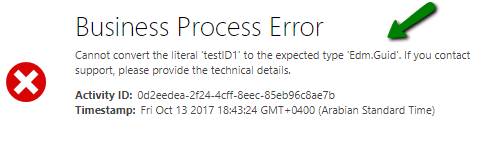
To begin with, let us first create a OData V4 service.
1) Open Visual Studio, create a new ASP.NET Web Application project with Empty Template of type Web API.

Add a new Model class of type Person
public class Person { public string ID { get; set; } public String Name { get; set; } public String Description { get; set; } }Add a new Sample Data Source as shown below.
public class SampleDataSource { private static SampleDataSource instance = null; public static SampleDataSource Instance { get { if (instance == null) { instance = new SampleDataSource(); } return instance; } } public List<Person> Persons { get; set; } private SampleDataSource() { this.Reset(); this.Initialize(); } public void Reset() { this.Persons = new List<Person>(); } public void Initialize() { this.Persons.AddRange(new List<Person> { new Person() { ID = "testID1", Name = "Person 1", Description = "Person 1 Description" }, new Person() { ID = "testID2", Name = "Person 2", Description = "Person 2 Description" }, new Person() { ID ="3920A281-E6A8-48FF-B119-5873C63B434A", Name = "Person 3", Description = "Person 3 Description" } }); } }Add a new controller as shown below.
[EnableQuery] public class PersonsController : ODataController { public IHttpActionResult Get() { return Ok(SampleDataSource.Instance.Persons.AsQueryable()); } }Update WebApiConfig.cs as shown below
public static class WebApiConfig { public static void Register(HttpConfiguration config) { config.MapODataServiceRoute("odata", null, GetEdmModel(), new DefaultODataBatchHandler(GlobalConfiguration.DefaultServer)); config.Count().Filter().OrderBy().Expand().Select().MaxTop(null); config.EnsureInitialized(); } private static IEdmModel GetEdmModel() { ODataConventionModelBuilder builder = new ODataConventionModelBuilder(); builder.Namespace = "Sample"; builder.ContainerName = "DefaultContainer"; builder.EntitySet<Person>("Persons"); var edmModel = builder.GetEdmModel(); return edmModel; } }Here we have published it as Microsoft Azure Web Apps.Note down the Entity Type Name and the EntitySet Name. Here the ID field is of type GUID.
Inside Dynamics 365, go to Settings à Administration click on Virtual Entity Data Sources.
Click on New to create a new Data Source, OData V4 Data Provider is the only provider available currently.
Specify the URL of the OData Service and other values and save the record.
Create a new Virtual Entity, and specify the Entity and EntitySet for External Name and External Collection Name property respectively.
This creates an id and name field for the entity. Open those fields and map them to the corresponding field of the Entity defined in OData. Similarly, we can create a new field (new_description) and map it to the corresponding field inside OData Entity as shown below.
Publish the changes.
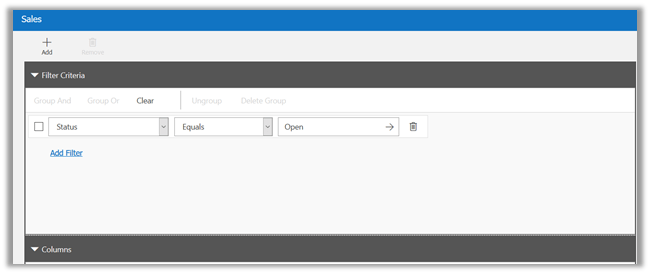
To see it in action, open Advanced Find View and search against the Person entity.
Hope it helps..
Share It -













 Nishant Rana's Weblog