Hi,
Check out this wonderful post
http://www.crmdynamics.net/microsoft-crm-product-information-pricing-faq/
Bye..

Hi,
Check out this wonderful post
http://www.crmdynamics.net/microsoft-crm-product-information-pricing-faq/
Bye..

Hi,
Just posting a very simple example on how to use the CRM_URL report parameter for drill down.
Create a new report, create a new dataset pointing to ORG_MSCRM database and add the following query string
select opportunityid,name from filteredopportunity.
Add a hidden report parameter named CRM_URL to the report.
Add table to report layout.
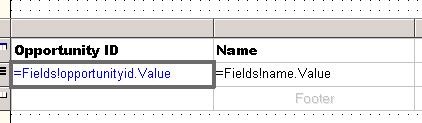
Right click the Opportunity ID text field, select Properties, Go to Navigation tab, select Jump to URL
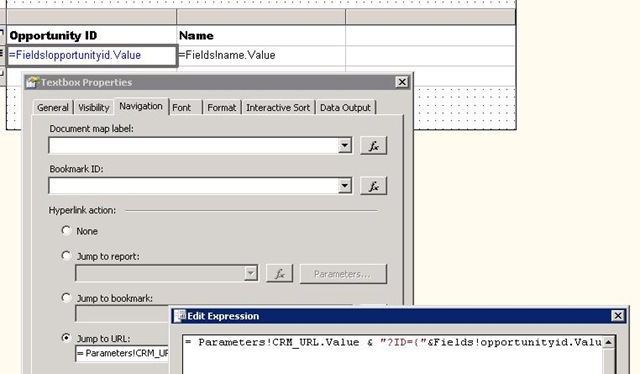
Put the following value over there
= Parameters!CRM_URL.Value
& "?ID={"&Fields!Opportunityid.Value.ToString()&"}&OTC=3"
i.e.
= Parameters!CRM_URL.Value & "?ID={"& GUID &"}&OTC=otc"
or
better use LogicalName parameter instead of OTC as OTC code might we change when we import it to
some other organization.

=Parameters!CRM_URL.Value & "?ID={"&Fields!guidFieldName.Value.ToString()&"}&LogicalName=entitySchemaName"

Upload the report in CRM and run it.
The value for CRM_URL would be filled by CRM.
CRM_URL would have the following value passed to it from CRM
http://servername:%5BPort%5D/orgname/CRMReports/viewer/drillopen.aspx
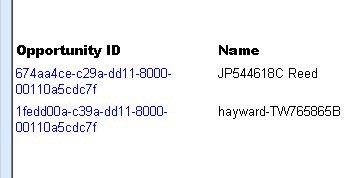
Clicking on Opportunity ID value would take us to the actual record within CRM.
Bye…

Hi,
Found this wonderful article on how to set the permissions within Microsoft Dynamics CRM
http://www.orbitone.com/en/blog/archive/2009/10/06/minimum-dynamics-crm-permissions.aspx
Bye..

First download the wsdl file for the lead record from Oracle CRM On Demand web application.
Add web references to it within a .NET windows application.
Use the following code for inserting the lead record.
We need to specify value for all the required field for the record to get inserted.
//Create the New lead record instandce And Set its url With proper session id
Lead myLead = New Lead();
myLead.Url = "https://secure-ausomxapa.crmondemand.com/Services/Integration;jsessionid=" + sessionID;
// create arrary Of lead record To be inserted
LeadData[] myLeadData = New LeadData[1];
myLeadData[0] = New LeadData();
myLeadData[0].LeadFirstName = "Nishant";
myLeadData[0].LeadLastName = "Rana";
myLeadData[0].Source = "Email";
myLeadData[0].dLead_Generation_Date = Convert.ToDateTime("7/30/2010");
myLeadData[0].LeadOwner = "Nishant Rana";
myLeadData[0].dLead_Generation_dateSpecified = True;
// add lead data array To listofLeadData Class
ListOfLeadData myLstLeadData = New ListOfLeadData();
myLstLeadData.Lead = myLeadData;
// create an instance Of leadinsert_input Class
LeadInsert_Input myLeadRecordInput = New LeadInsert_Input();
myLeadRecordInput.ListOfLead = myLstLeadData;
LeadInsert_Output myLeadRecordOutput = myLead.LeadInsert(myLeadRecordInput);
}
The sample code for the ManageSession.cs class
public static String Logoff(String logoffUrlString, string SessionID)
{
HttpWebRequest req = (HttpWebRequest)WebRequest.Create(logoffUrlString);
// set the session id in header
req.Headers["JSESSIONID"] = SessionID;
// make the HTTP call
HttpWebResponse resp = (HttpWebResponse)req.GetResponse();
return resp.StatusCode.ToString();
}
}
Hope it helps !
Bye..

Hi,
Just a sample code for updating a picklist attribute for an entity instance.
public void Execute(IPluginExecutionContext context)
{
DynamicEntity entity = (DynamicEntity)context.InputParameters.Properties["Target"];
if (entity.Name == "new_test")
{
// Post Create event so get the guid from Output Parameters
Guid testId = (Guid)context.OutputParameters.Properties["id"];
ICrmService crmService = context.CreateCrmService(true);
DynamicEntity myTest = new DynamicEntity();
myTest.Name = "EntityName";
// Set the key property
KeyProperty myTestGuid = new KeyProperty();
myTestGuid.Name = "EntityPrimaryKeyID";
Key myTestKey=new Key();
myTestKey.Value = testId;
myTestGuid.Value = myTestKey;
myTest.Properties.Add(myTestGuid);
// Picklist property to be updated
PicklistProperty myPP = new PicklistProperty();
myPP.Name = "new_picklist";
myPP.Value = new Picklist();
myPP.Value.name = "nameOfThePicklistValue";
// picklist value
myPP.Value.Value = 2;
myTest.Properties.Add(myPP);
try
{
crmService.Update(myTest);
}
catch (SoapException ex)
{
TextWriter log1 = TextWriter.Synchronized(File.AppendText(@"C:\g.txt"));
log1.WriteLine("MyMessage exception :-" + ex.Detail.InnerXml );
log1.Close();
}
}
}
}
Bye…

For an account record, the associated view of Contract would have default filter set as Draft. So if we want to change it to some other status for example “Active” we can make use of the following JavaScript for that.
This JavaScript is based on the popular JavaScript code used for hiding “add existing button”
Please check this wonderful article
http://blog.davehawes.com/post/2008/04/23/MSCRM-4-Remove-Add-Existing-xxxxx-button.aspx
The JavaScript code for changing default option
var navElement = document.getElementById('navContracts');
 if (navElement != null) {
  navElement.onclick = function LoadAreaOverride()  {
   loadArea('areaContracts');
   SetDefaultOption(document.getElementById('areaContractsFrame'));
  }
 }

function SetDefaultOption(Iframe) {
 if (Iframe != null ) {
  Iframe.onreadystatechange = function SetOption() {
   if (Iframe.readyState == 'complete') {
    var iFrame = frames[window.event.srcElement.id];
    var selectBox=iFrame.document.getElementById('statecode');
     selectBox.options[2].selected=true;
   }
  }
 }
http://social.microsoft.com/Forums/en-US/crmdevelopment/thread/85615ccd-b8e9-48d3-a906-4fd7b301dac0
Bye..


