Hi,
While trying to write Fakes for RetrieveSharedPrincipalsAndAccessResponse we’d realize that PrincipalAccess is read only property and the class itself is sealed.
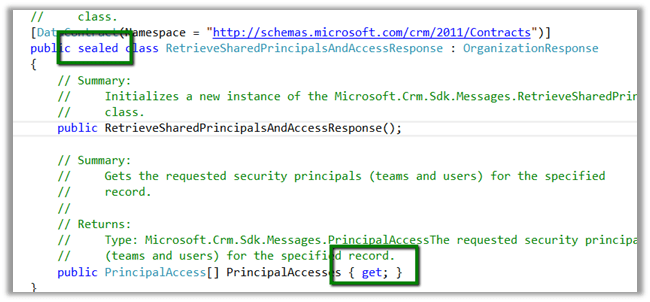
So to unit test it we need to write a wrapper class as suggested here
The wrapper class
/// <summary>
/// Wrapper class for retrieve response
/// </summary>
[DataContract(Namespace = "http://schemas.microsoft.com/xrm/2011/Contracts")]
public class RetrieveSharedPrincipalsAndAccessResponseWrapper : OrganizationResponse
{
/// <summary>
/// The _entity
/// </summary>
private PrincipalAccess[] _principalaccess;

/// <summary>
/// Initializes a new instance of the <see cref="RetrieveResponseWrapper"/> class.
/// </summary>
/// <param name="response">The response.</param>
public RetrieveSharedPrincipalsAndAccessResponseWrapper(OrganizationResponse response)
{
try
{
this.PrincipalAccesses = ((RetrieveSharedPrincipalsAndAccessResponseWrapper)response).PrincipalAccesses;
}
catch
{
this.PrincipalAccesses = ((RetrieveSharedPrincipalsAndAccessResponse)response).PrincipalAccesses;
}
}

/// <summary>
/// Gets or sets the PrincipalAccesses.
/// </summary>
/// <value>
/// The entity.
/// </value>
public PrincipalAccess[] PrincipalAccesses
{
get
{
return _principalaccess;
}

set
{
_principalaccess = value;
}
}
}
The unit test
 organizationService.ExecuteOrganizationRequest = request =>
 {
 RetrieveSharedPrincipalsAndAccessResponseWrapper retrieveResponseWrapper = new RetrieveSharedPrincipalsAndAccessResponseWrapper(new RetrieveSharedPrincipalsAndAccessResponse());
 PrincipalAccess[] principalAccess = new PrincipalAccess[1];
 PrincipalAccess pAccess = new PrincipalAccess();
 pAccess.AccessMask = AccessRights.CreateAccess;
 pAccess.Principal = new EntityReference("team", new Guid("9A69533A-2306-4DFC-9662-65ABFAB41348"));
 principalAccess[0] = pAccess;
 retrieveResponseWrapper.PrincipalAccesses = principalAccess;
 return retrieveResponseWrapper;
 };
Change in the Plugin code using Wrapper instead of original class
 IOrganizationService orgService = serviceFactory.CreateOrganizationService(context.UserId);

 var accessRequest = new RetrieveSharedPrincipalsAndAccessRequest
 {
 Target = new EntityReference("projectsite", new Guid("CDF30DD5-C64E-4EF5-ABA6-C9715C10A07D"))
 };

 RetrieveSharedPrincipalsAndAccessResponseWrapper accessResponse = (new RetrieveSharedPrincipalsAndAccessResponseWrapper(orgService.Execute(accessRequest)));
Hope it helps