Updated SOAPLogger for CRM 2013 to generate JavaScript


Hi,

We have tool called SOAPLogger (..\SDK\SampleCode\CS\Client\SOAPLogger\) that generates Soap request and response based on the C# code.

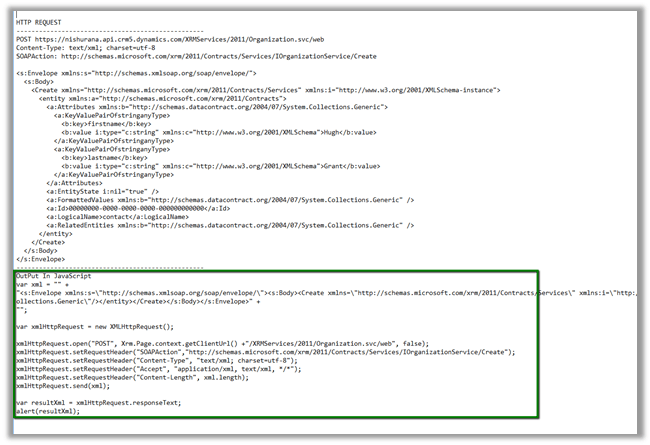
I have updated the tool to generate JavaScript that neatly wraps the Soap Request.

The output.txt and JavaScript code generated by the tool

Download the tool (convert .doc to .zip format)

https://nishantrana.me/wp-content/uploads/2014/08/soaplogger.doc


Hope it helps..

Use TryGetList to check if a list exist in SharePoint (SharePoint Object Model)


Hi,

We were getting the following error that “list doesn’t exist in the site” because the user was not having read permission on that list.

The code we were using was

SPList myList= spWeb.Lists[“mylist”];

A better approach would be

SPList myList = spWeb.Lists.TryGetList(“myList”);

If(myList != null )

// …

Bye ..

This project references NuGet package(s) that are missing on this computer. Enable NuGet Package Restore to download them


Hi,

Got this issue today while working on a visual studio solution downloaded from web.

To fix this

In Visual Studio

Go to à Tools à Options

Hope it helps ..

Fixed – Error creating web application in SharePoint 2013.


Hi,

We were facing issues while creating a new web application through central administration. The user was the farm administrator.

The way we got it fixed was by increasing the set the values for the properties in the Central Admin Sites’ App Pool

Followed by an IISRESET

Hope it helps ..

Microsoft Fakes and LINQ (Custom Workflow Activity) in CRM


Hi,

Just sharing a sample code to test a custom workflow activity using Microsoft Fakes.

The custom workflow activity uses LINQ.

The custom workflow activity code


public sealed class MyCustomWorkflowActivity : CodeActivity
{
#region Public Properties

[Input("Stage Name")]
public InArgument<string> StageName { get; set; }

#endregion

#region Methods

/// <summary>
/// Executes the workflow activity.
/// </summary>
/// <param name="executionContext">
/// The execution context.
/// </param>
protected override void Execute(CodeActivityContext executionContext)
{
// Create the tracing service
var tracingService = executionContext.GetExtension<ITracingService>();

// Create the context
var context = executionContext.GetExtension<IWorkflowContext>();

var serviceFactory = executionContext.GetExtension<IOrganizationServiceFactory>();

IOrganizationService service = serviceFactory.CreateOrganizationService(context.UserId);

try
{
using (var xrmServiceContext = new XrmServiceContext(service))
{
// get the business process workflow id
var workflow = (from w in xrmServiceContext.WorkflowSet
where w.Name == "Business Process Workflow Name"
select new Workflow { WorkflowId = w.WorkflowId }).FirstOrDefault();

if (workflow != null)
{
// get the stage name from the context's input parameter
var stageName = this.StageName.Get<string>(executionContext);
var stage = (from s in xrmServiceContext.ProcessStageSet
where s.StageName == stageName && s.ProcessId.Id == workflow.WorkflowId
select new ProcessStage { ProcessStageId = s.ProcessStageId }).FirstOrDefault();

if (stage != null)
{
// update the sales state in the case record to which the above business process flow is associated
var incident = new Incident
{
Id = context.PrimaryEntityId,
StageId = stage.ProcessStageId
};
service.Update(incident);
}
}
}
}
catch (FaultException<OrganizationServiceFault> e)
{
tracingService.Trace("Exception: {0}", e.ToString());
throw;
}

}

Unit Test Code


public void UnitTestCustomWorkflowActivity()
{

var workflowUserId = Guid.NewGuid();
var workflowCorrelationId = Guid.NewGuid();
var workflowInitiatingUserId = Guid.NewGuid();

var service = new Microsoft.Xrm.Sdk.Fakes.StubIOrganizationService();

var workflowContext = new Microsoft.Xrm.Sdk.Workflow.Fakes.StubIWorkflowContext();
workflowContext.UserIdGet = () =>
{
return workflowUserId;
};
workflowContext.CorrelationIdGet = () =>
{
return workflowCorrelationId;
};
workflowContext.InitiatingUserIdGet = () =>
{
return workflowInitiatingUserId;
};

// ITracingService
var tracingService = new Microsoft.Xrm.Sdk.Fakes.StubITracingService();
tracingService.TraceStringObjectArray = (f, o) =>
{
Debug.WriteLine(f, o);
};

// IOrganizationServiceFactory
var factory = new Microsoft.Xrm.Sdk.Fakes.StubIOrganizationServiceFactory();
factory.CreateOrganizationServiceNullableOfGuid = id =>
{
return service;
};

SetBpfStage target = new SetBpfStage();

var wfEntity = new Workflow();
wfEntity.Id = Guid.NewGuid();
wfEntity["name"] = "abcabcabc";
var wfEntity1 = new Workflow();
wfEntity1.Id = Guid.NewGuid();
wfEntity1["name"] = "abcabcabc";

var processStageEntity = new ProcessStage();
processStageEntity.Id = Guid.NewGuid();
processStageEntity["name"] = "abcabcabc";
service.ExecuteOrganizationRequest = r =>
{
RetrieveMultipleResponse response = null;
if (((Microsoft.Xrm.Sdk.Query.QueryExpression)((RetrieveMultipleRequest)r).Query).EntityName
== "workflow")
{
List<Entity> entities = new List<Entity> { wfEntity };

response = new RetrieveMultipleResponse
{
Results =
new ParameterCollection
{
{
"EntityCollection",
new EntityCollection
(entities)
}
}
};

return response;
}

if (((Microsoft.Xrm.Sdk.Query.QueryExpression)((RetrieveMultipleRequest)r).Query).EntityName
== "processstage")
{

List<Entity> entities = new List<Entity> { processStageEntity };

response = new RetrieveMultipleResponse
{
Results =
new ParameterCollection
{
{
"EntityCollection",
new EntityCollection
(entities)
}
}
};

return response;
}

return response;
};

service.UpdateEntity = (p) =>
{
};

var invoker = new WorkflowInvoker(target);
invoker.Extensions.Add<ITracingService>(() => tracingService);
invoker.Extensions.Add<IWorkflowContext>(() => workflowContext);
invoker.Extensions.Add<IOrganizationServiceFactory>(() => factory);

var inputs = new Dictionary<string, object>
{
{ "StageName", "New" }
};

invoker.Invoke(inputs);
}

Hope it helps..

Using LINQ in CRM 2013


There are few ways we can make use of LINQ to write queries against CRM.

Using the early bound entity classes along with the generated service context

Use the CrmSvcUtil tool to generated the early bound entity classes and service context

CrmSvcUtil.exe /url:http://<serverName>/<organizationName>/XRMServices/2011/Organization.svc

/out:<outputFilename>.cs /username:<username> /password:<password> /domain:<domainName>

/namespace:<outputNamespace> /serviceContextName:<serviceContextName>


Uri organizationUri = new Uri("http://server/orgname/XRMServices/2011/Organization.svc");
 Uri homeRealmUri = null;</pre>
<pre> ClientCredentials credentials = new ClientCredentials();
 credentials.Windows.ClientCredential = new System.Net.NetworkCredential("username", "password", "domain");
 OrganizationServiceProxy orgProxy = new OrganizationServiceProxy(organizationUri, homeRealmUri, credentials, null);
 orgProxy.EnableProxyTypes();
 IOrganizationService _service = (IOrganizationService)orgProxy; 
 
 var xrmServiceContext = new XrmServiceContext(_service);
 // get all contact record that has first name as Hugh
 var lstContact = (from c in xrmServiceContext.ContactSet
 where c.FirstName == "Hugh"
 select c).ToList();
 foreach(var contact in lstContact)
 {
 MessageBox.Show(contact.FullName);
 }


Using Early bound entity classes and OrganizationServiceContext

Suppose we have the early bound entity classes but haven’t generated the service context. In this case we can use OrganizationServiceContext


var xrmServiceContext = new OrganizationServiceContext(_service);

var lstContact = (from c in xrmServiceContext.CreateQuery<Contact>()
 where c.FirstName == "Hugh"
 select c).ToList();

foreach (var contact in lstContact)
 {
 MessageBox.Show(contact.FullName);
 }

Using Late bound and OrganizationServiceContext

Suppose we are not generating the early bound classes and using late binding


  var xrmServiceContext = new OrganizationServiceContext(_service);

 var lstContact = (from c in xrmServiceContext.CreateQuery("contact")
 where c["firstname"] == "Hugh"
 select c).ToList();

 foreach (var contact in lstContact)
 {
 MessageBox.Show(contact["fullname"].ToString());
 }

Hope it helps..


Nishant Rana's Weblog

Everything related to Microsoft .NET Technology

Skip to content ↓