Azure AD Conditional Access and Application Users / Service Principal in Dynamics 365


Through Azure AD Conditional Access, we can define and enforce policies regarding access to its cloud resources.

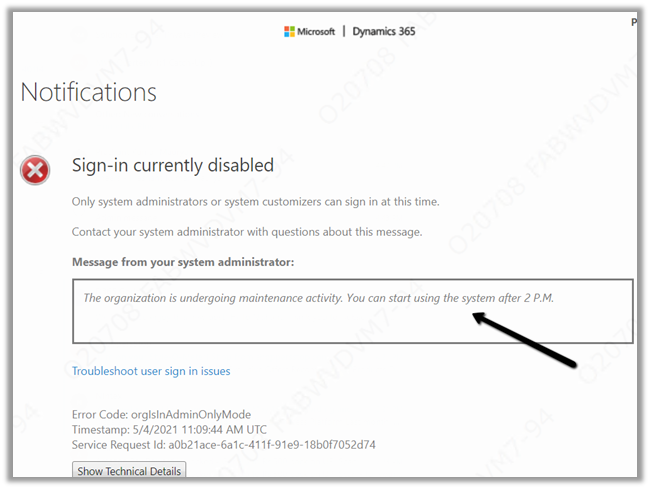
Users who do not comply or are blocked with the conditional access policies defined will get the below error message after login.

The Conditional Access works seamlessly for user accounts.

However, Conditional Access doesn’t apply for the Application users (Azure AD Apps / Service Principals in Azure AD) accessing Dynamics 365 / Dataverse Web API.

Say e.g. we have the following policy defined, which applies to all users on the Common Data Service app.

Blocking access from any location or device platform.

Now if a user tries to access Dynamics 365 App, after login he gets the below message.

Now we have the following application user registered which has appropriate security roles assigned.

Now if we try to consume CRM / DataVerse Web API through the application user – client credentials, we can see it working without any exception

If we check the Microsoft Docs, it mentions all user accounts but not service principals.

https://docs.microsoft.com/en-us/azure/active-directory/conditional-access/faqs#does-a-conditional-access-policy-apply-to-service-accounts

Check the below link as well

https://stackoverflow.com/questions/51344114/is-azure-ad-conditional-access-supported-for-dynamics-365-web-services

https://docs.microsoft.com/en-us/answers/questions/119765/app-registrations-and-conditional-access.html

In case if we are using the ROPC (Resource Owner Password Credential) grant type, we will get the below exception there as we are using an user account (UserPasswordCredential)

More on consuming Dataverse / Dynamics 365 Web API

https://nishantrana.me/2021/01/06/sample-code-dynamics-365-web-api-organization-service/

Hope it helps..

Advertisements

Fixed – Failed to process metadata description. We ran into a problem publishing the form. Please try again while publishing the form in Dynamics 365


While trying to publish the case form we got the below error –

Error: We ran into a problem publishing the form. Please try again. (SessionID: a000b750-91e2-11eb-9fd2-8fd31814d5b2)

Adding/removing components, refreshing the form multiple times, etc. didn’t help, and we kept getting the error.

Eventually, we switched to classic to make the required changes. There also we got the same error.

However here we got the option to download the log file.

The exception message was –

Failed to process metadata description – Name : Entity Key

An item with the same key has already been added.

As we got the error while trying to add the subgrid, we renamed the subgrid which we were trying to add

Saving the change i.e. new Name and publishing the form this worked successfully.

Similar issue – https://community.dynamics.com/crm/f/microsoft-dynamics-crm-forum/301844/an-item-with-the-same-key-has-already-been-added-error-while-publishing-an-entity/871480

Hope it helps..
Advertisements

Backup Concepts for Azure Data Lake


Daniel's avatar

Azure Data Lake Storage is designed to enable operational and exploratory analytics through a hyper-scale repository There are two different types of Data Lake Store in Azure (Gen1 and Gen2) available at the current date. If a new instance is deployed it is recommended to use Data Lake Store Gen2. The data is replicated so that the backup concept considers the “human fault” component and also the technical backup aspect.

Data LakeGen1

Azure Data Lake Storage Gen1 is an enterprise-wide hyper-scale repository for big data analytic workloads. Azure Data Lake enables you to capture data of any size, type, and ingestion speed in one single place for operational and exploratory analytics as stated at: https://docs.microsoft.com/de-de/azure/data-lake-store/data-lake-store-overview

Data LakeGen2

Azure Data Lake Storage Gen2 is a set of capabilities dedicated to big data analytics, built on Azure Blob storage. Data Lake Storage Gen2 is the result of converging the capabilities of our…

View original post 583 more words

Enhanced Personal Settings – 2021 Release Wave 1 in Dynamics 365 Sales


With 2021 Release Wave 1, a dedicated area for personal settings has been added in Dynamics 365 Sales Hub.

Before 2021 Release Wave 1 à

With 2021 Release Wave 1 à We can see a new area Personal Settings added in Sales Hub

The new personal setting area allows users to

  • Manage Insight cards
  • Manage Email Templates
  • Manage Email Signatures

Before 2021 Release Wave 1, the Manage insight cards settings were available inside the Sales Insight settings area

And Email templates and email signatures options were accessible within the Template section of the Admin Settings area. (In Customer Service Hub, these options are available within Customer Service Hub > Service > Templates section)

Both email signature and email template use the new editor

More on modern email template experience –

https://nishantrana.me/2020/08/20/modern-email-template-experience-in-dynamics-365-2020-release-wave-2/

Blog posts on 2021 Release Wave 1 – Dynamics 365

Hope it helps..

Advertisements

What is your IP?


How to – Show/ Hide header and ribbon menu dynamically on Dynamics 365/ Model Driven App forms


by Debajit Dutta (MVP – Business Solutions) https://debajmecrm.com/

Advertisements

Nishant Rana's Weblog

Everything related to Microsoft .NET Technology

Skip to content ↓