As a first step, add references to the latest version 9 assemblies
https://www.nuget.org/packages/Microsoft.CrmSdk.CoreAssemblies/
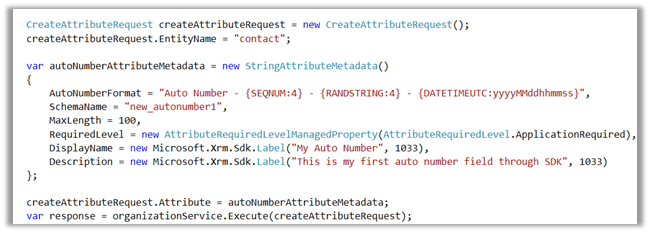
In the below sample code, we are creating an Auto number attribute in Contact Entity.
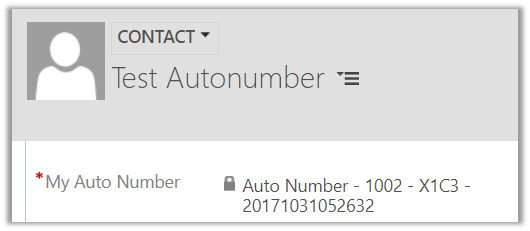
This is how the fields shows up inside contact form.
Using UpdateAttribute Request we can update the format for the AutoNumber field.
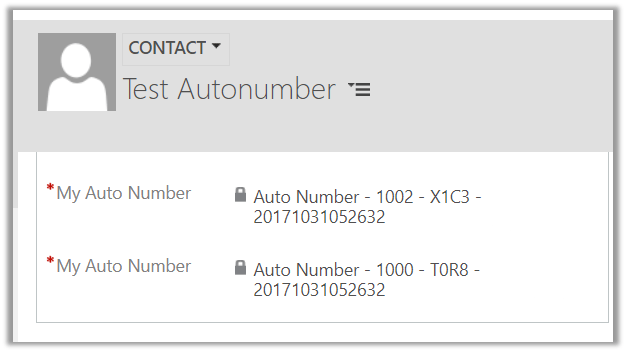
And also, we can have multiple auto number fields for an entity as shown below.
Sample Code
CreateAttributeRequest createAttributeRequest = new CreateAttributeRequest();
createAttributeRequest.EntityName = "contact";

var autoNumberAttributeMetadata = new StringAttributeMetadata()
{
AutoNumberFormat = "Auto Number - {SEQNUM:4} - {RANDSTRING:4} - {DATETIMEUTC:yyyyMMddhhmmss}",
SchemaName = "new_autonumber1",
MaxLength = 100,
RequiredLevel = new AttributeRequiredLevelManagedProperty(AttributeRequiredLevel.ApplicationRequired),
DisplayName = new Microsoft.Xrm.Sdk.Label("My Auto Number", 1033),
Description = new Microsoft.Xrm.Sdk.Label("This is my first auto number field through SDK", 1033)
};

createAttributeRequest.Attribute = autoNumberAttributeMetadata;
var response = organizationService.Execute(createAttributeRequest);
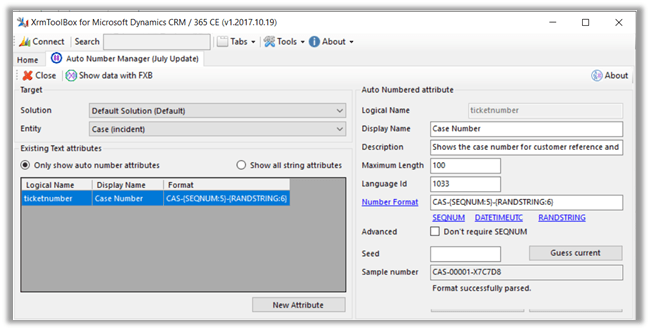
And now the simplest and best way to create these Auto Number fields à
Using Auto Number Manager developed by Jonas Rapp, Microsoft MVP.
https://www.linkedin.com/pulse/auto-number-attributes-microsoft-dynamics-365-jonas-rapp/
https://www.xrmtoolbox.com/
https://github.com/MscrmTools/XrmToolBox
Hope it helps..








 Nishant Rana's Weblog