Recommended Field showing up as Required Field Issue in Dynamics 365


Hi,

Yesterday while doing the analysis of how the existing solution which uses legacy form rendering works for new form rendering, we found a weird issue.

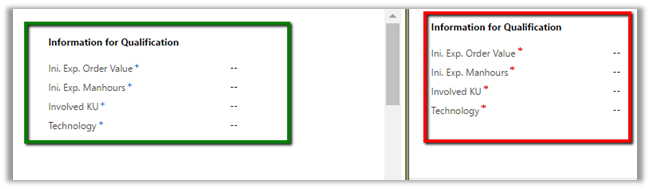
The field which we were setting as recommended through JavaScript was appearing as required. However, its behavior was like recommended field only i.e. we can save the form without specifying value for it.

In left the fields in legacy form rendering and in right Turbo forms or new form rendering

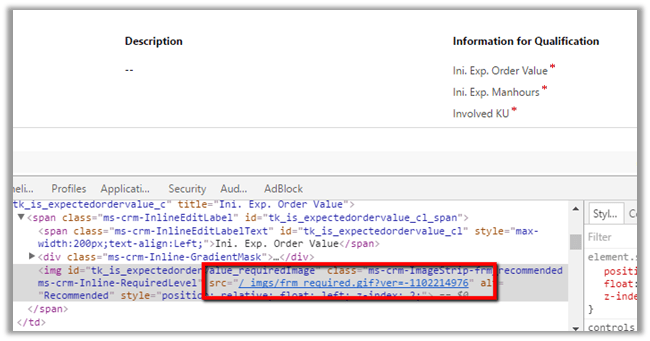
If we inspect through debugger, it seems like the issue is in the image that is being set

We are still analyzing it.

Hope it helps..

Unsupported filtering of subgrids in Dynamics 365 (CRM 2016)


Hi,

In one of the projects which was recently upgraded to CRM 2016 Online Update 1, legacy form rendering was being used. So, we were analyzing how the new form rendering will affect the existing JavaScript.

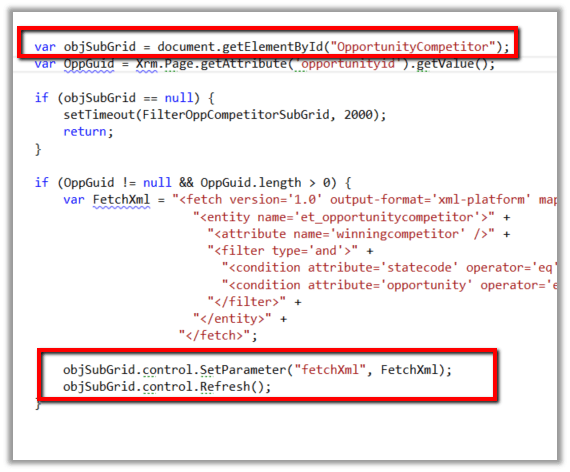
One of the unsupported JavaScript that was being used was for sub-grid filtering.

The interesting thing was that it works in CRM 2016 Online Update 1 for legacy form rendering but fails in case of new form rendering (turbo form).

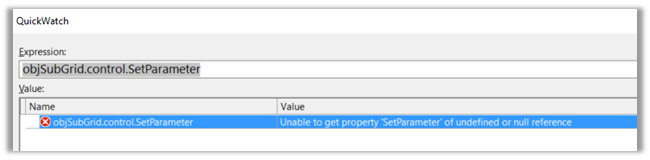
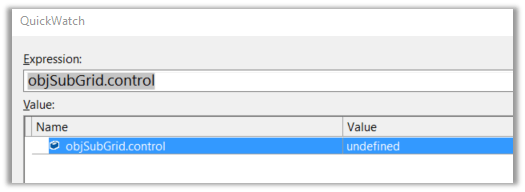
For turbo forms, we get the following objects as null

I couldn’t find any workaround of implementing the same in case of turbo forms. The only possible solution that I could think of is either using Quick View Form with Subgrid control inside it or through a html web resource.

Hope it helps..

Parallel.For vs ExecuteMultiple in Dynamics 365


Hi,

Thought of getting a rough idea on how much performance improvement we can gain if we are using Parallel.For and ExecuteMultiple.

Took a very simple scenario i.e. creating 10000 account records.

Normal For Loop 3242061 milliseconds à 54 minutes à 185 records per minute
Parallel.For 2160337 milliseconds à 36 minutes à 277 records per minute
ExecuteMultiple (single request with batch size of 1000) 494663 milliseconds à 8 minutes à 1250 records per minute

This clearly tells ExecuteMultiple far better.

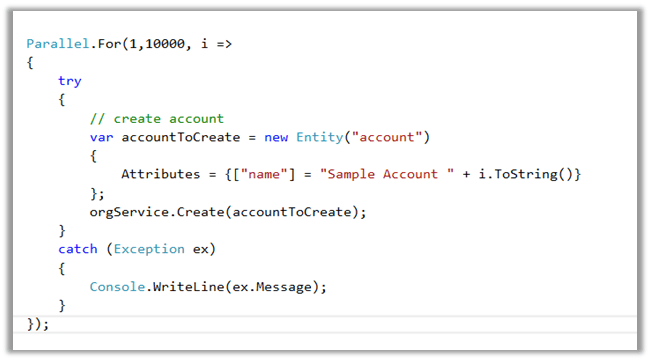
The sample code that I used for Parallel.For

Hope it helps..

Cleared MB2-712 Microsoft Dynamics CRM 2016 Customization and Configuration


Hi,

Today i cleared MB2-712 certification exam. It had 48 Questions in it with passing score 0f 700.

I referred to the following guide for my preparation by CRM MVP Neil Parkhurskt

https://neilparkhurst.com/2016/07/14/mb2-712-certification-microsoft-dynamics-crm-2016-customization-and-configuration-revision-guide/

Hope it helps..

Sample code to connect to Dynamics 365 Online through Console App (C#)


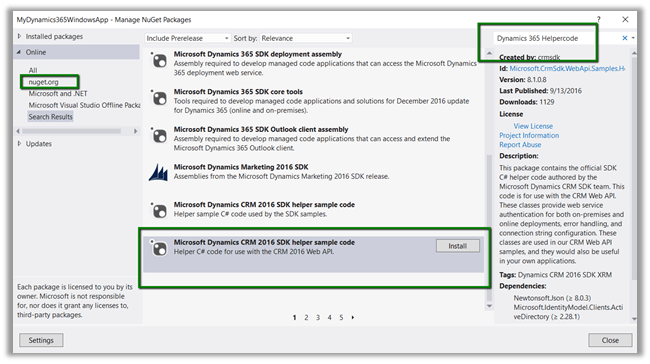
  • Create a console application add Newtonsoft and Active Directory Authentication Library. Or we can add the below Helper Sample Code package which will add the above libraries.
  • Add reference to System.Net.Http

  • Register the app

https://nishantrana.wordpress.com/2016/11/13/register-a-dynamics-365-app-with-azure-active-directory/

  • Sample Code

using System;
using System.Net.Http;
using System.Net.Http.Headers;
using System.Threading.Tasks;
using Microsoft.IdentityModel.Clients.ActiveDirectory;
using Newtonsoft.Json;
using Newtonsoft.Json.Linq;

namespace Dynamics365ConsoleApp
{
internal class Program
{
// username and password
private const string UserName = "sapnarana@nishant365.onmicrosoft.com";
private const string Password = "mypassword";
// Crm Url
private const string Resource = "https://nishant365.crm8.dynamics.com";
// Application's Client Id
private const string ClientId = "d08b641c-2dc8-4f33-8a57-b1573da88a22";
// Redirct Uri specified during registration of application
private const string RedirectUri = "http://localhost";
// Authroiztion Endpoint
private const string Authority = "https://login.windows.net/nishant365.onmicrosoft.com";

private static AuthenticationResult _authResult;

private static void Main(string[] args)
{
// without prompt
var authContext = new AuthenticationContext(Authority, false);
var credentials = new UserCredential(UserName, Password);
_authResult = authContext.AcquireToken(Resource, ClientId, credentials);

// with prompt
AuthenticationContext authContext = new AuthenticationContext(authority);
authResult = authContext.AcquireToken(resource, clientId, new Uri(redirectUri));

Task.WaitAll(Task.Run(async () => await GetFullNameSystemUsers()));
}

private static async Task GetFullNameSystemUsers()
{
var httpClient = new HttpClient
{
BaseAddress = new Uri(Resource),
Timeout = new TimeSpan(0, 2, 0)
};
httpClient.DefaultRequestHeaders.Add("OData-MaxVersion", "4.0");
httpClient.DefaultRequestHeaders.Add("OData-Version", "4.0");
httpClient.DefaultRequestHeaders.Accept.Add(new MediaTypeWithQualityHeaderValue("application/json"));
httpClient.DefaultRequestHeaders.Authorization = new AuthenticationHeaderValue("Bearer",
_authResult.AccessToken);

var retrieveResponse =
await httpClient.GetAsync("api/data/v8.1/systemusers?$select=fullname");
if (retrieveResponse.IsSuccessStatusCode)
{
var jRetrieveResponse =
JObject.Parse(retrieveResponse.Content.ReadAsStringAsync().Result);

dynamic systemUserObject = JsonConvert.DeserializeObject(jRetrieveResponse.ToString());

foreach (var data in systemUserObject.value)
Console.Write(data.fullname.Value);
}
}
}
}

For in depth understanding please refer the following post

https://debajmecrm.com/2016/02/23/understanding-in-depth-cross-origin-resource-sharing-cors-in-dynamics-crm-2016/

Hope it helps..

Register a Dynamics 365 app with Azure Active Directory


  • Sign in to Microsoft Azure Management Portal or Sign up for a free trial. The account should be in the same Office 365 tenant where we would like to register the app. (or link existing Azure Subscription not in same tenant as CRM)

https://manage.windowsazure.com/

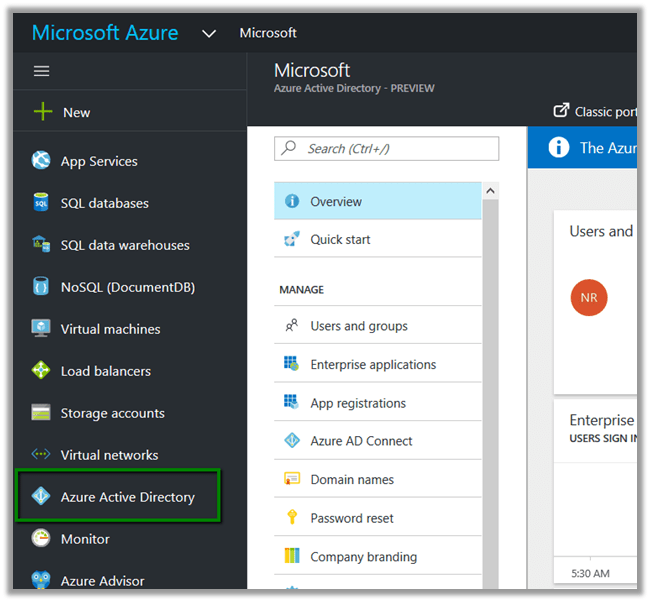
  • Inside Azure Management Portal select Azure Active Directory

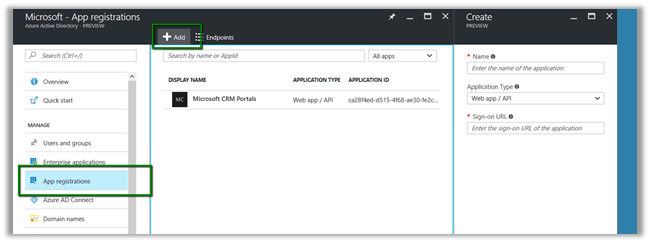
  • Select App registrations and click Add

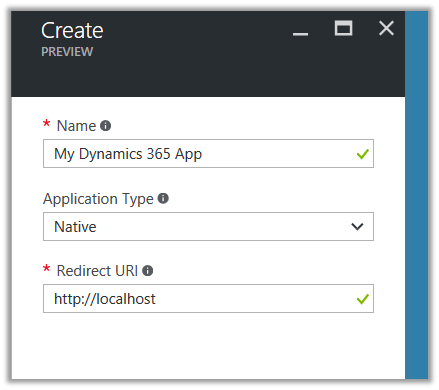
  • Provide required details for the App and click Create

  • Select the App created to get the required details

  • To give permission to App to access Dynamics CRM, click on Required Permissions in API Access section

  • Click on Add

  • Select Dynamics CRM Online

We’d get the notifications.

  • Along with Client id we would also need Authorization Endpoint, when we develop App.

Hope it helps..