Fixed – Duplicate records in Azure Synapse Link (Dataverse)


Recently for some of our Dataverse environments, we found duplicate records getting created (same GUID) for Notes and Work Order Incident tables in the corresponding CSV files.

Here we were using In place updateIn-place updates vs. append-only writes

This was causing the Power BI reports built on top of it to fail.

On raising the ticket, the Microsoft Support team mentioned that this is a known bug for certain regions, and they immediately ran the de-duplication scripts in the background which quickly fixed the issue for us. Also, they specified they will be deploying the fix for the issue in the coming days.

Hope it helps..

Advertisements

Fixed – Azure Synapse Link for Dataverse not starting


Recently while trying to configure “Azure Synapse Link for
Dataverse” for one of our environments, we faced an issue, where it got stuck as shown below.

Also, there were no files/folders created inside the Storage Account.

Posts on Azure Data Lake

The accounts were properly setup – https://docs.microsoft.com/en-us/power-apps/maker/data-platform/azure-synapse-link-synapse#prerequisites

Here we had only selected contact table for sync initially, and it had around 2.5 million records.

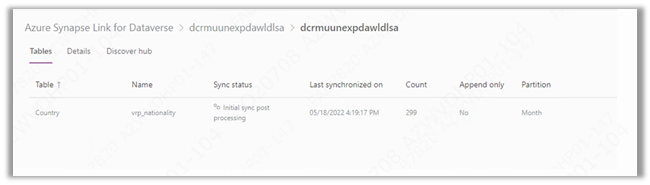
To fix this, we unlinked (using Unlink Option) and created the link again and this time we selected a table having very few record for e.g. country table as shown below.

This time the sync started immediately.

Than through Manage tables option, we added our contact table also, and it also started syncing properly as shown below-

Hope it helps..

Advertisements

Fixed – Authorization failed. The client with object id does not have authorization to perform action ‘Microsoft.Authorization/roleAssignments/write’ over scope ‘/subcriptions’ while configuring Azure Synapse Link for Dataverse


Recently while configuring Azure Synapse Link for Dataverse, for exporting data to Azure Data Lake we got the below error –

{“code”:”AuthorizationFailed”,”message”:”The client ‘abc’ with object id ‘d56d5fbb-0d46-4814-afaa-e429e5f252c8’ does not have authorization to perform action ‘Microsoft.Authorization/roleAssignments/write’ over scope ‘/subscriptions/30ed4d5c-4377-4df1-a341-8f801a7943ad/resourceGroups/RG/providers/Microsoft.Storage/storageAccounts/saazuredatalakecrm/providers/Microsoft.Authorization/roleAssignments/2eb81813-3b38-4b2e-bc14-f649263b5fcf’ or the scope is invalid. If access was recently granted, please refresh your credentials.”}


As well as the below error –


As the error suggests the error was because the user account used was not having the appropriate role(s) assigned.

The user needs to have the Owner as well as Blob Storage Data Contributor role on the Azure Data Lake Storage Gen2 account.

Also check –

https://nishantrana.me/2020/09/07/error-access-to-the-resource-is-forbidden-while-trying-to-connect-to-azure-data-lake-storage-gen2-using-power-bi-desktop/

https://nishantrana.me/2021/06/24/fixed-authorizationfailed-the-client-with-object-id-does-not-have-authorization-to-perform-action-microsoft-authorization-roleassignments-write-over-scope-storageaccou/

https://docs.microsoft.com/en-us/power-apps/maker/data-platform/azure-synapse-link-synapse#prerequisites

Hope it helps..

Advertisements