Dynamics 365 CRM Duplicate detection error : Generic SQL error.[Microsoft.Crm.DuplicateDetection: Microsoft.Crm.HasDuplicatesPlugin]


Prashant Maurya's avatarPrashant Kumar Maurya

Today we were facing a weird issue with one of CRM user. User was getting below error on create/update of Lead record.

Unhandled Exception: System.ServiceModel.FaultException`1[[Microsoft.Xrm.Sdk.OrganizationServiceFault, Microsoft.Xrm.Sdk, Version=8.0.0.0, Culture=neutral, PublicKeyToken=31bf3856ad364e35]]: Generic SQL error.Detail:
<OrganizationServiceFault xmlns:i=”http://www.w3.org/2001/XMLSchema-instance” xmlns=”http://schemas.microsoft.com/xrm/2011/Contracts”>
<ActivityId>68953102-d03e-4a6e-9da4-98695fddff4e</ActivityId>
<ErrorCode>-2147204784</ErrorCode>
<ErrorDetails xmlns:d2p1=”http://schemas.datacontract.org/2004/07/System.Collections.Generic” />
<Message>Generic SQL error.</Message>
<Timestamp>2018-03-25T09:32:10.3819266Z</Timestamp>
<ExceptionRetriable>false</ExceptionRetriable>
<ExceptionSource i:nil=”true” />
<InnerFault i:nil=”true” />
<OriginalException i:nil=”true” />
<TraceText>

[Microsoft.Crm.DuplicateDetection: Microsoft.Crm.HasDuplicatesPlugin]
[cacdbb1b-ea3e-db11-86a7-000a3a5473e8: HasDuplicatesPlugin]

</TraceText>
</OrganizationServiceFault>

1 – We unpublished all duplicate detection rules on lead entity but no luck.

2 – Then we unpublished duplicate detection rule for all entity in the organization still same issue,

3 – Then we tried various combination of publish and un-publish but issue was not resolve.

Seems like CRM was stuck in a state for this user where it was not able to recover from :(.

next thing we tried is to disable duplicate detection rule from duplicate detection settings and it worked :).

To disable…

View original post 32 more words

Configuration Migration Utility not migrating all the records in Dynamics 365


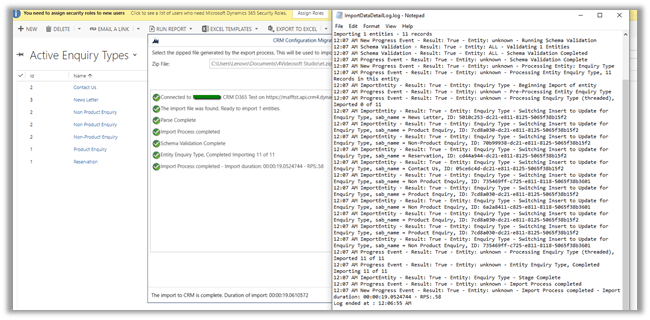
Recently while trying to move data for one of our entities, we saw that Configuration Migration Utility was only moving 7 records out of 11.

Even in the log, we couldn’t find any error message.

<<Drive>>:\Users\<<username>>\AppData\Roaming\Microsoft\Microsoft Dynamics® CRM Configuration Migration Utility

In fact, exporting and importing the records through excel was also only adding the 7 records.

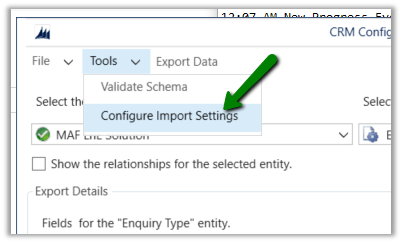
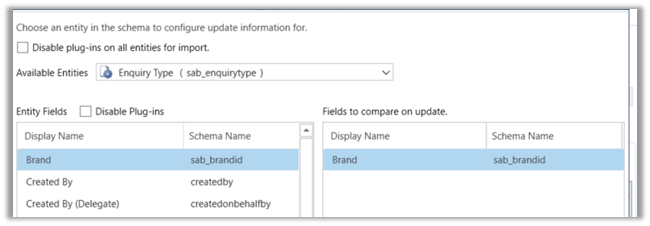
The way we fixed this issue was by specifying the primary field of the entity as the fields to compare on update.

Running the import again this time imported all the records.

Hope it helps..

How to – Stop an Azure Web Job using WEBJOBS_STOPPED and WEBJOBS_DISABLE_SCHEDULE configuration settings


We had one triggered web job running every 5 minutes that would pull the data from SQL On Prem DB and create lead records in CRM.

During testing we wanted to stop the running web job.

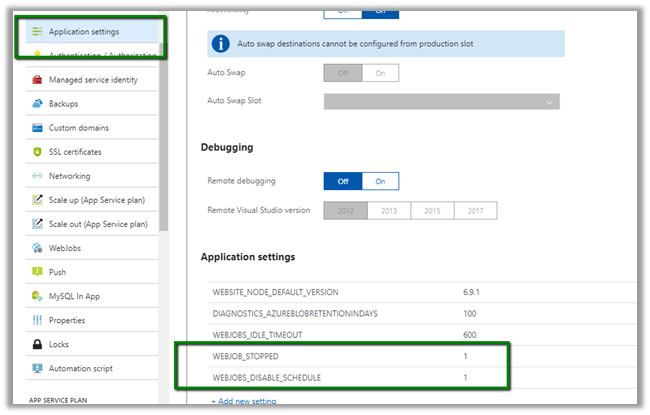
To do go to Application Settings for the App Service. Add WEBJOB_STOPPED and WEBJOBS_DISABLE_SCHEDULE setting with value 1.


We’d see our web job stop running.


Another option is to kill the process itself

Open à

https://[appname].scm.azurewebsites.net/ProcessExplorer


Get all the details here


https://github.com/projectkudu/kudu/wiki/WebJobs

Hope it helps..


Advertisements

Form now showing up properly after solution import in Dynamics 365.


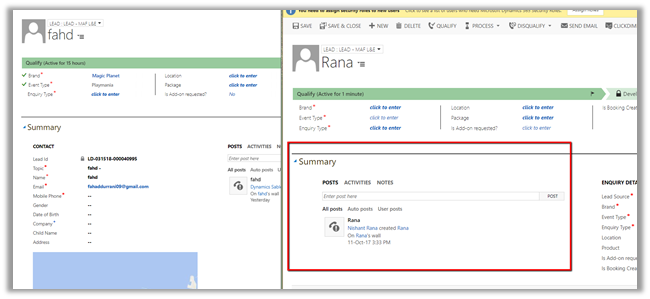
Recently after moving our solution from dev to test, we saw that one of our lead forms was not showing up properly.

As we can see below, the contact section is missing and the Social Pane instead of being in center is left aligned below the Summary tab label.

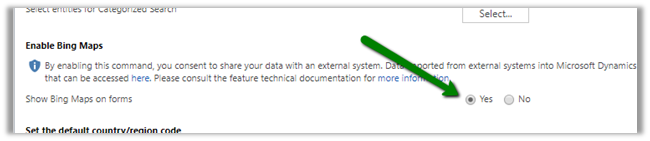
The fix for this was to enable the Bing Map from the System Settings in the Test.

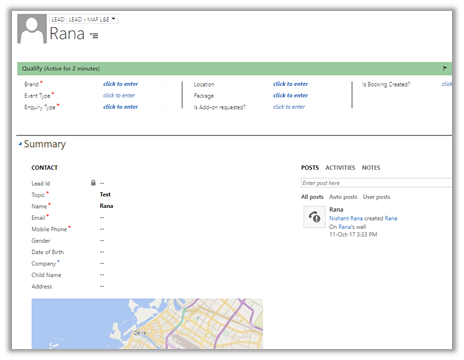
The same record in our test, after enabling the Bing Map.

Hope it helps..

Sample Code to bulk update the record using ExecuteMultiple in Dynamics 365


Sharing a sample code that can be used ExecuteMultiple to bulk update the records.


private void MyForm_Load(object sender, EventArgs e)
{

var orgProxy = GetOrgProxy();

// place your fetch xml code to retrieve the records to be updated
var fetchXML = @"FetchXMLQuery";

var multipleRequest = new ExecuteMultipleRequest()
{
// Assign settings that define execution behavior: continue on error, return responses.
Settings = new ExecuteMultipleSettings()
{
ContinueOnError = true,
ReturnResponses = true
},
// Create an empty organization request collection.
Requests = new OrganizationRequestCollection()
};

// get all the records > 5000
var totalRecords = GetTotalRecordsFetchXML(orgProxy, fetchXML);

// split the lst of entity to child list
// specify the size of the batch i.e. 500 here
var lstlstEntity = SplitList(totalRecords, 500);

// loop through each of the list and create the request and add it to Execute Multiple Request
foreach(var lstEntity in lstlstEntity)
{
multipleRequest.Requests.Clear();
foreach (var entity in lstEntity)
{
UpdateRequest createRequest = new UpdateRequest { Target = entity };
// add the field to be updated
entity.Attributes["sab_referencenumber"] = "1000";
multipleRequest.Requests.Add(createRequest);
}

ExecuteMultipleResponse multipleResponse = (ExecuteMultipleResponse)orgProxy.Execute(multipleRequest);
}
}

/// <summary>
/// Function to split the list into child list
/// </summary>
/// <param name="locations"></param>
/// <param name="nSize"></param>
/// <returns></returns>
public static List<List<Entity>> SplitList(List<Entity> locations, int nSize = 30)
{
var list = new List<List<Entity>>();
for (int i = 0; i < locations.Count; i += nSize)
{
list.Add(locations.GetRange(i, Math.Min(nSize, locations.Count - i)));
}
return list;
}


private static List<Entity> GetTotalRecordsFetchXML(OrganizationServiceProxy orgProxy, string fetchXML)
{
XDocument xDocument = XDocument.Parse(fetchXML);
var fetchXmlEntity = xDocument.Root.Element("entity").ToString();

EntityCollection entityColl = new EntityCollection();
List<Entity> lstEntity = new List<Entity>();
int page = 1;
do
{
entityColl = orgProxy.RetrieveMultiple(new FetchExpression(
string.Format("<fetch version='1.0' page='{1}' paging-cookie='{0}'>" + fetchXmlEntity + "</fetch>",
SecurityElement.Escape(entityColl.PagingCookie), page++)));

lstEntity.AddRange(entityColl.Entities);
}
while (entityColl.MoreRecords);

return lstEntity;
}


// Get service instance
public static OrganizationServiceProxy GetOrgProxy()
{
IServiceManagement<IOrganizationService> orgServiceManagement =
ServiceConfigurationFactory.CreateManagement<IOrganizationService>(new Uri("https://orgname.crm4.dynamics.com/XRMServices/2011/Organization.svc"));

AuthenticationCredentials authCredentials = new AuthenticationCredentials();
authCredentials.ClientCredentials.UserName.UserName = "username";
authCredentials.ClientCredentials.UserName.Password = "password";
AuthenticationCredentials tokenCredentials = orgServiceManagement.Authenticate(authCredentials);

return new OrganizationServiceProxy(orgServiceManagement, tokenCredentials.SecurityTokenResponse);

}

Hope it helps..


Solved – System.ArgumentNullException: Value cannot be null.Parameter name: SandboxAppDomainHelper.Execute: The plug-in type could not be found in the plug-in assembly in Dynamics 365


We got the below error while in one of our plugin assemblies. 

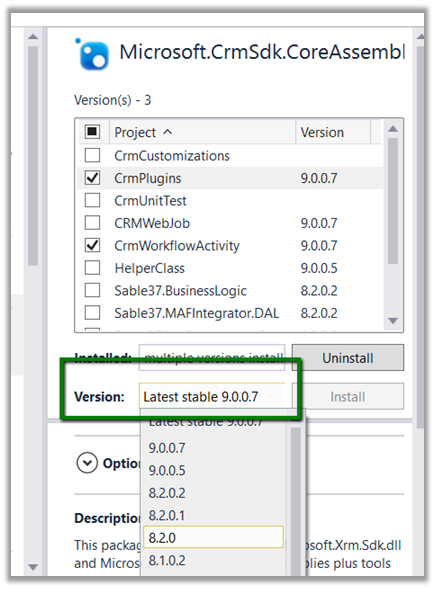
As it turned out we were referencing the latest, version 9 Dynamics 365 assemblies in our plugin project, against our Dynamics 365 Environment which was still in version 8.2.

Adding the appropriate NuGet Package (i.e. 8.2.0.0) fixed the issue for us.

The helpful post

http://blogs.it.ox.ac.uk/benwalker/2017/09/12/system-io-fileloadexception-error-in-plugin-deployed-by-crm-developer-toolkit-to-dynamics-2015/

Hope it helps..

Advertisements