EWS Editor for Dynamics 365


Marcello Tonarelli's avatarMarcello Tonarelli Blog

EWS Editor for Dynamics 365 is based off the original EWS Editor source and is designed to provide troubleshooting tools to help resolve Exchange server integration issues related to Server Side Synchronization and the E-mail Router. Below are the features available in the Alpha release:

  • Natively inspect Dynamics 365 Extended Properties (crmid, crmLinkState, etc) in any EWS Editor grid that contains items linked to Dynamics 365.
  • Retrieve ExchangeSyncIdMapping records for any given Appointment, Contact, or Task in any EWS Editor Grid that contains items linked to Dynamics 365.
  • Validate e-mails for promotion to Dynamics 365 by performing the CheckIncomingEmailRequest API.
  • Inspect the Mailbox Synchronization State, Mailbox Alerts, and other details in a thematically grouped interface.
  • Perform Mailbox diagnostics to check for misconfigured or stuck mailboxes with Server Side Synchronization.
  • Troubleshoot and anticipate ACT Synchronization issues between Dynamics 365 and Exchange Server.
  • Simulate various Exchange Web Service APIs commonly used by Dynamics 365.

View original post 28 more words

Duplicate Detection limitations – Dynamics 365


Some time back, had reblogged about Duplicate detection limitations.

The original post – https://crmfunda.wordpress.com/2018/09/26/d365-limitations-of-duplicate-detection-rules/, talks about the below limitations

Let us check each one of them with the enhanced experience that we now have in the platform

  • Duplicate Detection works seamless for Dynamics 365 for Phone app also as shown in the screenshot below.

  • Duplicate detection check kicks in when we qualify the lead

Here, qualifying the lead, pops up Duplicate Detection dialog box listing both the matching Account and Contact record.

We can either choose ignore and save to create a new record or click on continue to merge the record with the selected record(s).

  • On activating a matching inactive contact record,

Duplicate Detection is not triggered.

Duplicate detection can be setup to run on the following events – 

dd

  • While trying to publish 6th Duplicate Detection rule for Account entity,

we get the below exception

System.Web.HttpUnhandledException: Exception of type ‘System.Web.HttpUnhandledException’ was thrown. —> Microsoft.Crm.CrmException: The selected record type already has the maximum number of published rules. Unpublish or delete existing rules for this record type, and then try again.

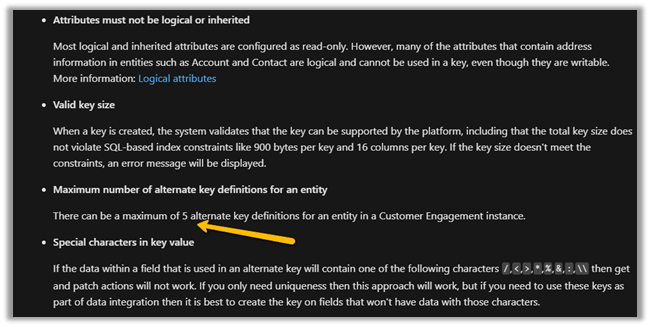
Thus maximum 5 duplicate detection rules can be published per entity.

More on Duplicate Detection

Hope it helps..
Advertisements

Set Custom Message and disable background processes inside the Administration mode for Sandbox and Production Environment – Power Platform


Recently while trying to enable Administration mode for one our environments, we realized 2 new options.

  • Background Operations – for disabling any background operations.
  • Custom Message – define the custom message for the users.

For CRM On-Premise, we used to place a custom HTML page + URL
Rewrite during the maintenance window.

Nicely document here – https://debajmecrm.com/dynamics-crm-maintenance-page/

Login to https://admin.powerplatform.microsoft.com/ with System Administrator role, select the Environment, and click on Edit.

Enable the Administration mode, and set the custom message.

Click on Save to make the change, within a minute or so the process will complete.

And the non-system administrator and customizer users will see the below page with our custom message as shown below.

Get more details –

https://docs.microsoft.com/en-us/power-platform/admin/admin-mode

Hope it helps..

Advertisements

Assign/Remove Security Roles to Users Via Power Automate


The Techie Dood's avatarThe Techie dood

Scenario/Use case:

If there is need to frequently change the security roles of User in CDS environment say a QA person doing role based testing.

Resolution:

  You can take leverage of Power Automate to perform this repetitive task.

Before you start further make sure to use a Dataverse Connection that has necessary permission to assign or remove security roles to a user. Like a user with a system administrator role.

Demo:

Step 1:

I am using Three variables here –

  1. FullName – fullname of the system user whose role you want to update
  2. Security Role – it can be a text input also. Here I have used it as dropdown input. The values are the Security Role Names.
  3. Clear Other Roles- Yes/No (if we need to remove all roles before applying the selected Role to the user)

Step 2:In the next step – lets retrieve the roleid using List…

View original post 165 more words

How to – Find the Subscription ID of your Microsoft products (Dynamics 365 Customer Engagement Plan)


Recently we were asked to provide the Subscription Id of the Dynamics 365 Customer Engagement Plan our organization had purchased.

To find the same, follow the below steps

Login to Microsoft Office admin center with administrator account

https://admin.microsoft.com/

Quick reference – Admin Center URL(s) in Microsoft Dynamics 365 (Power Platform)

https://nishantrana.me/2020/06/15/admin-center-urls-in-microsoft-dynamics-365-power-platform/

Navigate to Billing >> Your products and select / click on the product.

Copy the id from the URL, which will be the subscription id.

Hope it helps..

Advertisements

Fixed – ClientErrorAborted while creating flow in Power Automate


Recently while creating a flow in Power Automate we got the ClientErrorAborted error.

clientaborted

Users were having all the required licenses / roles.

And only a few users were getting the error, who were accessing the Power Platform from their VDI.

Eventually, after some analysis, we realized that it was because some of the required services were blocked.

We raised the Microsoft Support Ticket who suggested verifying and if required whitelist the below services.

https://docs.microsoft.com/en-us/powerapps/maker/canvas-apps/limits-and-config#required-services

Whitelisting them fixed the issue for us.

Hope it helps..

Advertisements