
Reset / Restore the standard (OOTB) button in Dynamics 365 / Dataverse


We recently worked on a requirement where we customized an out-of-the-box ribbon button in Dynamics 365 — specifically, the Reactivate Lead button. We had renamed it to ‘Reactivate’ as part of an earlier customization.
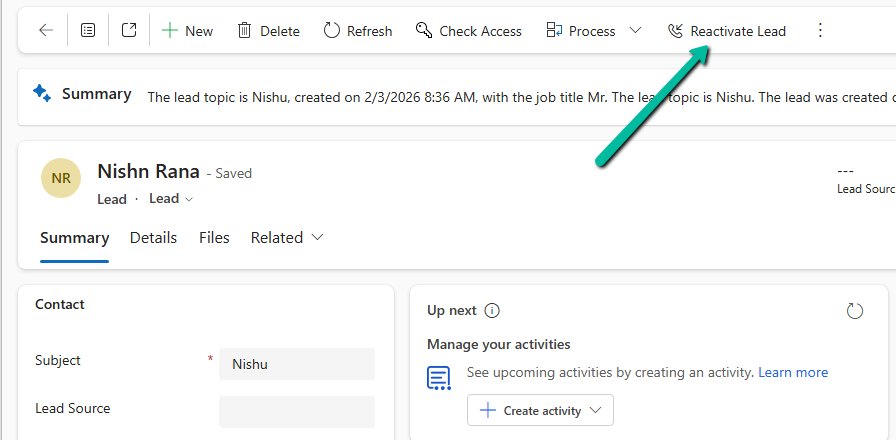
Below is how the button appeared on the form after customization:
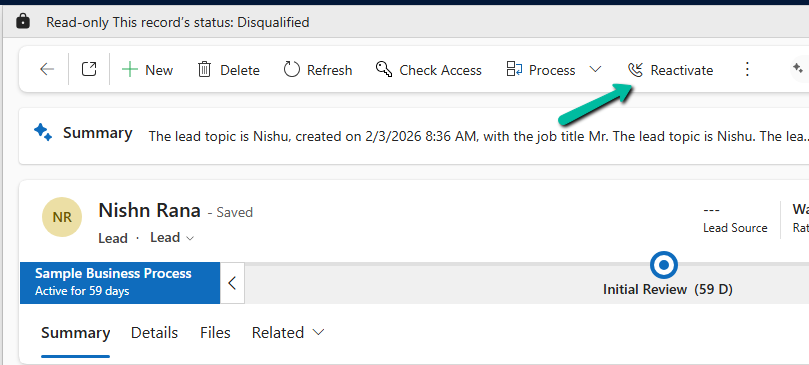
Later, we had a new requirement to hide this button completely and replace it with a custom ribbon button that implemented our own reactivation logic. However, when we tried to hide the button using Ribbon Workbench, we noticed that the Hide option was not available.

When we opened Ribbon Workbench and inspected the button, we observed that since the button was already customized, the standard options like Hide were no longer available.

While working within the same Ribbon Workbench session, we could see the ‘Uncustomize Button’ option.
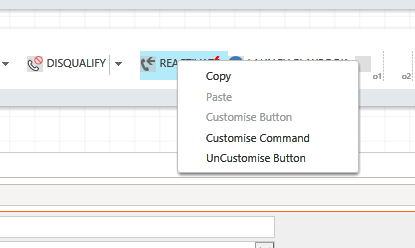
However, an interesting behavior we observed is that once we closed or reopened the solution inside the Ribbon Workbench, the ‘Uncustomise Button’ option was no longer available. In that case, only the Delete option was visible.
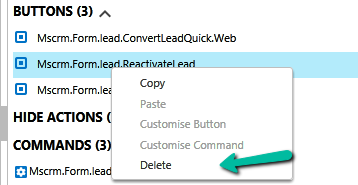
This is expected behavior. Once an OOTB button is customized, it becomes part of the solution layer, and certain default actions like Hide are no longer directly available.

To fix this and restore the original behavior, we followed a simple approach.

We selected the customized button in Ribbon Workbench and chose the Uncustomize Button or Delete option. We then published the solution and reloaded it. Once the solution was reloaded, the button was restored to its original out-of-the-box state. And now, the Hide option was available again as expected.
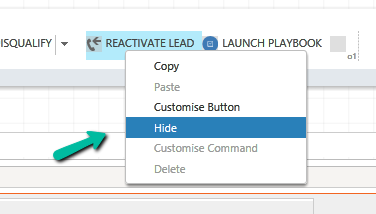
This allowed us to properly hide the OOTB button and proceed with implementing our custom ribbon button.

We referred to the blog below, which helped confirm the approach: https://innovativeaj.wordpress.com/2020/09/29/bring-me-back-to-life-restoring-the-d365-ootb-button-to-default-version/

Hope it helps..

Advertisements

Discover more from Nishant Rana's Weblog

Subscribe to get the latest posts sent to your email.

Unknown's avatar

Author: Nishant Rana

I love working in and sharing everything about Microsoft.NET technology !

One thought on “Reset / Restore the standard (OOTB) button in Dynamics 365 / Dataverse”

Please share your thoughts

This site uses Akismet to reduce spam. Learn how your comment data is processed.

Discover more from Nishant Rana's Weblog

Subscribe now to keep reading and get access to the full archive.

Continue reading

Power Platform Puzzles

D365 CRM, Power Platform Tips &Tricks

Power Spark

Power Spark By Shrangarika

Van Carl Nguyen

Exploration of Power Platform

My Trial

It is my experience timeline.

Power⚡Thomas

Sharing my knowledge and experience about the Microsoft Power Platform.

Arpit Power Guide

a guide to powering up community

Welcome to the Blog of Paul Andrew

Sponsored by Cloud Formations Ltd

Deriving Dynamics 365

Deriving Solutions and features on Power Platform/Dynamics 365

The CRM Ninja

Thoughts & musings from a Microsoft Business Applications Ninja!

D CRM Explorer

Learn about Microsoft Dynamics CRM Power Platform customization and implementation and other cool stuffs

Stroke // Jonas Rapp

I know pre-stroke. I will improve who I was.

Power Melange

Power Melange By Shalinee

Clavin's Blog - PPUG.ORG

AI - Power Automate - Power Apps - SharePoint Online - Azure - Nintex - K2 - Artificial Intelligence

Sat Sangha Salon

An Inquiry in Being

The Indoencers

The Influencers & Influences of Indian Music

Monika Halan's blog

Hand's-free money management

D365 Demystified

A closer look at Microsoft Dynamics 365.

Microsoft Mate (msftmate) - Andrew Rogers

Experienced consultant primarily focused on Microsoft Dynamics 365 and the Power Platform

Manmit Rahevar's Blog

One Stop Destination for Microsoft Technology Solutions

MG

Naturally Curious

Brian Illand

Power Platform and Dynamics 365

Steve Mordue

The Professional Paraphraser

Subwoofer 101

Bass defines your home theater

SQLTwins by Nakul Vachhrajani

SQL Server tips and experiences dedicated to my twin daughters.

Everything D365

Discovering Azure DevOps and D365 Business Applications

Tech Wizard

Lets do IT Spells

XRM Tricks (Power Platform & Dynamics CRM )

Power Platform & Dynamics CRM

CRM TIPS BY PRM

Mail to crmtipsbyprm@gmail.com for queries and suggestions

nijos.dev

Giving back to the community what I have learned

Power Platform Learning

Your Go-To Resource for Power Apps, Power Automate & More

xrm CRM Dynamics

Dynamics CRM Technical & Functional Info

Dynamics 365 Blogs - Explained in unique way

Sometimes you need to look at things from different perspective.