Enable Sound Notifications in Omnichannel (Voice and other channels) – Dynamics 365 for Customer Service


By default, this is how the notification appears for the agent when he is logged in to the app and is available.

There is no sound notification.

However, we enable sound notification here. This can be helpful in case the app is in the background and/or the agents are working on something else.

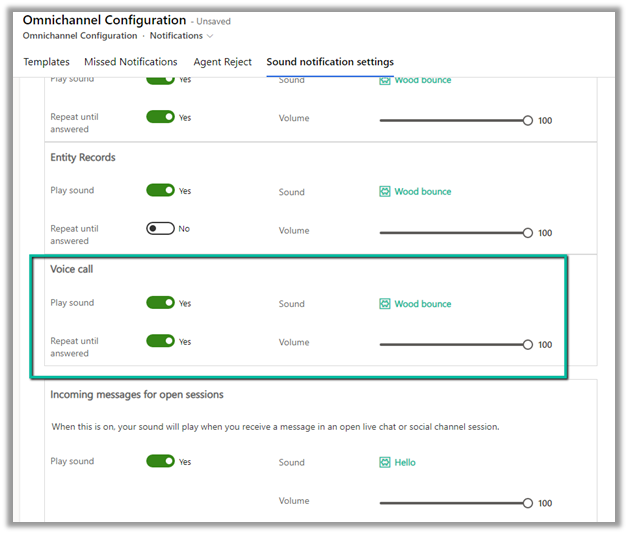
Navigate to Agent Experience >> Workspaces >> Notification Templates (Manage) in Customer Service Admin Center.

Let us enable sound notifications.

We can specify the following – Play sound, Sound to be played, whether the notification should keep on playing till the agent responds and the volume of the notification as shown below.
Here we also need to enable the Sound settings in the browser.

For the app, select Site Settings

Specify Allow for Notifications and Sound


Let us now call again, this time the agent hears the sound notifications, until he Accepts the call and that works even if the app/ the browser is minimized.

Hope it helps..

Advertisements

Understanding Overflow handling – Work item limit exceeds in Voice Channel – Omnichannel (Dynamics 365 Customer Service)


Say for one the Advanced Queue of type Voice we have the following Overflow handling defined (the queue has only 1 user assigned to it).

i.e.

Condition = Work item limit exceeds 1

Action = Voicemail

And it also has an Out of operation hours condition defined.

Now, if the customer calls during working hours and if the user’s presence is Available, the agent will receive the notification and the first conversation will have the Status as Active. If we make a second call its status will be open and it won’t go to Voicemail. Now if we make a 3rd call to that number it will go to Voicemail.

This is because we have set the Work item limit exceeds as 1, so it will keep one conversation in the open status, and any subsequent calls after that will go to the Voicemail.


Now here if the user is either in DND, Away, Offline, or not logged into CRM during work hours (if a customer calls outside work hours it will directly go to the Voicemail as we have the Out of operation hours condition defined), the first conversation will have the status as open and then any subsequent calls will go to the Voicemail.

In short,

More detail – Queue Overflow

Hope it helps..

Advertisements

Calculated Column inside Plugin? – Dataverse / Dynamics 365


Recently while working on a plugin, we realized that for a particular column, we were not getting value in the context (on Post Create), the same was the case for Post Update and Post Image.

Also using Retrieve and RetrieveMultipleto fetch its value inside the Plugin didn’t work

Eventually, we realized it was a calculated column, which doesn’t give value inside the Plugin.

If we do RetrieveMultiple and RetrieveMultiple from a console app, outside Plugin, we get the value for that field.

Hope it helps..


Advertisements