{Dynamics 365 Security Nuances} Can a user work with only team roles in Dynamics 365


Debajit's avatarDebajit's Dynamic CRM Blog

Recently I was conducting a training in Dynamics 365 where I got the same question. Just a quick thought and the answer that comes to mind is “Yes”. After all,

a user’s security role is the sum of the security roles directly assigned to the user + sum of the roles the user derives through it’s association with the Teams (provided teams are given security role)

And here I was, where a user is belonging to a team and the team has a security with all the right privileges assigned to make the user work in Dynamics.

When I assigned the role directly to the user and the user is not part of the team, it just worked fine. Now comes the other way round. I remove the user’s security role, assign the same security role to a team and add the user to the team.

image

As you can see…

View original post 250 more words

Insufficient Permissions error while updating records using Excel Online in Dynamics 365


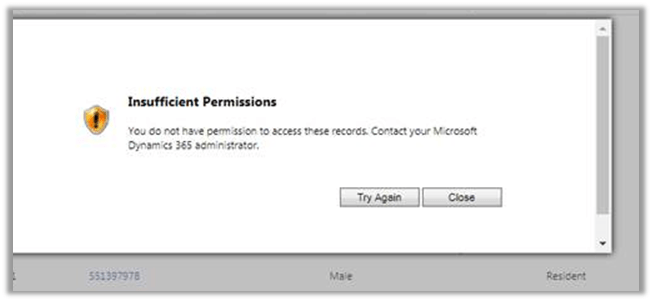
Recently one of our users reported the below while trying to bulk update the records using Excel Online feature.

The user had the Update rights for those records.

Basically, the Excel Online update features creates a data import job in the background.

https://debajmecrm.com/2015/11/14/dynamics-crm-excel-online-field-changes-save/

So the user had to be given the import data rights.

We resolved the issue by giving the following rights to the user at organization level.

  • Data Import
  • Data Map
  • Import Source File
  • Web Wizard
  • Web Wizard Access Privilege
  • Wizard Page

https://community.dynamics.com/crm/b/crmpowerobjects/archive/2015/08/18/data-import-privileges

Hope it helps..

Fixed – The unit schedule id is missing error while trying to migrating product in Dynamics 365


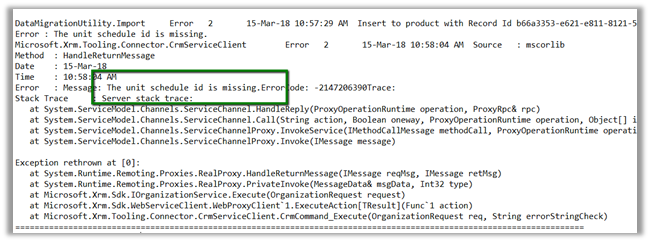
Recently while trying import products from our Dev to Test environment using the Configuration Migration tool we got the below error

The reason being we were using default unit as a unit group in out DEV and the same wasn’t there in the TEST environment. Interestingly if we set the correct GUID in the data.xml generated by Configuration Migration tool and try importing, still the products do not get imported.

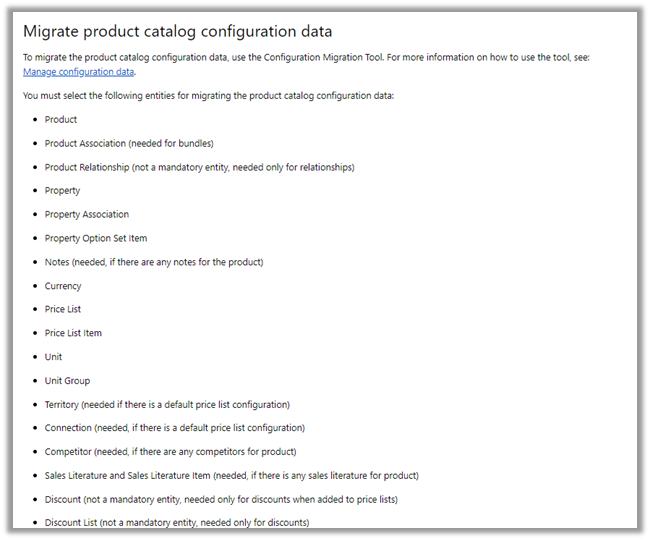
So basically, if we try importing the products entity alone we might run into issues. To migrate it properly we need to add the related entities along with it as mentioned in the Microsoft documentation.

https://docs.microsoft.com/en-us/dynamics365/customer-engagement/admin/manage-product-catalog-configuration

We created a new schema file with Product and its related entities, and this time migration worked properly.

Hope this helps.

Advertisements