Server Is Busy. The record was saved. However, the data could not be displayed because the server is busy error in Dynamics 365.


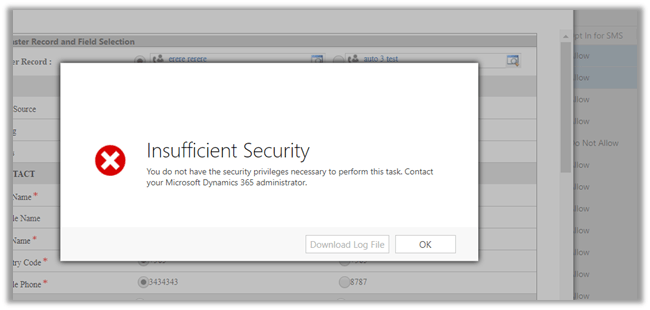
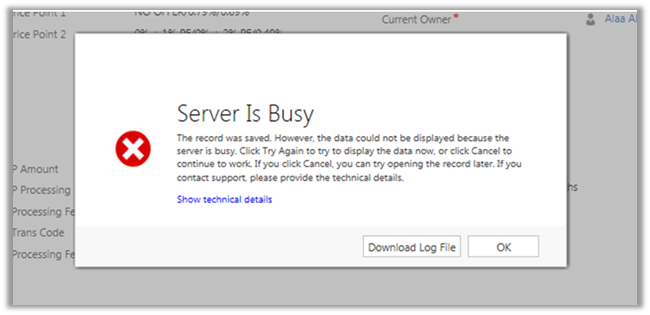
Recently one of our users got the below error

The error message is bit incorrect here. The error was because the user had User Level Read Access to the record or (Entity to be specific) and on saving the record, we had one of our real-time workflow being triggered which was assigning this record to another user. And on assignment, the record being getting assigned to another user, the user who had created\saved the record was losing the access to it.

Hope it helps..

Entities not appearing while creating\ managing the Export Profile in Data Export Service in Dynamics 365


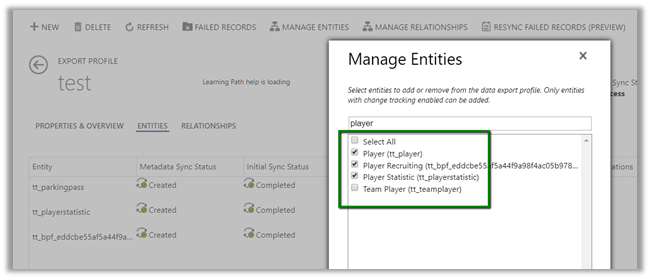
We recently configured the Data Export Service and while creating the export profile, some of the entities were not appearing there.

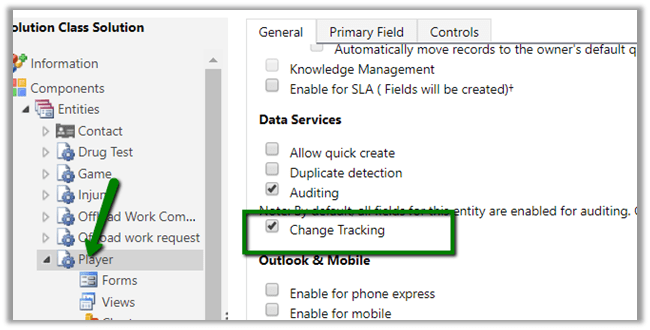
We had the Change Tracking Enabled for them.

This is what it was showing to us.

Trying after few hours we got all our entities there

I think it might be caching or there is some pull mechanism that took time to detect that change at the Data Export Service side. Not sure though.

Please drop your comments if you have also faced this and know the exact reason for that.

Hope it helps.

Metadata contains a reference that cannot be resolved: ‘https://orgname.crm8.dynamics.com/XRMServices/2011/Organization.svc?wsdl&sdkversion=9’ error in Dynamics 365


We would run into this issue while trying to connect to Dynamics 365 Version 9.0 from a client application.

It is because Customer Engagement Platform (version 9.0) only supports TLS 1.2.

More details here

https://blogs.msdn.microsoft.com/crm/2017/09/28/updates-coming-to-dynamics-365-customer-engagement-connection-security/

How we can fix it à

We need to add the following line of code to our existing code


public static OrganizationServiceProxy GetOrganizationServiceProxy()
{
ClientCredentials clientCredentials = new ClientCredentials();

clientCredentials.UserName.UserName = "username";
clientCredentials.UserName.Password = "password";

// Set security protocol to TLS 1.2 for version 9.0 of Customer Engagement Platform
ServicePointManager.SecurityProtocol = SecurityProtocolType.Tls12;

return new OrganizationServiceProxy(new Uri("https://orgname.crm.dynamics.com/XRMServices/2011/Organization.svc"),
null, clientCredentials, null);
}

Helpful post

https://debajmecrm.com/2018/01/08/fixed-error-while-connecting-to-dynamics-365-version-9-0-metadata-contains-a-reference-that-cannot-be-resolved/

https://waelhamze.wordpress.com/2018/01/11/dynamics-365-ce-tls-connectivity-issue-from-net-and-powershell/

http://abhinavranjan.xyz/2017/12/21/issue-authenticating-crm-organization-service-web-app-july-2017-update/

Hope it helps..

User does not have the privilege to act on behalf another user error while using impersonation in Web API in Dynamics 365.


We might receive below error while using impersonation in Web API call.

{\r\n  \”error\”:{\r\n    \”code\”:\”\”,\”message\”:\”User does not have the privilege to act on behalf another user.\”,\”innererror\”:{\r\n      \”message\”:\”User does not have the privilege to act on behalf another user.\”,\”type\”:

Impersonation in Web API

http://www.inogic.com/blog/2016/02/impersonation-available-using-web-api-in-dynamics-crm-2016/

This error can occur in a scenario when User A is trying to impersonate User B, but user A doesn’t have “Act on Behalf of Another User” privilege.

Below article nicely explains it

https://community.dynamics.com/crm/b/magnetismsolutionscrmblog/archive/2013/07/18/act-on-behalf-of-another-user

Hope it helps..

Service Unavailable – HTTP Error 503 error while trying to login to Dynamics 365 Online.


While trying to login into Dynamics 365 Online, we got the below issue

It could be some issue related to ADFS (http://himbap.com/blog/?p=2165). Until it is corrected, the only solution is to wait for some time for the service to be up and running.

It was close to 90 minutes for us.

Hope it helps..

A security error has occurred. Make sure you are signed into Microsoft Dynamics CRM and try again in Click Dimensions.


We had this issue in past when we started getting below error in most of the entities of Click Dimensions.

The issue can occur if the password would have expired or changed for the Service Credentials account of Click Dimensions.

Go to Settings à ClickDimensions Settings à Service Credentials.

In our case it wasn’t changed but we were still getting the issue. The only way we were able to fix it was to specify a different account for the Service Credentials.

Hope it helps.