Calling On Demand Workflow through a Button in Ribbon (launchOnDemandWorkflow) in CRM 2011


I had to call an on demand workflow through a custom button click inside the ribbon. I thought of using launchOnDemandWorkflow function.

http://inogic.blogspot.com/2009/06/call-workflow-from-isv-button.html

But couldn’t really find a way of calling that function.

So thought of calling it through its url, which would be something like this

http://servername/orgname/_grid/cmds/dlg_runworkflow.aspx?


iObjType=10004

&iTotal=1

&sIds=%7b4BEBDCAF-8F66-E011-A475-00155D045711%7d%3b

&wfId=%7bF0ED25C7-5129-4297-8515-69DFFA0739FF%7d


function CallOnDemandWorkflow() {


var recordID = crmForm.ObjectId;


var url = http://server/org/_grid/cmds/dlg_runworkflow.aspx?iObjType=10004&iTotal=1&sIds={“ + recordID + “}&wfId={F0ED25C7-5129-4297-8515-69DFFA0739FF}”;

window.open(url);

}

However I keep getting some JavaScript Error.

Finally found out the correct way of doing so.

function CallOnDemandWF() {

var a = new Array(crmFormSubmit.crmFormSubmitId.value);

var sIds = crmFormSubmit.crmFormSubmitId.value+“;”;

var sEntityTypeCode = “10004”; //Replace this with your entity type code

var sWorkflowId = “{F0ED25C7-5129-4297-8515-69DFFA0739FF}”; //Replace this with your actual workflow ID

var iWindowPosX = 500; //Modal dialog position X

var iWindowPosY = 200; //Modal dialog position Y

var oResult = openStdDlg(prependOrgName(“/_grid/cmds/dlg_runworkflow.aspx”)+“?iObjType=” + CrmEncodeDecode.CrmUrlEncode(sEntityTypeCode) + “&iTotal=” +

CrmEncodeDecode.CrmUrlEncode(a.length) + “&wfId=” + CrmEncodeDecode.CrmUrlEncode(sWorkflowId)+ “&sIds=” + CrmEncodeDecode.CrmUrlEncode(sIds) , a, iWindowPosX, iWindowPosY);

}

Check out the thread

http://axforum.info/forums/showthread.php?t=29333

Final Output
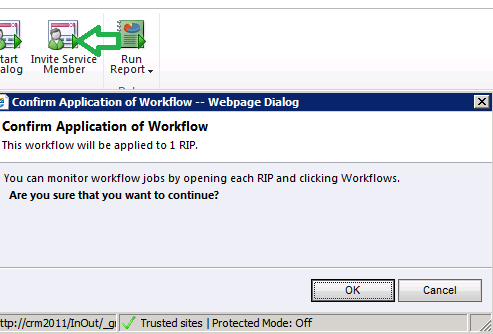
The ribbondiffxml used is following

    <RibbonDiffXml>

            <CustomActions>

                <CustomAction

                Id=CA_MyFirstButton

                Location=Mscrm.Form.new_rip.MainTab.Workflow.Controls._children

                Sequence=31>

                    <CommandUIDefinition>

                        <Button

                        Id=B_MyFirstButton

                        Command=Cmd_JavaScript

                        LabelText=Invite Service Member

                        ToolTipTitle=Invite User

                        ToolTipDescription=Use this workflow to invite Service Member to the portal

                        TemplateAlias=o1

                        Image16by16=/_imgs/ribbon/startdialog_16.png

                        Image32by32=/_imgs/ribbon/startdialog_32.png></Button>

                    </CommandUIDefinition>

                </CustomAction>

            </CustomActions>

            <Templates>

                <RibbonTemplates

                Id=Mscrm.Templates/>

            </Templates>

            <CommandDefinitions>

                <CommandDefinition
Id=Cmd_JavaScript>

                    <EnableRules>

                        <EnableRule
Id=Mscrm.Enabled></EnableRule>

                    </EnableRules>

                    <DisplayRules></DisplayRules>

                    <Actions>

                        <JavaScriptFunction

                            Library=$webresource:new_InOut

                            FunctionName=CallOnDemandWF

                    >

                        </JavaScriptFunction>

                    </Actions>

                </CommandDefinition>

            </CommandDefinitions>

            <RuleDefinitions>

                <TabDisplayRules/>

                <DisplayRules/>

                <EnableRules/>

            </RuleDefinitions>

            <LocLabels/>

        </RibbonDiffXml>

Bye.

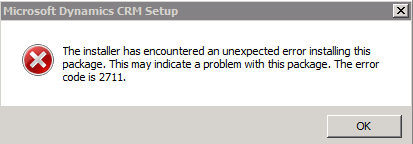
The installer has encountered an unexpected error installing this package. This may indicate a problem with this package. The error code is 2711.


I was getting the above error while uninstalling CRM 2011 Server beta.

Uninstalling Microsoft Dynamics CRM 2011 for Microsoft Office Outlook before uninstalling Server resolved the issue.

Wonderful tools to learn Linq and oData Query for CRM 2011


Check out these wonderful tools to lear Linq and oData Query

Bye.

Using Organization.svc in Silverlight Application


Hi,

While searching for how to use Organization.svc within a silverlight application, i found these 2 helpful posts

http://msdn.microsoft.com/en-us/library/gg594452.aspx#Y1145  

http://erikpool.blogspot.com/2010_12_01_archive.html

The other easier option that i can think of is creating a custom wcf service that uses Organization.svc and using this custom wcf service in the silverlight application.

Download the solution here 

http://www.box.net/shared/pgditixq1o

Bye.

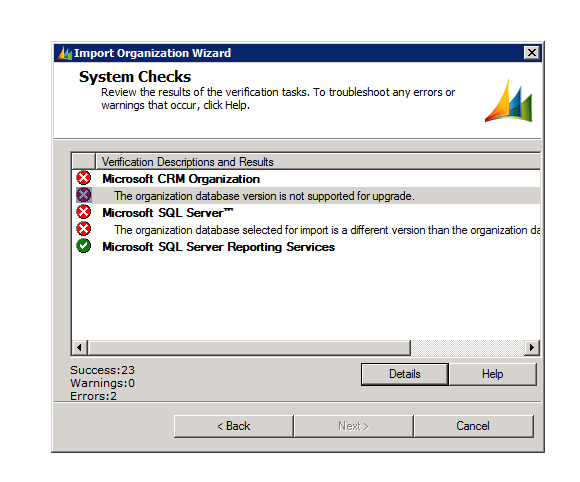
The organization database version is not supported for upgrade – error while importing organization in CRM 2011


After restoring the database to the server, I got the following error while importing the organization using the Deployment Manager

The build version of the database that I was importing was different than the build version of the database of the organization that I already had there.

http://support.microsoft.com/kb/946594 ( to find the build version of the database)

The one we were importing had higher build version.

Than we installed the update for Microsoft Dynamics CRM 2011 Release Candidate

http://support.microsoft.com/kb/2461082

Restarted the server and was able to import the organization successfully.

Hope it helps.

CrmService and Silverlight.


Two ways we can use consume CrmService within a Silverlight Application are as follows.

  1. Add Service Reference to CrmService in the Silverlight Project and work with CrmServiceSoapClient class.

    The things we need to consider here are

    We need to explicitly pass the Header information otherwise our CrmService won’t work.

    We need to make use of Dynamic Entity in case of Retrieve request as we might not receive values for certain fields. 

  2. The other easier option is to add a web service to the SilverlightApplication.Web application, which in turn will consume the CrmService. 

    In our Silverlight Application we will Add Service Reference to this custom web service (acting as a wrapper) instead of CrmService directly. 

    Download the solution here

    http://www.box.net/shared/3p5kkf7di2 

    MainPage.xaml àInteracts with CrmService directly.

    Page1.xamlàUses custom web service to interact with CrmService. 

Hope it helps.