I had to call an on demand workflow through a custom button click inside the ribbon. I thought of using launchOnDemandWorkflow function.
http://inogic.blogspot.com/2009/06/call-workflow-from-isv-button.html
But couldn’t really find a way of calling that function.
So thought of calling it through its url, which would be something like this
http://servername/orgname/_grid/cmds/dlg_runworkflow.aspx?
iObjType=10004
&iTotal=1
&sIds=%7b4BEBDCAF-8F66-E011-A475-00155D045711%7d%3b
&wfId=%7bF0ED25C7-5129-4297-8515-69DFFA0739FF%7d
function CallOnDemandWorkflow() {
var recordID = crmForm.ObjectId;
var url = “http://server/org/_grid/cmds/dlg_runworkflow.aspx?iObjType=10004&iTotal=1&sIds={“ + recordID + “}&wfId={F0ED25C7-5129-4297-8515-69DFFA0739FF}”;
window.open(url);
}
However I keep getting some JavaScript Error.
Finally found out the correct way of doing so.
function CallOnDemandWF() {
var a = new Array(crmFormSubmit.crmFormSubmitId.value);
var sIds = crmFormSubmit.crmFormSubmitId.value+“;”;
var sEntityTypeCode = “10004”; //Replace this with your entity type code
var sWorkflowId = “{F0ED25C7-5129-4297-8515-69DFFA0739FF}”; //Replace this with your actual workflow ID
var iWindowPosX = 500; //Modal dialog position X
var iWindowPosY = 200; //Modal dialog position Y
var oResult = openStdDlg(prependOrgName(“/_grid/cmds/dlg_runworkflow.aspx”)+“?iObjType=” + CrmEncodeDecode.CrmUrlEncode(sEntityTypeCode) + “&iTotal=” +
CrmEncodeDecode.CrmUrlEncode(a.length) + “&wfId=” + CrmEncodeDecode.CrmUrlEncode(sWorkflowId)+ “&sIds=” + CrmEncodeDecode.CrmUrlEncode(sIds) , a, iWindowPosX, iWindowPosY);
}
Check out the thread
http://axforum.info/forums/showthread.php?t=29333
Final Output
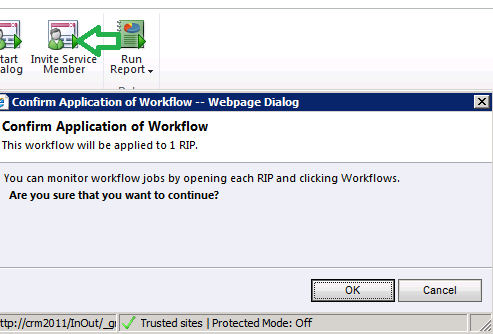
The ribbondiffxml used is following
<RibbonDiffXml>
<CustomActions>
<CustomAction
Id=“CA_MyFirstButton”
Location=“Mscrm.Form.new_rip.MainTab.Workflow.Controls._children”
Sequence=“31“>
<CommandUIDefinition>
<Button
Id=“B_MyFirstButton”
Command=“Cmd_JavaScript”
LabelText=“Invite Service Member”
ToolTipTitle=“Invite User”
ToolTipDescription=“Use this workflow to invite Service Member to the portal”
TemplateAlias=“o1”
Image16by16=“/_imgs/ribbon/startdialog_16.png”
Image32by32=“/_imgs/ribbon/startdialog_32.png“></Button>
</CommandUIDefinition>
</CustomAction>
</CustomActions>
<Templates>
<RibbonTemplates
Id=“Mscrm.Templates“/>
</Templates>
<CommandDefinitions>
<CommandDefinition
Id=“Cmd_JavaScript“>
<EnableRules>
<EnableRule
Id=“Mscrm.Enabled“></EnableRule>
</EnableRules>
<DisplayRules></DisplayRules>
<Actions>
<JavaScriptFunction
Library=“$webresource:new_InOut”
FunctionName=“CallOnDemandWF”
>
</JavaScriptFunction>
</Actions>
</CommandDefinition>
</CommandDefinitions>
<RuleDefinitions>
<TabDisplayRules/>
<DisplayRules/>
<EnableRules/>
</RuleDefinitions>
<LocLabels/>
</RibbonDiffXml>
Bye.