Expand/Collapse Process
Xrm.Page.ui.process.setDisplayState(“collapsed”); // “expanded”

Hide Process from form
Xrm.Page.ui.process.setVisible(false);


Expand/Collapse Process
Xrm.Page.ui.process.setDisplayState(“collapsed”); // “expanded”
Hide Process from form
Xrm.Page.ui.process.setVisible(false);


Hi,
Was looking into how the business hours works in SLA.
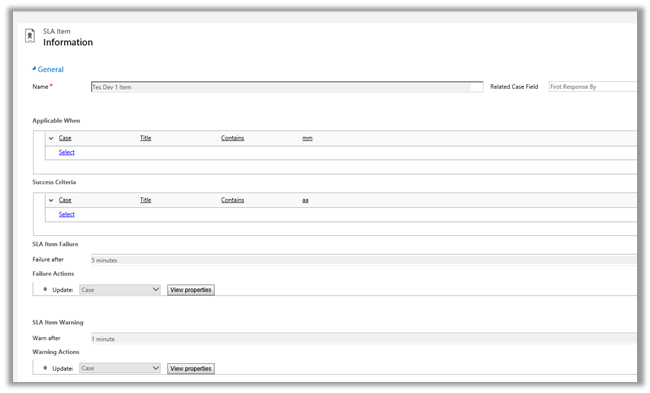
For this we a created new SLA record on CreatedOn field and which will update one of the fields on warning after one minute and some other field on failure after waiting for 5 minute.
And Applicable When -> when the Title field of Case contains “mm” text in it.
Following was the schedule
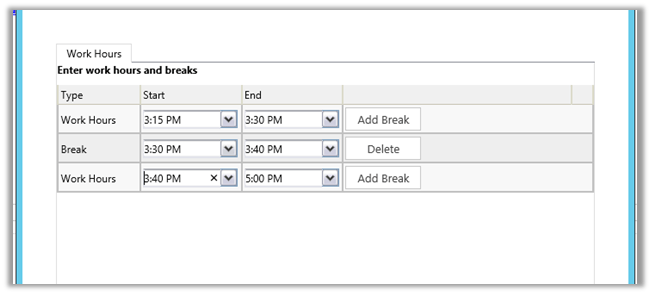
We created case record that satisfies the above condition at 3:28 P.M.
It updated one field on warning after one minute and then on 3:30 it went into wait condition and then resumed at 3:40 and showed failure at 3:43 as expected (i.e. total 5 minutes).
So it did consider the Break specified and on resuming ran for the remaining 3 minutes.
Hope it helps..

Hi,
Got this error in one of the steps in the Action. It was updating one of the lookup field using Update step.
The issue was that the lookup field was not in the form. Adding that particular field in the form back resolved the issue.
Hope this helps..

Hi,
CreateMultiEntityAssociation method of CrmServiceclient can be used for associating 1 : n records i.e. if we have one contact record that we want to associate with multiple opportunity record ( 1-n) then we can use that method. This way we wont have to update each individual record.
Sample Code
Uri organizationUri = new Uri("http://server/crmrog/XRMServices/2011/Organization.svc");
Uri homeRealmUri = null;
ClientCredentials credentials = new ClientCredentials();
credentials.Windows.ClientCredential = System.Net.CredentialCache.DefaultCredentials;
OrganizationServiceProxy orgProxy = new OrganizationServiceProxy(organizationUri, homeRealmUri, credentials, null);

CrmServiceClient crmServiceClient = new CrmServiceClient(orgProxy);
List<Guid> lstOpportunityGuid = new List<Guid>();
lstOpportunityGuid.Add(new Guid("9DDCE989-0738-E411-9878-00155D56FF56"));
lstOpportunityGuid.Add(new Guid("019E1598-0738-E411-9878-00155D56FF56"));
lstOpportunityGuid.Add(new Guid("EA393A91-0738-E411-9878-00155D56FF56"));
crmServiceClient.CreateMultiEntityAssociation("contact", new Guid("CF1FC3C0-0738-E411-9878-00155D56FF56"), "opportunity", lstOpportunityGuid, "opportunity_customer_contacts");
Hope it helps ..

Hi,
Suppose we need to call the service created here in our plugin
https://nishantrana.me/2014/09/05/configure-a-wcf-service-for-windows-authentication/
As plugin don’t have configuration file, we need to specify binding information in Code.
The sample code to call the WCF Service by passing Network Credentials
private static void CallWCFService()
{
BasicHttpBinding binding = new BasicHttpBinding();
binding.Security.Mode = BasicHttpSecurityMode.TransportCredentialOnly;
binding.Security.Transport.ClientCredentialType = HttpClientCredentialType.Windows;

// Specify the endpointAddress
EndpointAddress endpointAddress = new EndpointAddress(new Uri("http://servername:port/Service1.svc"));

ServiceReference1.Service1Client client = new ServiceReference1.Service1Client(binding, endpointAddress);
if (client.ChannelFactory.Credentials != null)
client.ChannelFactory.Credentials.Windows.ClientCredential = new System.Net.NetworkCredential("username", "password", "domain");
if (client.ClientCredentials != null)
client.ClientCredentials.Windows.AllowedImpersonationLevel = System.Security.Principal.TokenImpersonationLevel.Delegation;
MessageBox.Show(client.GetData(1));
}
Hope it helps ..

 Nishant Rana's Weblog