Import Solution progress bar rolls back without any error in CRM 2015\CRM 2013 Online.


Hi,

Occasionally while importing the solution to our UAT environment we have faced this issue where the solution hasn’t imported, didn’t give any error but has rolled back.

This issue seems to be occurring when we are facing Network Issues and Internet connection intermittently goes down.

Trying it again once the network is stable resolves this.

Hope it helps..

Unit Testing (Microsoft Fakes) RetrieveSharedPrincipalsAndAccessResponse in Plugin in CRM 2016 (and earlier)


Hi,

While trying to write Fakes for RetrieveSharedPrincipalsAndAccessResponse we’d realize that PrincipalAccess is read only property and the class itself is sealed.
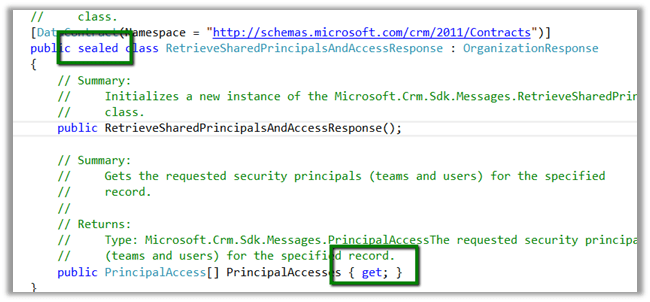
So to unit test it we need to write a wrapper class as suggested here

http://alexanderdevelopment.net/post/2013/10/17/unit-testing-custom-microsoft-dynamics-crm-code-part-4/

The wrapper class


/// <summary>
/// Wrapper class for retrieve response
/// </summary>
[DataContract(Namespace = "http://schemas.microsoft.com/xrm/2011/Contracts")]
public class RetrieveSharedPrincipalsAndAccessResponseWrapper : OrganizationResponse
{
/// <summary>
/// The _entity
/// </summary>
private PrincipalAccess[] _principalaccess;

/// <summary>
/// Initializes a new instance of the <see cref="RetrieveResponseWrapper"/> class.
/// </summary>
/// <param name="response">The response.</param>
public RetrieveSharedPrincipalsAndAccessResponseWrapper(OrganizationResponse response)
{
try
{
this.PrincipalAccesses = ((RetrieveSharedPrincipalsAndAccessResponseWrapper)response).PrincipalAccesses;
}
catch
{
this.PrincipalAccesses = ((RetrieveSharedPrincipalsAndAccessResponse)response).PrincipalAccesses;
}
}

/// <summary>
/// Gets or sets the PrincipalAccesses.
/// </summary>
/// <value>
/// The entity.
/// </value>
public PrincipalAccess[] PrincipalAccesses
{
get
{
return _principalaccess;
}

set
{
_principalaccess = value;
}
}
}

The unit test


 organizationService.ExecuteOrganizationRequest = request =>
 { 
 RetrieveSharedPrincipalsAndAccessResponseWrapper retrieveResponseWrapper = new RetrieveSharedPrincipalsAndAccessResponseWrapper(new RetrieveSharedPrincipalsAndAccessResponse());
 PrincipalAccess[] principalAccess = new PrincipalAccess[1]; 
 PrincipalAccess pAccess = new PrincipalAccess();
 pAccess.AccessMask = AccessRights.CreateAccess;
 pAccess.Principal = new EntityReference("team", new Guid("9A69533A-2306-4DFC-9662-65ABFAB41348"));
 principalAccess[0] = pAccess;
 retrieveResponseWrapper.PrincipalAccesses = principalAccess; 
 return retrieveResponseWrapper;
 };


Change in the Plugin code using Wrapper instead of original class


 IOrganizationService orgService = serviceFactory.CreateOrganizationService(context.UserId);

 var accessRequest = new RetrieveSharedPrincipalsAndAccessRequest
 {
 Target = new EntityReference("projectsite", new Guid("CDF30DD5-C64E-4EF5-ABA6-C9715C10A07D"))
 };

 RetrieveSharedPrincipalsAndAccessResponseWrapper accessResponse = (new RetrieveSharedPrincipalsAndAccessResponseWrapper(orgService.Execute(accessRequest)));

Hope it helps

Plugin on Retrieve Multiple in CRM 2015.


Recently we had a requirement to filter sub grid on one of the forms. We thought of using Plugin on Retrieve Multiple for this.

Here we were showing Opportunity Sub Grid on Account form.

So we created a view for Opportunity that will be used as Sub Grid. Used it as Related Record Sub Grid so that we can have the GUID of the Account record being passed to the plugin.

The problem we faced à Sorting and Paging stopped working for the Sub Grid.

http://crmtipoftheday.com/2015/10/05/limitations-of-retrieve-plugins/v

</p>
<p>void IPlugin.Execute(IServiceProvider serviceProvider)<br />
{<br />
// Obtain the execution context from the service provider.<br />
IPluginExecutionContext context = (IPluginExecutionContext)<br />
serviceProvider.GetService(typeof(IPluginExecutionContext));</p>
<p>// Obtain the organization service reference.<br />
IOrganizationServiceFactory serviceFactory = (IOrganizationServiceFactory)serviceProvider.GetService(typeof(IOrganizationServiceFactory));<br />
IOrganizationService service = serviceFactory.CreateOrganizationService(context.UserId);</p>
<p>// The InputParameters collection contains all the data passed in the message request.<br />
if (context.InputParameters.Contains("Query") &amp;&amp; context.InputParameters["Query"] is QueryExpression &amp;&amp; context.MessageName == "RetrieveMultiple")<br />
{<br />
QueryExpression qe = (QueryExpression)context.InputParameters["Query"];<br />
if (qe.EntityName == "opportunity")<br />
{<br />
string currentCustomerId = string.Empty;<br />
ConditionExpression[] filters = qe.Criteria.Conditions.ToArray();<br />
foreach (var filter in filters)<br />
{<br />
currentCustomerId = filter.Values[0].ToString();<br />
}</p>
<p>FetchXmlToQueryExpressionRequest req = new FetchXmlToQueryExpressionRequest();<br />
req.FetchXml = "&lt;fetch version='1.0' output-format='xml-platform' mapping='logical' distinct='false'&gt;" +<br />
"&lt;entity name='opportunity'&gt;" +<br />
" &lt;attribute name='name' /&gt;" +<br />
"&lt;attribute name='customerid' /&gt;" +<br />
"&lt;attribute name='estimatedvalue' /&gt;" +<br />
"&lt;attribute name='statuscode' /&gt;" +<br />
"&lt;attribute name='opportunityid' /&gt;" +<br />
"&lt;order attribute='name' descending='false' /&gt;" +<br />
"&lt;link-entity name='account' from='accountid' to='parentaccountid' alias='ad'&gt;" +<br />
" &lt;filter type='and'&gt;" +<br />
" &lt;filter type='or'&gt;" +<br />
" &lt;condition attribute='accountid' operator='eq' uiname='aaass' uitype='account' value=' " + currentCustomerId + "' /&gt;" +<br />
" &lt;condition attribute='accountid' operator='under' uiname='aaass' uitype='account' value='" + currentCustomerId + "' /&gt;" +<br />
"&lt;/filter&gt;" +<br />
"&lt;/link-entity&gt;" +<br />
"&lt;/entity&gt;" +<br />
"&lt;/fetch&gt;";<br />
FetchXmlToQueryExpressionResponse resp = (FetchXmlToQueryExpressionResponse)service.Execute(req);<br />
context.InputParameters["Query"] = resp.Query;</p>
<p>}<br />
}</p>
<p>

Hope it helps..

Advertisements

Add Find Columns to Lookup View in CRM.


Hi,

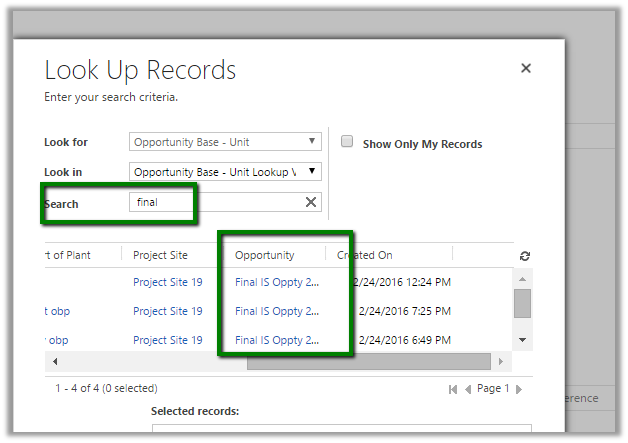
Recently we had a requirement to search based on a particular attribute within the lookup view. The initial thought was to add a Find Columns to the lookup view. But then realized we do not have option of adding Find Columns to the lookup view.

The next thought was if I add that particular field to the list of Find Columns in Quick Find view will it work in Lookup View also? And it worked, basically adding any fields in the Find Column will make it Searchable.

The search works properly in the Lookup View as well as Lookup Inline View.

Hope it helps..

Sample Fetch XML Report using Multivalued Parameter (in Operator) in CRM


Hi,

Sharing a sample report which shows the usage of Multi Value parameter in filter.

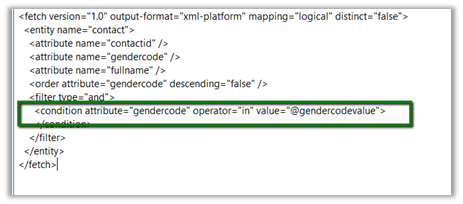
Replace the Condition generated in the Fetch xml query using Advanced Find

As following

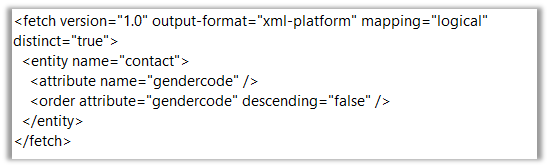
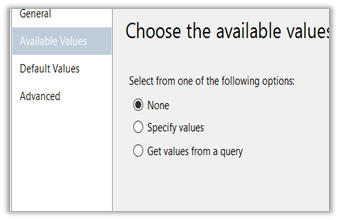
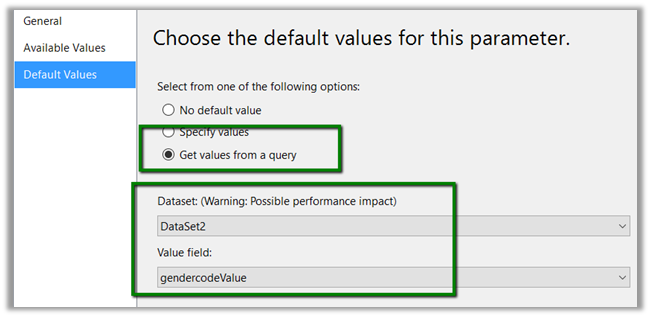
Create another DataSet to provide value for @gendercodevalue parameter.

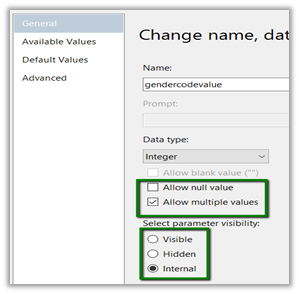
Set @gendercodevalue parameter as following ( internal – if we do not want user to select or specify value for it in report)

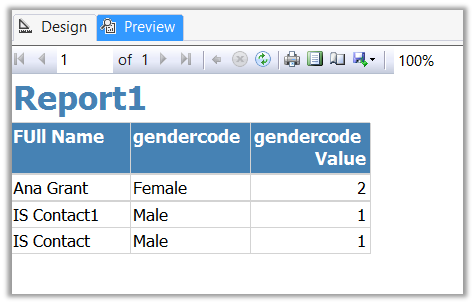
Preview:

Hope it helps..

Advertisements

Missing New button in Quote Line entity for creating new views in CRM 2015.


Hi,

We found the New button was missing in Quote Line when we tried to creating the new views.

The work around is to use “Save As” and crate new view.

Hope it helps..