We can get the ‘get_code’ error if we are using Assign Step in Action/Workflow and the value is null for the field selected.
Here we need to use If condition to check if the value exist for that particular field before using Assign Step.

We can get the ‘get_code’ error if we are using Assign Step in Action/Workflow and the value is null for the field selected.
Here we need to use If condition to check if the value exist for that particular field before using Assign Step.

Sample code: Using jqGrid in ASP.NET page to show CRM data
Just sharing a simple ASP.NET page that uses jqGrid to show contact records in CRM and allows user to search.

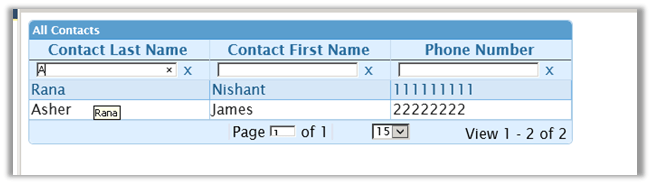
Here is the code SampleJQGrid.zip (remove .doc)
Hope it helps ..

Hi,
We were writing a LINQ query to get the contract record information by passing in the lawyer name. The lawyer is a lookup in the contract record.
So we were using contract.lawyerid.Name field of lookup in our where condition.
However we got the below error while doing so..

It seems like the LINQ Implementation for CRM doesn’t correctly interpret the lookup field’s name if we are using it in the where clause.
The solution was to do a join between the entities and then use the where condition against the lawyer entity username field itself.

Hope it helps..

Hi,
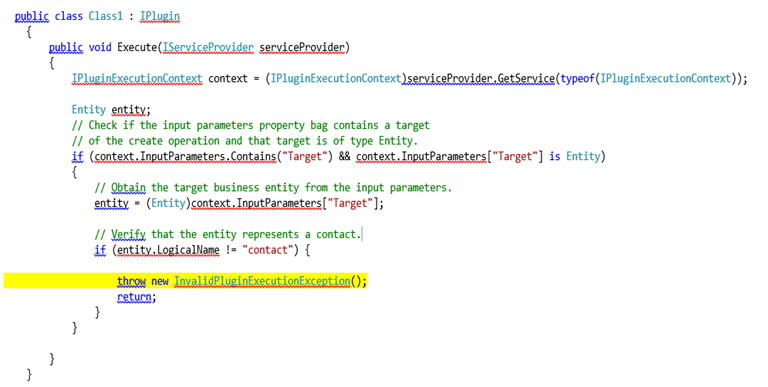
Let us take a simple plugin to understand the debugging process. We need the profile which we will use for debugging.
Register the plugin (debug version) and corresponding step using plugin registration tool.
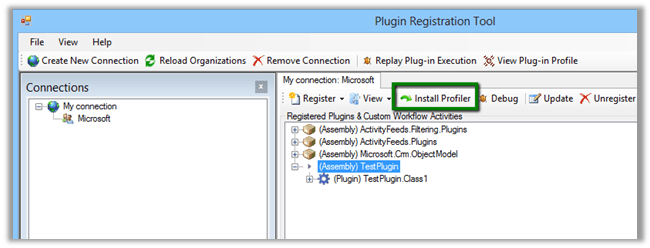
Select Install Profiler in Plugin Registration tool and wait till the installation is complete.
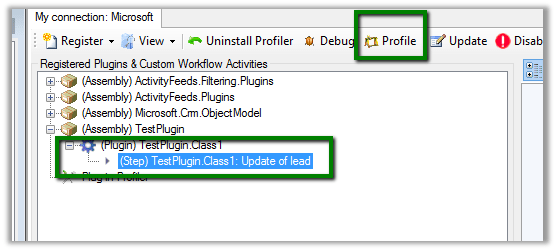
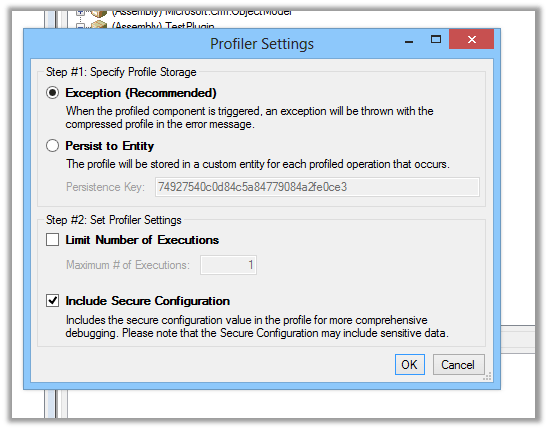
Select the Step in Plugin and Click Profile in the tool
Select Ok in the dialog box
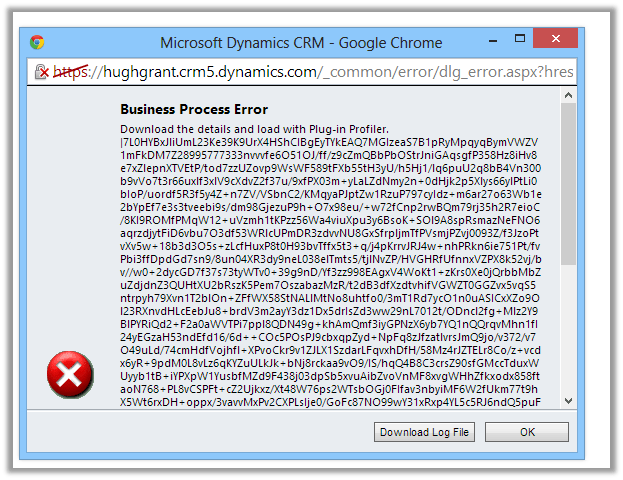
Open CRM and perform the step that will run the plugin.
Download the log file.
Open Visual Studio and attach debugger to PluginRegistrationTool.exe
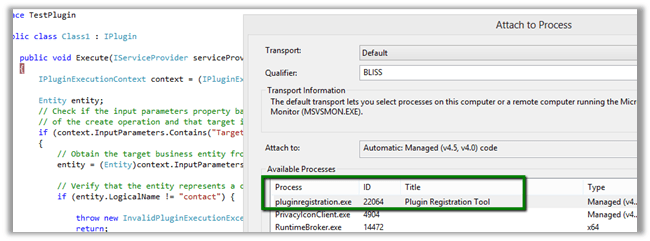
Go back to Plugin Registration tool, select the step and select Debug from the tool bar.

Specfiy the log file in the Profile location and plugin assembly that is in debug folder.
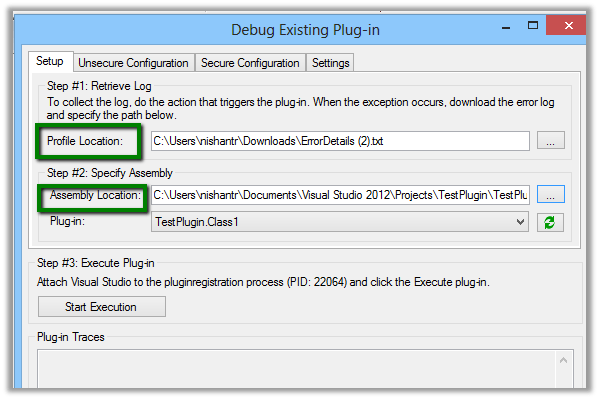
Click on Start Execution to start debugging
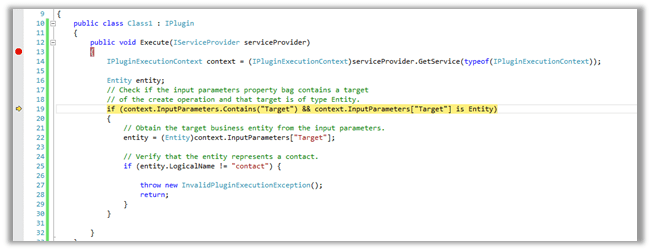
Hope it helps.

Hi,
Just sharing a sample code that retrieves optionset data from CRM and also sorts it. We are using it to bind drop down in one of our custom SharePoint Application Page.
/// <summary>
/// The get global option sets.
/// </summary>
/// <param name="config">
/// The config.
/// </param>
/// <param name="globalOptionSetName">
/// The _global option set name.
/// </param>
/// <returns>
/// The <see cref="List"/>.
/// </returns>
public static List<XrmOptionSet> GetGlobalOptionSets(IOrganizationService config, string globalOptionSetName)
{
using (
XrmServiceContext context = SDKHelper.GetXrmServiceContext(
config.OrganizationServiceUrl,
config.Credentials))
{
RetrieveOptionSetRequest retrieveOptionSetRequest = new RetrieveOptionSetRequest
{
Name =
globalOptionSetName
};
// Execute the request.
RetrieveOptionSetResponse retrieveOptionSetResponse =
(RetrieveOptionSetResponse)context.Execute(retrieveOptionSetRequest);
OptionSetMetadata retrievedOptionSetMetadata =
(OptionSetMetadata)retrieveOptionSetResponse.OptionSetMetadata;
OptionMetadata[] optionList = retrievedOptionSetMetadata.Options.ToArray();
List<XrmOptionSet> optionSetItems = new List<XrmOptionSet>();
// Add each item in OptionMetadata array to the ListItemCollection object.
foreach (OptionMetadata o in optionList)
{
XrmOptionSet xrmOptionSet = new XrmOptionSet();
xrmOptionSet.Label = o.Label.LocalizedLabels[0].Label;
xrmOptionSet.Value = o.Value.Value.ToString(CultureInfo.InvariantCulture);
optionSetItems.Add(xrmOptionSet);
}
optionSetItems.Sort(
delegate(XrmOptionSet thisItem, XrmOptionSet otherItem)
{
return thisItem.Label.CompareTo(otherItem.Label);
});
return optionSetItems;
}
}
/// <summary>
/// The get local option sets.
/// </summary>
/// <param name="config">
/// The config.
/// </param>
/// <param name="entityName">
/// The entity name.
/// </param>
/// <param name="optionSetAttributeName">
/// The option set attribute name.
/// </param>
/// <returns>
/// The <see cref="List"/>.
/// </returns>
public static List<XrmOptionSet> GetLocalOptionSets(
IOrganizationService config,
string entityName,
string optionSetAttributeName)
{
using (
XrmServiceContext context = SDKHelper.GetXrmServiceContext(
config.OrganizationServiceUrl,
config.Credentials))
{
// Create the Attribute Request.
RetrieveAttributeRequest retrieveAttributeRequest = new RetrieveAttributeRequest
{
EntityLogicalName =
entityName,
LogicalName =
optionSetAttributeName,
RetrieveAsIfPublished
= true
};
// Get the Response and MetaData. Then convert to Option MetaData Array.
RetrieveAttributeResponse retrieveAttributeResponse =
(RetrieveAttributeResponse)context.Execute(retrieveAttributeRequest);
PicklistAttributeMetadata retrievedPicklistAttributeMetadata =
(PicklistAttributeMetadata)retrieveAttributeResponse.AttributeMetadata;
OptionMetadata[] optionList = retrievedPicklistAttributeMetadata.OptionSet.Options.ToArray();
List<XrmOptionSet> optionSetItems = new List<XrmOptionSet>();
// Add each item in OptionMetadata array to the ListItemCollection object.
foreach (OptionMetadata o in optionList)
{
XrmOptionSet xrmOptionSet = new XrmOptionSet();
xrmOptionSet.Label = o.Label.LocalizedLabels[0].Label;
xrmOptionSet.Value = o.Value.Value.ToString(CultureInfo.InvariantCulture);
optionSetItems.Add(xrmOptionSet);
}
optionSetItems.Sort(
delegate(XrmOptionSet thisItem, XrmOptionSet otherItem)
{
return thisItem.Label.CompareTo(otherItem.Label);
});
return optionSetItems;
}
}
}
Hope it helps.


 Nishant Rana's Weblog