Import Solution progress bar rolls back without any error in CRM 2015\CRM 2013 Online.


Hi,

Occasionally while importing the solution to our UAT environment we have faced this issue where the solution hasn’t imported, didn’t give any error but has rolled back.

This issue seems to be occurring when we are facing Network Issues and Internet connection intermittently goes down.

Trying it again once the network is stable resolves this.

Hope it helps..

Unit Testing (Microsoft Fakes) RetrieveSharedPrincipalsAndAccessResponse in Plugin in CRM 2016 (and earlier)


Hi,

While trying to write Fakes for RetrieveSharedPrincipalsAndAccessResponse we’d realize that PrincipalAccess is read only property and the class itself is sealed.
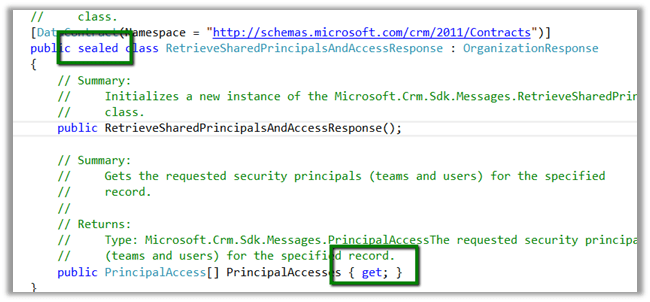
So to unit test it we need to write a wrapper class as suggested here

http://alexanderdevelopment.net/post/2013/10/17/unit-testing-custom-microsoft-dynamics-crm-code-part-4/

The wrapper class


/// <summary>
/// Wrapper class for retrieve response
/// </summary>
[DataContract(Namespace = "http://schemas.microsoft.com/xrm/2011/Contracts")]
public class RetrieveSharedPrincipalsAndAccessResponseWrapper : OrganizationResponse
{
/// <summary>
/// The _entity
/// </summary>
private PrincipalAccess[] _principalaccess;

/// <summary>
/// Initializes a new instance of the <see cref="RetrieveResponseWrapper"/> class.
/// </summary>
/// <param name="response">The response.</param>
public RetrieveSharedPrincipalsAndAccessResponseWrapper(OrganizationResponse response)
{
try
{
this.PrincipalAccesses = ((RetrieveSharedPrincipalsAndAccessResponseWrapper)response).PrincipalAccesses;
}
catch
{
this.PrincipalAccesses = ((RetrieveSharedPrincipalsAndAccessResponse)response).PrincipalAccesses;
}
}

/// <summary>
/// Gets or sets the PrincipalAccesses.
/// </summary>
/// <value>
/// The entity.
/// </value>
public PrincipalAccess[] PrincipalAccesses
{
get
{
return _principalaccess;
}

set
{
_principalaccess = value;
}
}
}

The unit test


 organizationService.ExecuteOrganizationRequest = request =>
 { 
 RetrieveSharedPrincipalsAndAccessResponseWrapper retrieveResponseWrapper = new RetrieveSharedPrincipalsAndAccessResponseWrapper(new RetrieveSharedPrincipalsAndAccessResponse());
 PrincipalAccess[] principalAccess = new PrincipalAccess[1]; 
 PrincipalAccess pAccess = new PrincipalAccess();
 pAccess.AccessMask = AccessRights.CreateAccess;
 pAccess.Principal = new EntityReference("team", new Guid("9A69533A-2306-4DFC-9662-65ABFAB41348"));
 principalAccess[0] = pAccess;
 retrieveResponseWrapper.PrincipalAccesses = principalAccess; 
 return retrieveResponseWrapper;
 };


Change in the Plugin code using Wrapper instead of original class


 IOrganizationService orgService = serviceFactory.CreateOrganizationService(context.UserId);

 var accessRequest = new RetrieveSharedPrincipalsAndAccessRequest
 {
 Target = new EntityReference("projectsite", new Guid("CDF30DD5-C64E-4EF5-ABA6-C9715C10A07D"))
 };

 RetrieveSharedPrincipalsAndAccessResponseWrapper accessResponse = (new RetrieveSharedPrincipalsAndAccessResponseWrapper(orgService.Execute(accessRequest)));

Hope it helps

The type or namespace name ‘RSASignaturePadding’ does not exist in the namespace ‘System.Security.Cryptography’ (are you missing an assembly reference?) in Unit Test Project.


Was getting the below error while trying to build a unit test project (framework version 4.5.2) in VS 2012.

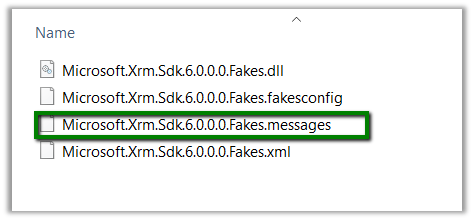
Delete the .messages file as suggested in some forums, but that didn’t help.

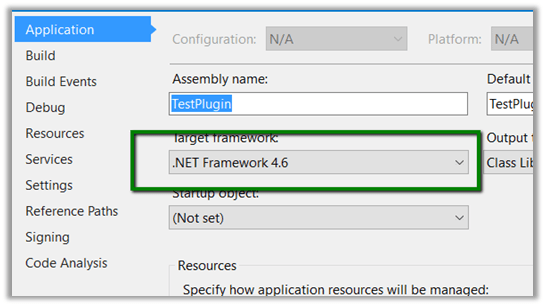
Just tried building the project by changing the Target Framework to 4.6.

That worked and after that on switching back the target version to 4.5.2 also worked.

Helpful post

https://social.msdn.microsoft.com/Forums/vstudio/en-US/2de45cd4-2744-4a91-91a2-785f305c1ef7/errors-on-trying-to-add-fakes-assembly-on-system?forum=vsunittest

Hope it helps..

Xrm.Utility.openEntityForm with Regarding field in CRM 2015.


Hi

We recently had a requirement to open new Task form on click of a ribbon button with Regarding field prefilled.

And as mentioned in the SDK, we can’t set the values for regarding lookups.

https://msdn.microsoft.com/en-us/library/gg334375.aspx#BKMK_SetLookupFieldValues

The workaround is to create custom parameters, set its value in JavaScript and use these values on the onLoad of the Form.

http://www.crmnerd.com/customizations/using-xrm.utility.openentityform-with-custom-parameters/

http://butenko.pro/2013/01/ms-crm-2011-open-new-activity-form-with-regarding-field-prefilled/#comment-134

Hope it helps..

Administration Mode Enabled. Only system administrators and system customizers can sign in at this time in CRM 2015 Online.


Hi,

After we copied our Dev instance to another Sandbox instance we got this message on opening CRM.

To disable it.

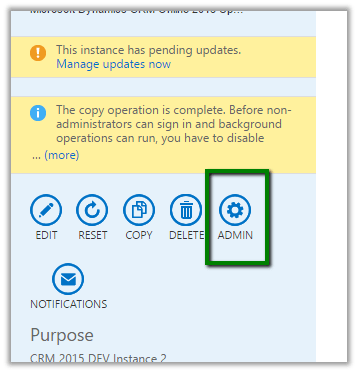
Go to Office 365 Administration Section

Select your sandbox instance.

Select Admin

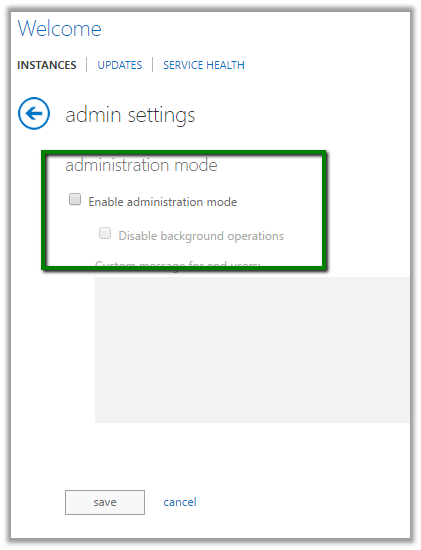
Uncheck Enable Administration Mode

Hope it helps.

DateTime fields in CRM 2015


Hi,

We recently had a requirement wherein we were working with DateTime fields in a Plugin. It was related to Time Zone.

These articles were of extreme help.

http://develop1.net/public/post/Dynamics-CRM-DateTimes-the-last-word.aspx

http://inogic.com/blog/2015/06/handling-datetime-fields-in-microsoft-dynamics-crm-update-1/

http://ttidbit.blogspot.com/2013/01/crm-timezone-codes.html

Sample Code to use LocalTimeFromUtcTimeRequest


var currentUserSettings = organizationProxy.RetrieveMultiple(
new QueryExpression("usersettings")
{
ColumnSet = new ColumnSet("timezonecode"),
Criteria = new FilterExpression
{
Conditions =
{
new ConditionExpression("systemuserid", ConditionOperator.EqualUserId)
}
}
}).Entities[0];

var timeZoneCode = currentUserSettings.Attributes["timezonecode"].ToString();

DateTime time1 = DateTime.UtcNow;

LocalTimeFromUtcTimeRequest convert = new LocalTimeFromUtcTimeRequest();
convert.UtcTime = time1.ToUniversalTime();
convert.TimeZoneCode = Convert.ToInt32(timeZoneCode);
LocalTimeFromUtcTimeResponse response = (LocalTimeFromUtcTimeResponse)organizationProxy.Execute(convert);
MessageBox.Show(response.LocalTime.ToString());


The interesting part was that our plugin was running under the context of System account, so to get the logged in user from UI, we added an additional field and populated the value of time zone in it on on load using current logged in user’s information, and used the same field in plugin.

Hope it helps..