Sample code to close a quote as won using WinQuoteRequest in CRM 2016 (and earlier)


Just sharing a sample code to close quote as won through C#


WinQuoteRequest winQuoteRequest = new WinQuoteRequest();
Entity quoteClose = new Entity("quoteclose");
quoteClose.Attributes["quoteid"] = new EntityReference("quote", new Guid("015816C2-2F10-E611-8112-3863BB353ED0"));
quoteClose.Attributes["subject"] = "Quote Close" + DateTime.Now.ToString();
winQuoteRequest.QuoteClose = quoteClose;
winQuoteRequest.Status = new OptionSetValue(-1);
organizationProxy.Execute(winQuoteRequest);

Hope it helps..

Set PartyList field To in Email in CRM 2015 (and earlier)


Sample code to set the PartyList field for Email Activity.


function setContact() {

var partlistData = new Array();
partlistData[0] = new Object();

// guid of the record
partlistData[0].id = "8B2AD82B-30D6-E511-811F-3863BB356F90";

// name of the record
partlistData[0].name = "Hugh Grant";

// entity schema name
partlistData[0].entityType = "contact";
Xrm.Page.getAttribute("to").setValue(partlistData)

}

Hope it helps..

The selected translations file is either invalid or does not conform to the required translations file schema error while importing translations in CRM 2015 (and earlier)


Hi,

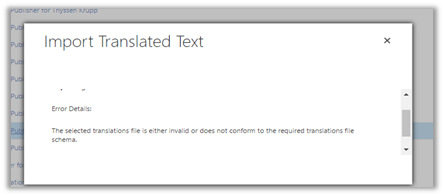
While importing translations we got the below error

On opening the CrmTranslations.xml we saw the translations missing for that row.

On specifying the values for those fields and importing it back fixed the issue.

Hope it helps..

Unit Testing (Microsoft Fakes) RetrieveSharedPrincipalsAndAccessResponse in Plugin in CRM 2016 (and earlier)


Hi,

While trying to write Fakes for RetrieveSharedPrincipalsAndAccessResponse we’d realize that PrincipalAccess is read only property and the class itself is sealed.
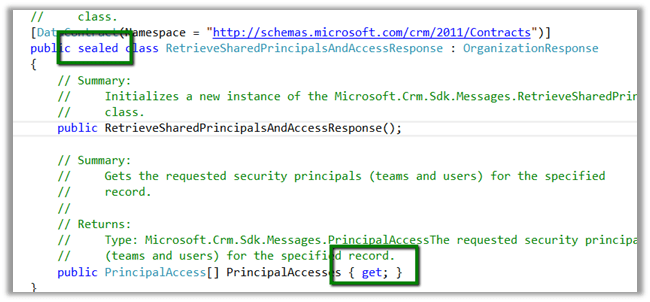
So to unit test it we need to write a wrapper class as suggested here

http://alexanderdevelopment.net/post/2013/10/17/unit-testing-custom-microsoft-dynamics-crm-code-part-4/

The wrapper class


/// <summary>
/// Wrapper class for retrieve response
/// </summary>
[DataContract(Namespace = "http://schemas.microsoft.com/xrm/2011/Contracts")]
public class RetrieveSharedPrincipalsAndAccessResponseWrapper : OrganizationResponse
{
/// <summary>
/// The _entity
/// </summary>
private PrincipalAccess[] _principalaccess;

/// <summary>
/// Initializes a new instance of the <see cref="RetrieveResponseWrapper"/> class.
/// </summary>
/// <param name="response">The response.</param>
public RetrieveSharedPrincipalsAndAccessResponseWrapper(OrganizationResponse response)
{
try
{
this.PrincipalAccesses = ((RetrieveSharedPrincipalsAndAccessResponseWrapper)response).PrincipalAccesses;
}
catch
{
this.PrincipalAccesses = ((RetrieveSharedPrincipalsAndAccessResponse)response).PrincipalAccesses;
}
}

/// <summary>
/// Gets or sets the PrincipalAccesses.
/// </summary>
/// <value>
/// The entity.
/// </value>
public PrincipalAccess[] PrincipalAccesses
{
get
{
return _principalaccess;
}

set
{
_principalaccess = value;
}
}
}

The unit test


 organizationService.ExecuteOrganizationRequest = request =>
 { 
 RetrieveSharedPrincipalsAndAccessResponseWrapper retrieveResponseWrapper = new RetrieveSharedPrincipalsAndAccessResponseWrapper(new RetrieveSharedPrincipalsAndAccessResponse());
 PrincipalAccess[] principalAccess = new PrincipalAccess[1]; 
 PrincipalAccess pAccess = new PrincipalAccess();
 pAccess.AccessMask = AccessRights.CreateAccess;
 pAccess.Principal = new EntityReference("team", new Guid("9A69533A-2306-4DFC-9662-65ABFAB41348"));
 principalAccess[0] = pAccess;
 retrieveResponseWrapper.PrincipalAccesses = principalAccess; 
 return retrieveResponseWrapper;
 };


Change in the Plugin code using Wrapper instead of original class


 IOrganizationService orgService = serviceFactory.CreateOrganizationService(context.UserId);

 var accessRequest = new RetrieveSharedPrincipalsAndAccessRequest
 {
 Target = new EntityReference("projectsite", new Guid("CDF30DD5-C64E-4EF5-ABA6-C9715C10A07D"))
 };

 RetrieveSharedPrincipalsAndAccessResponseWrapper accessResponse = (new RetrieveSharedPrincipalsAndAccessResponseWrapper(orgService.Execute(accessRequest)));

Hope it helps

The type or namespace name ‘RSASignaturePadding’ does not exist in the namespace ‘System.Security.Cryptography’ (are you missing an assembly reference?) in Unit Test Project.


Was getting the below error while trying to build a unit test project (framework version 4.5.2) in VS 2012.

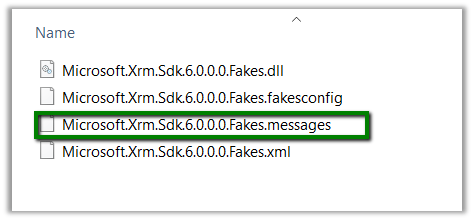
Delete the .messages file as suggested in some forums, but that didn’t help.

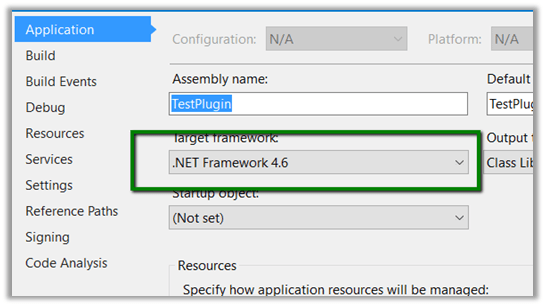
Just tried building the project by changing the Target Framework to 4.6.

That worked and after that on switching back the target version to 4.5.2 also worked.

Helpful post

https://social.msdn.microsoft.com/Forums/vstudio/en-US/2de45cd4-2744-4a91-91a2-785f305c1ef7/errors-on-trying-to-add-fakes-assembly-on-system?forum=vsunittest

Hope it helps..

Xrm.Utility.openEntityForm with Regarding field in CRM 2015.


Hi

We recently had a requirement to open new Task form on click of a ribbon button with Regarding field prefilled.

And as mentioned in the SDK, we can’t set the values for regarding lookups.

https://msdn.microsoft.com/en-us/library/gg334375.aspx#BKMK_SetLookupFieldValues

The workaround is to create custom parameters, set its value in JavaScript and use these values on the onLoad of the Form.

http://www.crmnerd.com/customizations/using-xrm.utility.openentityform-with-custom-parameters/

http://butenko.pro/2013/01/ms-crm-2011-open-new-activity-form-with-regarding-field-prefilled/#comment-134

Hope it helps..