Fix: Invalid ‘where’ condition. An entity member is invoking an invalid property or method while using LINQ in CRM 2013.


Hi,

We were writing a LINQ query to get the contract record information by passing in the lawyer name. The lawyer is a lookup in the contract record.

So we were using contract.lawyerid.Name field of lookup in our where condition.

However we got the below error while doing so..

 

It seems like the LINQ Implementation for CRM doesn’t correctly interpret the lookup field’s name if we are using it in the where clause.

The solution was to do a join between the entities and then use the where condition against the lawyer entity username field itself.

Hope it helps..

CRM 2013 Tool – CRM 2013 One Click Navigation


Fixes some of the navigation issues in CRM 2013..

Hosk's avatarHosk's Dynamic Blog

Gather round children Uncle Ben is going to tell you a story.

Once upon a time Microsoft updated it’s CRM version from CRM 2011 to CRM 2013 and during this process removed the popular left hand navigation and replaced it with a better looking but much harder to use new navigation.  Highlights of the new navigation

Top menu disappearing just as  you try to go to it (this has been fixed a bit in the latest rollup because it stays there longer)

impossible to find Advanced find button

a smaller command bar with only room for 5 items (bumped up to 7 in the latest release)

To speed this story up,  Rockton Software commissioned a contest to see who could create the best solution to help the CRM 2013 navigation.   CRM MVP’s from all the land flocked round to battle it in a winner takes all ($5000 reward).  You…

View original post 340 more words

Serialize and Deserialize InfoPath form and extract the attachment using WebClient in C#


Hi,

Suppose this is our InfoPath form

First we will generate the class for the above InfoPath form

https://nishantrana.me/2014/07/13/generate-a-c-class-from-an-infopath-form/

The sample code


myFields invoice = null;
WebClient webclient = new WebClient();
webclient.UseDefaultCredentials = true;

using (Stream fileStream = webclient.OpenRead("http://server:5000/formlibrary/FirstForm.xml?NoRedirect=true"))
{
if (fileStream != null)
{
XmlTextReader reader = new XmlTextReader(fileStream);

reader.Read();
reader.MoveToContent();

XmlSerializer xser = new XmlSerializer(typeof(myFields));
myFields invoiceInfopath = (myFields)xser.Deserialize(reader);
byte[] b = invoiceInfopath.field2;

// filename
int nameBufferLen = b[20] * 2;
byte[] fileNameBufffer = new Byte[nameBufferLen];

for (int i = 0; i < nameBufferLen; i++)
{
fileNameBufffer[i] = b[24 + i];
}

char[] charFileName = UnicodeEncoding.Unicode.GetChars(fileNameBufffer);
string fileName = new string(charFileName);
fileName = fileName.Substring(0, fileName.Length - 1);

// attchment
byte[] fileContent = new byte[b.Length - (24 + nameBufferLen)];

for (int i = 0; i < fileContent.Length; i++)
{
fileContent[i] = b[24 + nameBufferLen + i];
}

FileStream fs = new FileStream(@"C:\test\" + fileName, FileMode.Create);
fs.Write(fileContent, 0, fileContent.Length);
fs.Close();
}

Hope it helps.

How to Read the InfoPath content and extract the attachment using XMLDocument in C#


The InfoPath form:-

The namespace and the field1 that is node that contains the attachment

Sample Code:


XmlDocument myDoc = new XmlDocument();
myDoc.Load(@"C:\test\form.xml");

// specify the name space
XmlNamespaceManager ns = new XmlNamespaceManager(myDoc.NameTable);
ns.AddNamespace("my", "http://schemas.microsoft.com/office/infopath/2003/myXSD/2014-07-12T15:29:09");

// the node that contains the attachment
XmlNodeList nl = myDoc.SelectNodes("/my:myFields/my:group1/my:group2/my:field1", ns);
foreach (XmlNode n in nl)
{
string s = n.InnerText;
byte[] b = Convert.FromBase64String(s);
int nameBufferLen = b[20] * 2;

// file name buffer to get the filename with extension
byte[] fileNameBufffer = new Byte[nameBufferLen];

for (int i = 0; i < nameBufferLen; i++)
{
fileNameBufffer[i] = b[24 + i];
}
char[] charFileName = UnicodeEncoding.Unicode.GetChars(fileNameBufffer);
string fileName = new string(charFileName);
fileName = fileName.Substring(0, fileName.Length - 1);

// byte array for the remaining content
byte[] fileContent = new byte[b.Length - (24 + nameBufferLen)];

for (int i = 0; i < fileContent.Length; i++)
{
fileContent[i] = b[24 + nameBufferLen + i];
}

FileStream fs = new FileStream(@"C:\test\" + fileName, FileMode.Create);
fs.Write(fileContent, 0, fileContent.Length);
fs.Close();

}

Hope it helps..


Generate a C# class from an InfoPath form


To generate a C# class from change the extension to .cab from .xsn.

Open and copy the content of cab file to a separate folder

Open the Visual Studio Developer Command Prompt and run the XSD.exe to generate the class


Hope it helps…

Sample HttpModule for CRM 2013 on premise.


Suppose we have to redirect user belonging to a specific group to some specific page, while they try to access CRM 2013.

For this we can implement an HttpModule

Sample code


public class Class1 : IHttpModule
{
public void Dispose()
{

}
public delegate void MyEventHandler(Object s, EventArgs e);
private MyEventHandler _eventHandler = null;

public event MyEventHandler MyEvent
{
add { _eventHandler += value; }
remove { _eventHandler -= value; }
}
public void Init(HttpApplication context)
{
context.AuthenticateRequest += new EventHandler(ContextOnAuthenticateRequest);
}

private void ContextOnAuthenticateRequest(object sender, EventArgs eventArgs)
{
HttpApplication app = sender as HttpApplication;
HttpContext context = app.Context;

// if the user belongs to adminsitrators role or reporting group
// redirect the user to bing.com
if (context.User.IsInRole(@"BUILTIN\Administrators") &&
context.User.IsInRole(@"LSS\ReportingGroup {0993772e-cfb6-47ba-8b88-2129bfc97f89}"))
{
app.Context.Response.Redirect("http://www.bing.com");
}

if (_eventHandler != null)
_eventHandler(this, null);
}
}


Put the dll in the bin of the CRMWeb

..\Microsoft Dynamics CRM\CRMWeb\bin

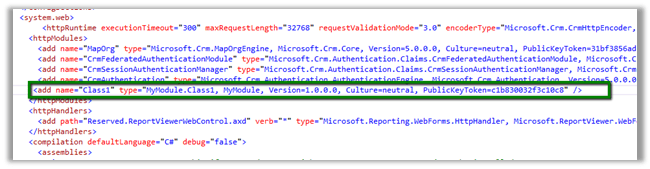
And register the http module in the web.config

(use sn –T MyModule.dll to get the public key token)

Moreover this can be implemented using URLRewrite as it runs before the authentication so we wont be able to get the username

http://www.iis.net/downloads/microsoft/url-rewrite

Hope it helps


Nishant Rana's Weblog

Everything related to Microsoft .NET Technology

Skip to content ↓