Form now showing up properly after solution import in Dynamics 365.


Recently after moving our solution from dev to test, we saw that one of our lead forms was not showing up properly.

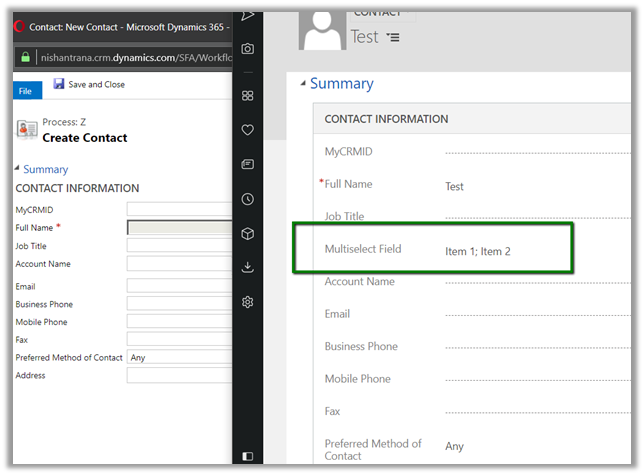
As we can see below, the contact section is missing and the Social Pane instead of being in center is left aligned below the Summary tab label.

The fix for this was to enable the Bing Map from the System Settings in the Test.

The same record in our test, after enabling the Bing Map.

Hope it helps..

Sample Code to bulk update the record using ExecuteMultiple in Dynamics 365


Sharing a sample code that can be used ExecuteMultiple to bulk update the records.


private void MyForm_Load(object sender, EventArgs e)
{

var orgProxy = GetOrgProxy();

// place your fetch xml code to retrieve the records to be updated
var fetchXML = @"FetchXMLQuery";

var multipleRequest = new ExecuteMultipleRequest()
{
// Assign settings that define execution behavior: continue on error, return responses.
Settings = new ExecuteMultipleSettings()
{
ContinueOnError = true,
ReturnResponses = true
},
// Create an empty organization request collection.
Requests = new OrganizationRequestCollection()
};

// get all the records > 5000
var totalRecords = GetTotalRecordsFetchXML(orgProxy, fetchXML);

// split the lst of entity to child list
// specify the size of the batch i.e. 500 here
var lstlstEntity = SplitList(totalRecords, 500);

// loop through each of the list and create the request and add it to Execute Multiple Request
foreach(var lstEntity in lstlstEntity)
{
multipleRequest.Requests.Clear();
foreach (var entity in lstEntity)
{
UpdateRequest createRequest = new UpdateRequest { Target = entity };
// add the field to be updated
entity.Attributes["sab_referencenumber"] = "1000";
multipleRequest.Requests.Add(createRequest);
}

ExecuteMultipleResponse multipleResponse = (ExecuteMultipleResponse)orgProxy.Execute(multipleRequest);
}
}

/// <summary>
/// Function to split the list into child list
/// </summary>
/// <param name="locations"></param>
/// <param name="nSize"></param>
/// <returns></returns>
public static List<List<Entity>> SplitList(List<Entity> locations, int nSize = 30)
{
var list = new List<List<Entity>>();
for (int i = 0; i < locations.Count; i += nSize)
{
list.Add(locations.GetRange(i, Math.Min(nSize, locations.Count - i)));
}
return list;
}


private static List<Entity> GetTotalRecordsFetchXML(OrganizationServiceProxy orgProxy, string fetchXML)
{
XDocument xDocument = XDocument.Parse(fetchXML);
var fetchXmlEntity = xDocument.Root.Element("entity").ToString();

EntityCollection entityColl = new EntityCollection();
List<Entity> lstEntity = new List<Entity>();
int page = 1;
do
{
entityColl = orgProxy.RetrieveMultiple(new FetchExpression(
string.Format("<fetch version='1.0' page='{1}' paging-cookie='{0}'>" + fetchXmlEntity + "</fetch>",
SecurityElement.Escape(entityColl.PagingCookie), page++)));

lstEntity.AddRange(entityColl.Entities);
}
while (entityColl.MoreRecords);

return lstEntity;
}


// Get service instance
public static OrganizationServiceProxy GetOrgProxy()
{
IServiceManagement<IOrganizationService> orgServiceManagement =
ServiceConfigurationFactory.CreateManagement<IOrganizationService>(new Uri("https://orgname.crm4.dynamics.com/XRMServices/2011/Organization.svc"));

AuthenticationCredentials authCredentials = new AuthenticationCredentials();
authCredentials.ClientCredentials.UserName.UserName = "username";
authCredentials.ClientCredentials.UserName.Password = "password";
AuthenticationCredentials tokenCredentials = orgServiceManagement.Authenticate(authCredentials);

return new OrganizationServiceProxy(orgServiceManagement, tokenCredentials.SecurityTokenResponse);

}

Hope it helps..


Solved – System.ArgumentNullException: Value cannot be null.Parameter name: SandboxAppDomainHelper.Execute: The plug-in type could not be found in the plug-in assembly in Dynamics 365


We got the below error while in one of our plugin assemblies. 

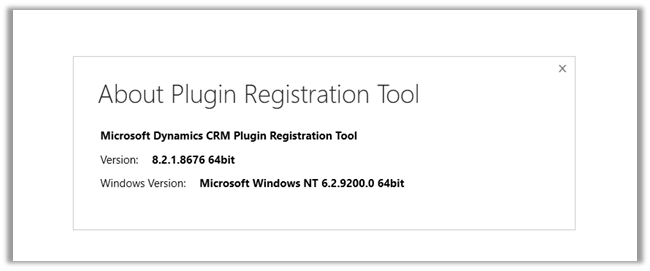
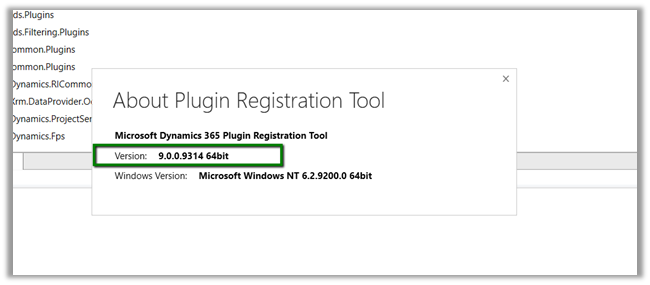
As it turned out we were referencing the latest, version 9 Dynamics 365 assemblies in our plugin project, against our Dynamics 365 Environment which was still in version 8.2.

Adding the appropriate NuGet Package (i.e. 8.2.0.0) fixed the issue for us.

The helpful post

http://blogs.it.ox.ac.uk/benwalker/2017/09/12/system-io-fileloadexception-error-in-plugin-deployed-by-crm-developer-toolkit-to-dynamics-2015/

Hope it helps..

Advertisements

Microsoft.Crm.CrmException: GetAssemblyMetadata: expected mdtAssemblyRef or mdtAssembly while registering plugin assembly in Dynamics 365


While registering a plugin assembly through plugin registration tool we got the below error

The reason being we were using MSBuild.ILMerge.Task Nuget package and there were few assemblies being referenced in the plugin project that had copy local set as true.

https://nishantrana.me/2017/05/17/using-ilmerge-for-plugin-in-crm/

So eventually the single plugin assembly that was getting build had these assemblies also being merged in it, which led to the above error.

Setting Copy Local as False for those assemblies fixed the issue.

Hope it helps.

{Quick Fix} Qualify button on Lead not working in Dynamics 365


Debajit's avatarDebajit's Dynamic CRM Blog

I have been working with Customer IT Team on a Dynamics 365 project and we have been doing kind of fancy stuffs, new features and what not. And suddenly we are being reported that Qualify button on lead form is not working. However the same is working from the “Home Page grid”.

First glance and I thought – Must be some silly tampering with the Qualify button. However one quick inspection with Ribbon Workbench negated that suspicion. How can such a stuff working for years can’t work all of a sudden in our environment? Product Bug? Can’t be for sure. It’s been working for years!

After beating around the bush, we finally decided to keep a back-up of our customizations and restored vanilla lead form from different environment. Qualify button started working like piece of cake.

In curiosity, to find out what caused the issue, I started removing one field…

View original post 76 more words

TFS vs. Git…or is it TFS with Git?


Good read on – Git and TFVC

Johan Leino's avatarJohan Leino

Maybe you ended up on this post because you searched for ‘Git vs. TFS’. I hope so.
I have seen some debate going on for some time now in twitter about Git versus TFS (here are some examples):

image

If that’s the case I think you’re looking at it from the wrong angle, so to say. It really a matter of centralized vs. distributed version control.
Here’s how Microsoft actually explains it when you choose version control while creating a new project in Team Foundation Service:

image

Team Foundation Version Control (TFVC) uses a single, centralized server repository to track and version files. Local changes are always checked in to the central server where other developers can get the latest changes.

Git is a Distributed Version Control System (DVCS) that uses a local repository to track and version files. Changes are shared with other developers by pushing and pulling changes through…

View original post 1,731 more words