CRM Online to SharePoint Online Integration using REST and ADFS


Validating Input Parameters in SSRS


We recently developed a report which had Days Input Parameter in it. Now the requirement was if the user enters any thing other then number (integer) over there they should get the appropriate error message.

Here if we define the Days parameter of type Integer and if we enter say for e.g. value = ‘x’ over there
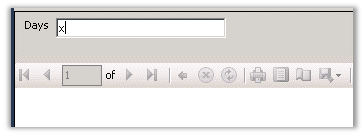
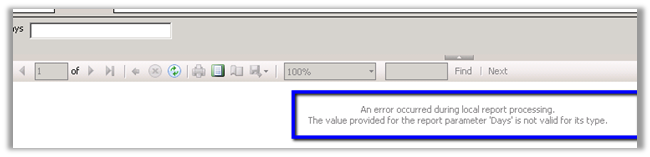
We will get the following error message.
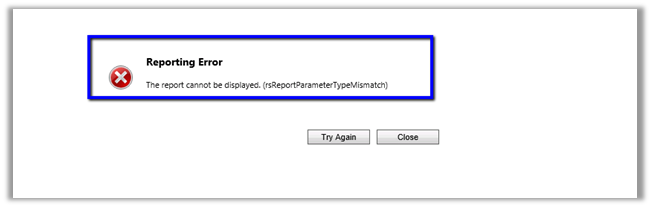
And if we upload the same report in the CRM, we will get the following error message, which doesn’t seem that user friendly.
Now to display proper error message to the end user we can take the following approach.

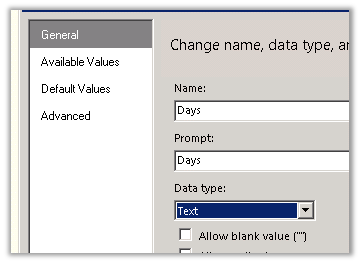
Change the parameter type to Text first. (From integer type)
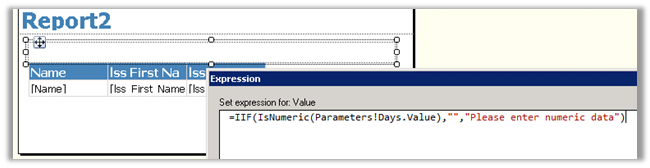
Add a text box to report to show the error message, have following expression. If the value entered for Days parameter is not of numeric type display error message.
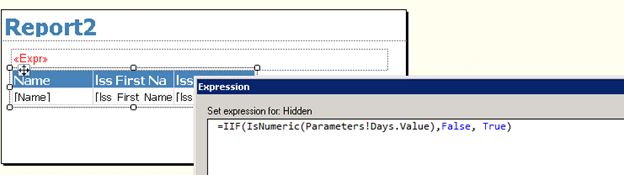
To hide the table if the Days field is not numeric, set the Hidden property with the following expression. If the Days parameter value is not numeric then hide the table.
And the following change in the DataSet’s query

Original Query

SELECT
Name, lss_First_Name, lss_Last_Name

FROM
Account

WHERE (DATEDIFF(day,CreatedOn,GETDATE())@Days)

New Query

If Days is not a numeric field then then modified select query to retrieve blank data from the table (using createdon field null criteria here in our case)

DECLARE
@SQL
Nvarchar(1000)

IF  ISNUMERIC(@Days)= 1 BEGIN

SET
@SQL ‘SELECT Name, lss_First_Name, lss_Last_Name FROM Account WHERE (DATEDIFF(day, CreatedOn, GETDATE())) >’+Convert(nvarchar,@Days)+

End

Else

Begin

SET @SQL=‘SELECT Name, lss_First_Name, lss_Last_Name FROM Account WHERE createdon=Null’

End

exec(@SQL)

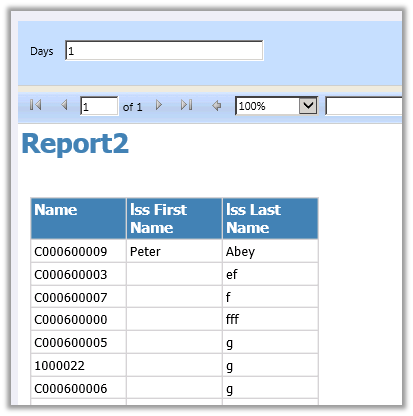
The report with proper Days value for e.g. 1
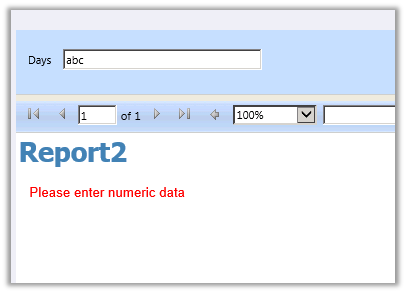
If entered incorrect Days value for e.g. abc
Helpful post

http://geekswithblogs.net/Compudicted/archive/2012/08/14/validate-ssrs-report-input-parameters-the-proper-way.aspx

Hope it helps.

Unit Test RetrieveAttributeResponse in CRM using Microsoft Fakes.


Hi,

Recently we wrote a plugin that was using RetrieveAttribute class to get the label as well as value of the optionset field.

The issue that we faced over here is that the AttributeMetadata property of RetrieveAttributeResponse is read only, we cannot set it. The following post provided the solution i.e. writing a wrapper class over the RetrieveAttributeResponse

http://www.alexanderdevelopment.net/post/2013/01/13/How-to-unit-test-C-Dynamics-CRM-interface-code-part-III


organizationService.ExecuteOrganizationRequest = request =>
 {
 var retrievedPicklistAttributeMetadata = new PicklistAttributeMetadata();

if (request.Parameters["LogicalName"].ToString() == "lss_service_request_status")
 {
 var optionMetadata = new OptionMetadata(new Label("Closed", 1033), 10);
 optionMetadata.Label.UserLocalizedLabel = new LocalizedLabel("Closed", 1033);
 optionMetadata.Label.UserLocalizedLabel.Label = "Closed";

var serviceRequestTypeOptionSet = new OptionSetMetadata
 {
 Name = "lss_service_request_status",
 DisplayName = new Label("Service Request Status", 1033),
 IsGlobal = false,
 OptionSetType = OptionSetType.Picklist,
 Options = { optionMetadata }
 };

retrievedPicklistAttributeMetadata.OptionSet = serviceRequestTypeOptionSet;
 }

var retrAttResponse = new RetrieveAttributeResponseWrapper(new RetrieveAttributeResponse());
 retrAttResponse.AttributeMetadata = retrievedPicklistAttributeMetadata;
 return retrAttResponse;
 };

Hope it helps!


2013 in review


The WordPress.com stats helper monkeys prepared a 2013 annual report for this blog.

Here’s an excerpt:

The Louvre Museum has 8.5 million visitors per year. This blog was viewed about 300,000 times in 2013. If it were an exhibit at the Louvre Museum, it would take about 13 days for that many people to see it.

Click here to see the complete report.

Microsoft Fakes and WebChannelFactory (Unit Test for WCF Service)


Hi,

Recently we wrote a plugin assembly that was calling a rest service using WebChannelFactory.


// wcf interface

[ServiceContract]

public interface IAutoNumber
 {
 /// <summary>
 /// Gets the next number.
 /// </summary>
 /// <param name="value">The value.</param>
 /// <returns>the next incremental value</returns>
 [WebGet(UriTemplate = "getsequencenumber/{value}")]
 [OperationContract]
 string GetNextNumber(string value);
 }

// plugin code

using (
 var webChannelFactory =
 new WebChannelFactory<IAutoNumber>(
 new Uri(dictionaryConfigSettings[Constants.AutoNumberServiceUrl])))
 {
 IAutoNumber client = webChannelFactory.CreateChannel();
 // get the next number from sequence
 autoNumber = Constants.PrefixClient +
 AddPadding(client.GetNextNumber(Constants.EntityNameClient),
 Constants.PrefixClientLength);

if (entity.Attributes.Contains("name"))
 {
 // add the value to the name property bag input parameter for the client record being created
 entity.Attributes["name"] = autoNumber;
 }
 else
 {
 entity.Attributes.Add("name", autoNumber);
 }
 }

Next we had to write the unit test case for the plugin using Microsoft Fakes. 
Below is the code that we used
</span></pre>
using (ShimsContext.Create())
 {
 ShimChannelFactory<IAutoNumber>.Constructor = factory => { };
 IAutoNumber autoNumber = new StubIAutoNumber
 {
 GetNextNumberString = s => { return "12345"; }
 };
 ShimChannelFactory<IAutoNumber>.AllInstances.CreateChannel = factory => { return autoNumber; };
 var preClientCreate = new PreClientCreate();
 preClientCreate.Execute(serviceProvider);
 }

Hope it helps.

Cannot make a call on this channel because a call to Open() is in progress error in CRM 2011.


Hi,

We had developed a Visual Web Part for SharePoint 2013 that used IOrganizationService of CRM 2011. It was all working fine however yesterday it started throwing this error.

After some investigation we realized that the user whose credentials we were using as Client Credentials for the OrganizationService had recently been changed.

Updating it to the correct updated one fixed the issue for us.

Hope it helps.