I recently wrote a LINQ using joins, all seemed fine, but was still getting the attributeName exception. Finally this post came to rescue.
Hope it helps.

I recently wrote a LINQ using joins, all seemed fine, but was still getting the attributeName exception. Finally this post came to rescue.
Hope it helps.

Hi,
I was very happy to receive the eBook of Microsoft Dynamic CRM 2013 Marketing Automation (Packt Publishing by Alok Singh and Sandeep Chanda) for review few days back.

It a mini guide focusing on the Marketing Module of CRM 2013, with around 100 pages divided into 6 chapters. It starts by explaining the challenges faced in marketing and how CRM 2013 can address those challenges. It then explains in detail various feature available in Microsoft Dynamics CRM 2013 that can be leveraged to successful implement the marketing module.It also talks about two of the most popular third party marketplace solution available for marketing module of CRM i.e. ClickDimensions and CoreMotives.
The book is very informative and clearly explains everything that there is in Marketing Module of CRM 2013. The authors are expert and we can clearly see their authority in the subject.
It a must read guide for all the CRM professionals.
Grab your copy here
Bye.

This question has popped up in the forums now and again so I thought I would write a blog post on it.
The solution on how to do this is simple, once you know where to look and how it works. I can understand why some people struggle to find the answer to the question of setting a date field to the current date and time because you don’t see it mentioned very often and it isn’t obvious.
To set the a Date Time value in CRM to a when the workflow was run you can use the dynamic value
Process
Execution Time
This basically does what is says on the tin and sets a Date time value to Execution time of the workflow.

Open up your workflow and choose the Update, select Account entity
To set a field
Select the field and in the example above, I clicked into…
View original post 67 more words

Hi,
We recently developed a Visual Web Part which was using OrganizationService to interact with CRM.

We were initially using Network Credentials for OrganizationService and were setting appropriate username, password and domain. Later we changed it to Default Credentials and set the AppPool identity of the SharePoint portal’s app pool to a CRM User with appropriate access. It was then we started getting this error.
The reason was SharePoint web configuration settings has Identity Impersonation set as true.
If impersonation is set as true, then IIS uses the ‘NT AUTHORITY\IUSR’ but if disabled IIS will run under whatever account been set in the identity pool.
So one way of fixing the issue was setting impersonation as false.
Hope it helps.

I started SharePoint 2013 development recently. Initially, I only got dual core CPU and 4 GB RAM and as you probably know, it runs very slow. I’m not curious about it cause I expect the performance when you install SharePoint 2013 with less than minimum recommended hardware specification.
Issue
Then .. I fed up with it and upgrade the RAM to 8 GB, but funny things my development box is still runs very slow. I looked into my task manager and found something like below. Several NodeRunner.exe processes consume lots of Memory and CPU.
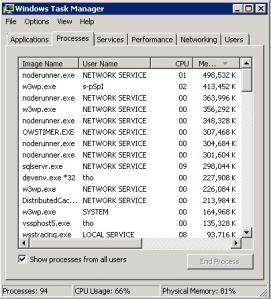
Solution
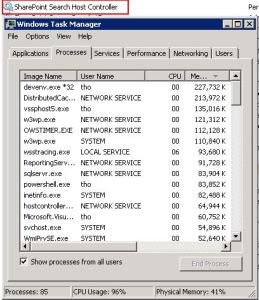
NOTE: I’ve…
View original post 52 more words

Hi,
I was getting the following exception while trying to get the text for an option set field named area of law in linq.
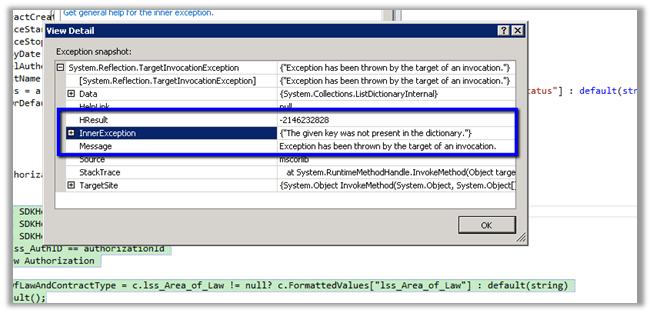
The query with joins
var authorization = (from a in
SDKHelper.XrmServiceContext.lss_AuthorizationSet join c in SDKHelper.XrmServiceContext.lss_contractSet on a.lss_ContractId.Id equals c.Id
join l in
SDKHelper.XrmServiceContext.lss_lawyerSet on c.lss_LawyerId.Id equals l.Id
where a.lss_AuthID == authorizationId
select
new
Authorization{
AreaOfLawAndContractType = c.lss_Area_of_Law != null? c.FormattedValues[“lss_area_of_law”] : default(string)
}).FirstOrDefault();
return authorization;
The fix was instead of using FormattedValues collection of related entity in join, we need to use the FormattedValues collection of the primary entity.
var authorization = (from a in
SDKHelper.XrmServiceContext.lss_AuthorizationSet
join c in
SDKHelper.XrmServiceContext.lss_contractSet on a.lss_ContractId.Id equals c.Id
join l in
SDKHelper.XrmServiceContext.lss_lawyerSet on c.lss_LawyerId.Id equals l.Id
where a.lss_AuthID == authorizationId
select
new
Authorization
{
AreaOfLawAndContractType = c.lss_Area_of_Law != null? a.FormattedValues[“lss_area_of_law”] : default(string)
}).FirstOrDefault();
return authorization;
Hope it helps.


 Nishant Rana's Weblog