
With this new update in Power Automate, it’s now easier for us to find and use the actions and connectors we need. We can also quickly access tools and AI features while building flows. This helps save time and makes the flow-building experience smoother.
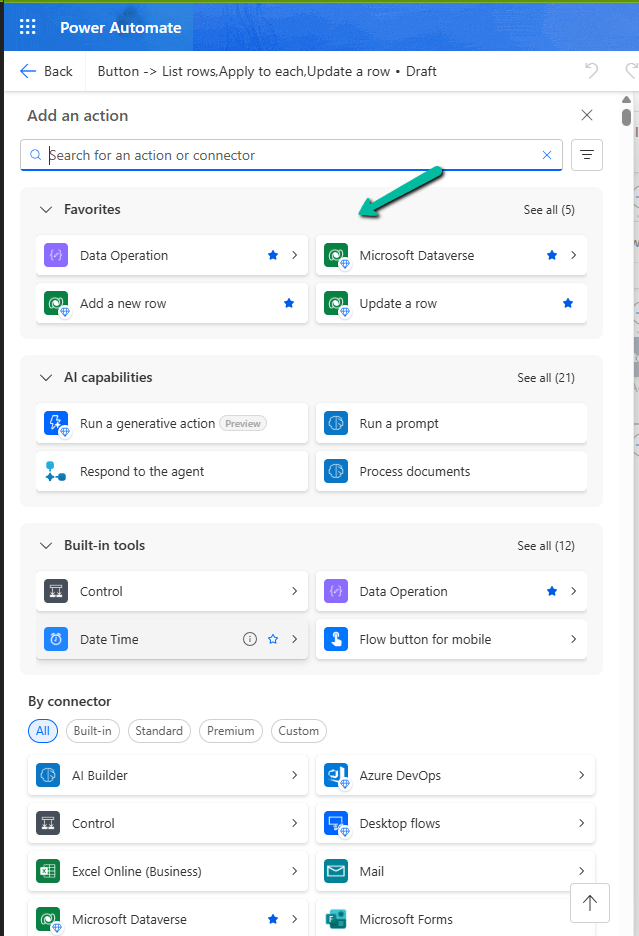
Here is a screenshot of the new connector and action pane in Power Automate, below we have added Dataverse connector and some of its action as favorites.

Earlier, when we clicked on the plus sign (+) to add a new action in our flow, it opened a big list of actions and connectors. It was hard to find the ones we used often, and we had to scroll a lot.
Now, with the new design, things are much easier. We can do the following:
– Mark any connector or action as a ‘Favorite’. These favorites will always show up at the top in a new Favorites section.
– Quickly see useful AI tools like ‘Run a prompt’ or ‘Process documents’ in a special AI section.
– Easily find basic tools like Control, Data Operation, and JSON under the Built-in tools section.
This change helps us find what we need faster. It’s especially useful if we often use the same connectors like Microsoft Dataverse or Excel.
Hope it helps..
Discover more from Nishant Rana's Weblog
Subscribe to get the latest posts sent to your email.
Share It -


One thought on “Favorite your Actions and Connectors for quick retrieval in Cloud Flows (Power Automate)”