
A new feature recently added in the platform is the capability for the Power Platform administrators to see different operations performed in the environment.
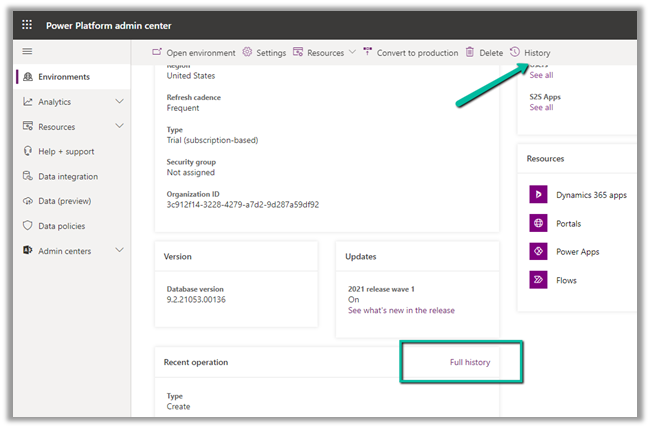
Log in to Admin Center and select an the appropriate environment
Select History or select Full History from the Recent Operation section
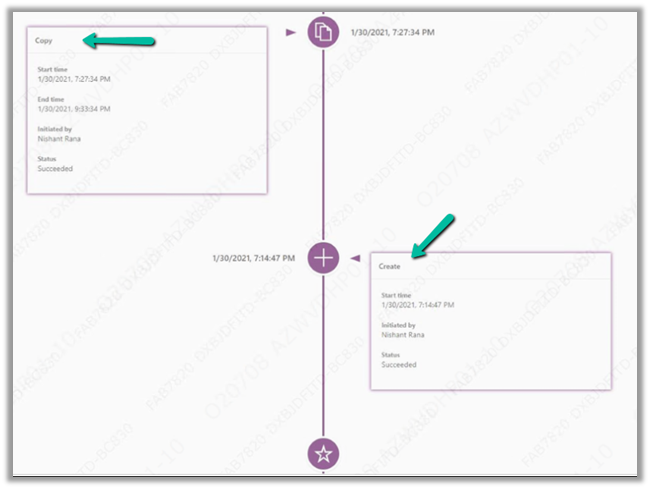
For e.g. we can see the below details listed
- Create – Start time, Initiated by, Status.
- Copy – Start time, End time, Initiated By, Status.
- Edit etc.
Also check out –
Set Custom Message and disable background processes inside the Administration mode for Environment
Hope it helps..
Advertisements
Discover more from Nishant Rana's Weblog
Subscribe to get the latest posts sent to your email.
Share It -


 Nishant Rana's Weblog
2 thoughts on “Environment History in Power Platform Administration Center”