
Recently while trying import products from our Dev to Test environment using the Configuration Migration tool we got the below error
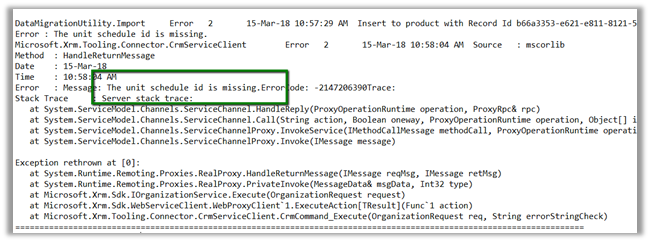
The reason being we were using default unit as a unit group in out DEV and the same wasn’t there in the TEST environment. Interestingly if we set the correct GUID in the data.xml generated by Configuration Migration tool and try importing, still the products do not get imported.
So basically, if we try importing the products entity alone we might run into issues. To migrate it properly we need to add the related entities along with it as mentioned in the Microsoft documentation.
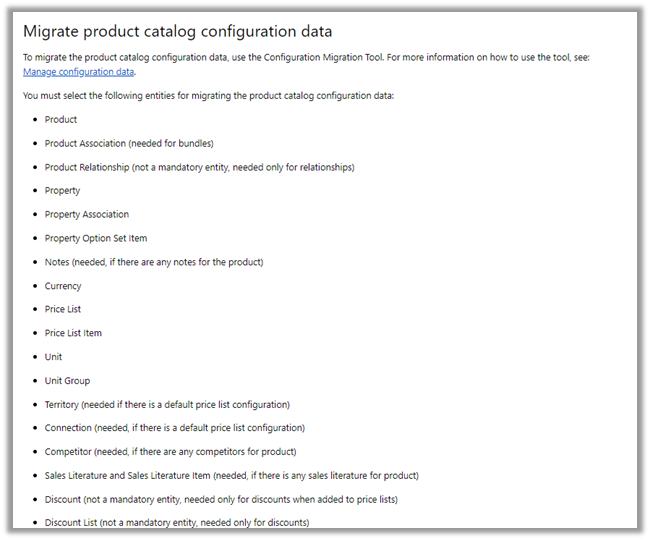
We created a new schema file with Product and its related entities, and this time migration worked properly.
Hope this helps.
Discover more from Nishant Rana's Weblog
Subscribe to get the latest posts sent to your email.
Share It -


 Nishant Rana's Weblog
For doing product migration using SSIS KingswaySoft – check the migration starter pack http://www.kingswaysoft.com/blog/2016/09/16/Announcing-Migration-Starter-Pack-for-CRM-Online-and-CRM-On-Premise
LikeLike
if i am creating a new unit in dyanmics then it is giving me this error : The unit schedule ID is missing. To create a unit, specify a unit schedule ID.
How can i add new Unit ?
LikeLike