
Microsoft Flow is a workflow management tool, using which we can create automated workflows between various services and apps.

With Dynamics CRM Online common scenarios could be
- Create Dynamics CRM Leads from an Excel table.
- When an opportunity is created post to Yammer.
- Copy new Dynamic CRM Account to Common Data Model etc.
https://flow.microsoft.com/en-us/
https://flow.microsoft.com/en-us/services/shared_dynamicscrmonline/dynamics-crm-online/
- Below are some of the templates available for CRM Online

- Let us take a Template that creates Leads based on Tweets

- Connect to both the services

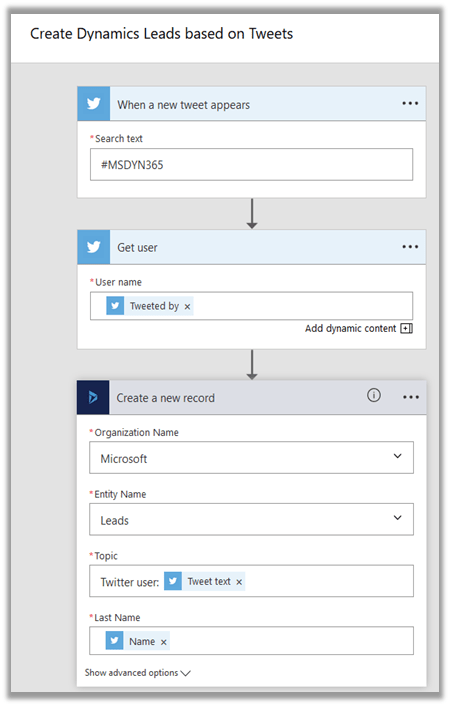
- Configure it, for e.g. search for #msdyn365, get the Tweeter User Name and create the lead record. Map topic in lead with tweet text.

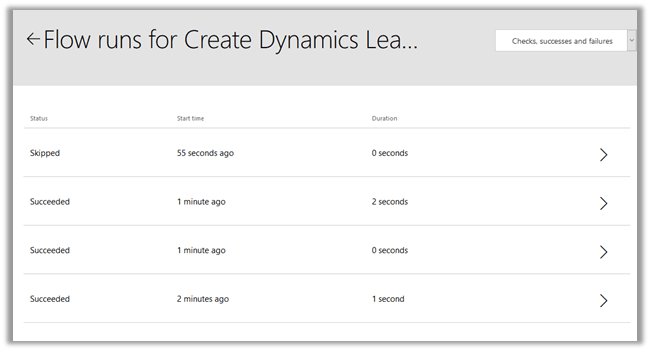
- Check the status of the flow.
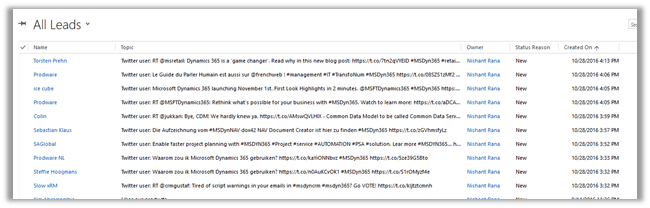
- Leads created in CRM
Hope it helps..
Discover more from Nishant Rana's Weblog
Subscribe to get the latest posts sent to your email.
Share It -


 Nishant Rana's Weblog
Hi Nishant,
I followed the above steps and i am able to create leads when where a new tweet comes and matches my search text.
But my question is how a sales person will contact that lead as tweeter doesn’t provide contact number or Email of that person who made tweet.
Please provide some input on this.
Thanks,
Shahbaaz
LikeLike