Sample code to parse JSON Date Format


Hi,

Just sharing a sample code to parse JSON Date Format (e.g. “\/Date(628318530718)\/”) to Date.


entity = JSON.parse(retrieveReq.responseText).d;

if (entity['BirthDate'] != null) {

var jdate = parseJsonDate(entity['BirthDate']);
 var year = jdate.getFullYear();
 var month = jdate.getMonth() + 1 < 10 ? '0' + (jdate.getMonth() + 1) : (jdate.getMonth() + 1);
 var date = jdate.getDate() < 10 ? '0' + jdate.getDate() : jdate.getDate();
 var dateString = month + '/' + date + '/' + year;

 alert(dateString);
 }

function parseJsonDate(jsonDate) {
 var offset = new Date().getTimezoneOffset() * 60000;
 var parts = /\/Date\((-?\d+)([+-]\d{2})?(\d{2})?.*/.exec(jsonDate);

if (parts[2] == undefined)
 parts[2] = 0;

if (parts[3] == undefined)
 parts[3] = 0;

return new Date(+parts[1] + offset + parts[2] * 3600000 + parts[3] * 60000);
 }

}

Bye.

Sample Code to Cancel All the Open Activities for a particular record in CRM 2011.


Hi,

Just sharing a sample code that could be used to cancel all the open activities for a particular record.

 private void CancelChildActivities(Guid entityRecordGuid, IOrganizationService service)
 {
 QueryExpression qe = new QueryExpression();
 qe.ColumnSet = new ColumnSet(new string[] { "activityid", "activitytypecode" });
 qe.EntityName = "activitypointer";

FilterExpression filterStateCode = new FilterExpression();
 filterStateCode.FilterOperator = LogicalOperator.Or;
 filterStateCode.AddCondition("statecode", ConditionOperator.Equal, "Open");
 filterStateCode.AddCondition("statecode", ConditionOperator.Equal, "Scheduled");

FilterExpression filter = new FilterExpression();
 filter.FilterOperator = LogicalOperator.And;
 filter.AddCondition("regardingobjectid", ConditionOperator.Equal, entityRecordGuid);
 filter.AddFilter(filterStateCode);

qe.Criteria = filter;

RetrieveMultipleRequest request = new RetrieveMultipleRequest();
 request.Query = qe;
 RetrieveMultipleResponse response = (RetrieveMultipleResponse)service.Execute(request);

foreach (Entity activity in response.EntityCollection.Entities)
 {
 CancelActivity(activity, service);
 }

}

 private void CancelActivity(Entity entity, IOrganizationService service)
 {
 EntityReference moniker = new EntityReference();

if (entity.LogicalName == "activitypointer")
 {
 if (entity.Attributes.Contains("activityid") & entity.Attributes.Contains("activitytypecode"))
 {
 moniker.LogicalName = entity.Attributes["activitytypecode"].ToString();
 moniker.Id = (Guid)entity.Attributes["activityid"];

SetStateRequest request = new SetStateRequest();
 request.EntityMoniker = moniker;
 request.State = new OptionSetValue(2);
 request.Status = new OptionSetValue(-1);
 SetStateResponse response = (SetStateResponse)service.Execute(request);
 }
 }

}

Bye.

Customization (Unsupported) of Lookup in CRM 2011.


Hi,

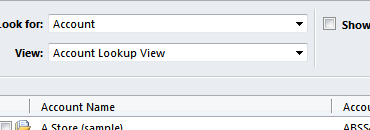
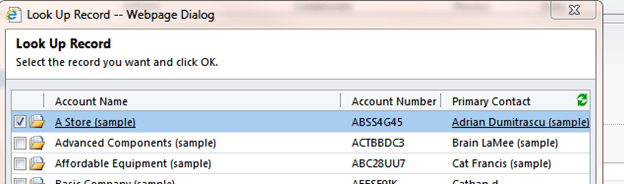
For disabling view button, disabling “look for” option or hiding Button in lookup we can make use of JavaScript.

We need to refer to our lookup through DOM in our onload event and set its attributes (unsupported).

Suppose our lookup id is customerid

document.getElementById(“customerid”).setAttribute(“disableViewPicker“, “1”);


document.getElementById(“customerid”).setAttribute(“disableQuickFind“, “1”); 


document.getElementById(“customerid”).setAttribute(“_lookupbrowse“, “1”); 

Hiding New Button

function myHideLookupButton()

{

crmForm.all.customerid.attachEvent(“setadditionalparams“,HideButton);

}

function HideButton()

{

crmForm.all.customerid.AddParam(“ShowNewButton“, 0);

}

Bye.

Add JavaScript to NavBarItem in CRM 2011.


Suppose we want to add a new link on an entity’s form and want to call JavaScript on onclick of that link.

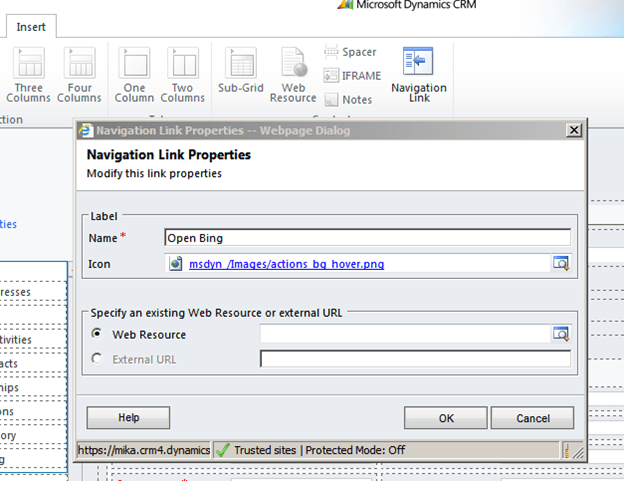
For doing so first we need to add a Navigation link on the form.

Click on Insert tab and Select Navigation Link button.

Specify Name and Icon and click on OK.

Save and Publish the customization, then open the form in IE Developer tool to get its id. We will use that id in our JavaScript function for onload of the form.

Our function


function OpenBing()
{
// get the navItem
var navItem = document.getElementById('navLink{6daba50b-300a-824b-453c-660e5b10781b}');

// override the onclick to call the connection page
navItem.onclick =function()
{
window.open("http://www.bing.com");
};
}

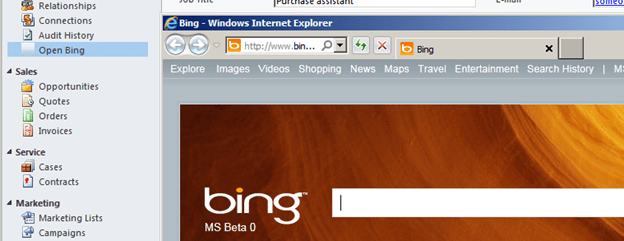
Clicking on Open Bing link opens up the Bing page.

Hope it helps.

Cleared MB2-867 CRM 2011 Installation and Configuration Exam


Hi,

Yesterday i cleared the installation and configuration exam of CRM 2011. There were 74 questions in it and 140 minutes to answer them.

Most of the questions were on system requirements while installing Microsoft Dynamics CRM 2011, Outlook, Email Router.

If we remember the below points we can easily answer around 40 questions correctly.

Microsoft Dynamics CRM Server 2011 E-Mail Router

can be installed on computers running

  • Windows 7 32-bit, 64-bit editions.  (32 bit version of router on Windows 7 32-bit)
  • Windows Server 2008 or later 64-bit editions.

can work with following e-mail systems

  • Microsoft Exchange 2003, 2007, 2010, Online.
  • SMTP servers for outgoing.
  • POP3 complaint server for incoming.

Microsoft Dynamics CRM for Outlook is supported on

  • Window 7 RTM (32-bit and 64-bit)
  • Windows Vista SP1 (32-bit and 64-bit) SP1
  • Windows XP Professional SP3, Professional x64 SP2, Tablet PC SP3 Edition.

Supported version of Microsoft Office Outlook

  • Office 2010 RTM
  • Office 2007 SP2
  • Office 2003 SP3

IE Version Supported for Microsoft Dynamic CRM for Outlook

  • IE 7, 8, 9.

Microsoft Dynamics CRM 2011 Server can be installed on following Windows Server  (only 64-bit versions)

  • Windows Server 2008 Standard, Enterprise, Datacenter – SP2
  • Windows Web Server 2008 – SP2
  • Windows Small Business Server Premium, Standard – RTM.

Supported SQL Server Editions (only 64-bit)

SQL Server 2008 Standard, Enterprise, Datacenter, Developer all SP1.

  • Microsoft Dynamics Reporting Extensions setup must be run on a computer that has SQL Server 2008 Reporting Services installed.
  • Microsoft Dynamics CRM Report Authoring Extension must be installed on the computer where SQL Server   is installed.
  • Understand how Claim Based Authentication and IFD are configured for Microsoft Dynamics CRM 2011.

Read about permission required while installing CRM 2011.

Minimum permissions required for Microsoft Dynamics CRM Setup, services, and components.

 To remember the above points  i also created a small mind map as well.


Hope it helps.


Error “A Microsoft Dynamic CRM service has been disabled or has not yet started” while configuring Microsoft Dynamics CRM for Outlook.


Got this issue while configuring Microsoft Dynamics CRM for Outlook for CRM Online.

It was because of the following service being disabled.

Enabling the service resolved the issue.

Hope it helps.