Sample Code to Retrieve all the members of a Static Marketing List in CRM 2011


Hi,

Below is the code that we could use to retrieve the GUIDs of all the members associated to a STATIC marketing list.

 private void GetAllMembers_Click(object sender, EventArgs e)
 {
 ArrayList memberGuids = new ArrayList();
 IOrganizationService orgService = GetOrganizationService();

PagingInfo pageInfo = new PagingInfo();
 pageInfo.Count = 5000;
 pageInfo.PageNumber = 1;

QueryByAttribute query = new QueryByAttribute("listmember");
 // pass the guid of the Static marketing list
 query.AddAttributeValue("listid", new Guid("2CA7881F-3EDA-E111-B988-00155D886334"));
 query.ColumnSet = new ColumnSet(true);
 EntityCollection entityCollection = orgService.RetrieveMultiple(query);

foreach (Entity entity in entityCollection.Entities)
 {
 memberGuids.Add(((EntityReference) entity.Attributes["entityid"]).Id);
 }

// if list contains more than 5000 records
 while (entityCollection.MoreRecords)
 {
 query.PageInfo.PageNumber += 1;
 query.PageInfo.PagingCookie = entityCollection.PagingCookie;
 entityCollection = orgService.RetrieveMultiple(query);

foreach (Entity entity in entityCollection.Entities)
 {
 memberGuids.Add(((EntityReference)entity.Attributes["entityid"]).Id);
 }
 }

}

public IOrganizationService GetOrganizationService()
 {
 Uri organizationUri = new Uri("http://servername/orgname/XRMServices/2011/Organization.svc");
 Uri homeRealmUri = null;
 ClientCredentials credentials = new ClientCredentials();
 credentials.Windows.ClientCredential = System.Net.CredentialCache.DefaultNetworkCredentials;
 OrganizationServiceProxy orgProxy = new OrganizationServiceProxy(organizationUri, homeRealmUri, credentials, null);
 IOrganizationService _service = (IOrganizationService)orgProxy;
 return _service;
 }

Hope it helps.

How to – Pass parameters to JavaScript Web Resource function in CRM 2011.


Hi,

Suppose we want to pass few values as parameter to our JavaScript function.

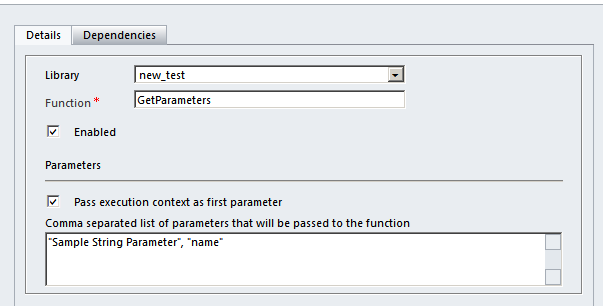
Here we have a JavaScript library named new_test which has GetParameters function.

Here we are passing three parameters

  1. Pass execution context as first parameter. (Check box)

Using getEventSource method we can get the name attribute’s value.

  1. Sample String Parameter” = string value.
  2. name” = string value with schema name of the “name” attribute.

We can use the attribute’s  name in our Xrm.page.getAttribute method.

The JavaScript function

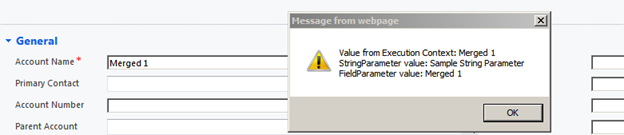
The alert box

Hope it helps!

Advertisements

Showing custom warning message on an entity form in CRM


Hi,

I was searching for a way to show custom warning message in an entity’s form and came across these two helpful posts

For CRM 4 :-

http://social.microsoft.com/Forums/br/crmdevelopment/thread/1791ab40-a1e6-4099-bb4b-6e52a9a45c18

For CRM 2011 : –

http://crm2011wiki.wordpress.com/2012/04/16/showing-custom-alerts-in-notifications-area/

Hope it helps.


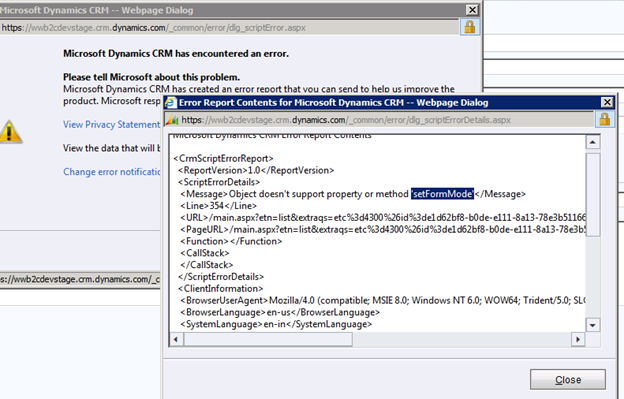
“Object doesn’t support property or method ‘setFormMode’” error while closing the record’s form in CRM 2011.


Hi,

We had recently written a plugin for sending email. In the description of the email we were inserting the URL of the record

string recordUrl = string.Format(“<a href=’{0}/userdefined/edit.aspx?etc=4300&id={1}‘>Click here to open the record</a>”, this.serverName, marketingListGuid.ToString());

While clicking the link the record opens properly, however when we try closing the form’s window we get the below error

We have UR8 installed in our on premise development environment there we don’t get this error, however we are still getting the above error for our online dev and production environment.

http://social.microsoft.com/Forums/lv-LV/crmdevelopment/thread/0c0aa09e-0ea6-4150-8056-a2b7b91f3256?prof=required

Bye.

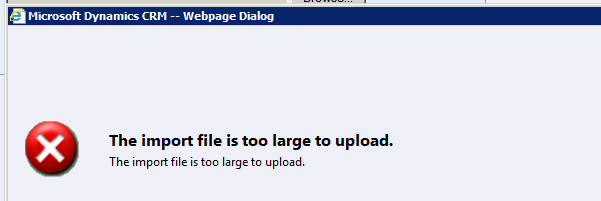
“The import file is too large to upload” error while importing csv file of more than 8 mb in CRM 2011.


Hi,

I was importing a csv file of size 11 mb using import data feature and got the below error.

The unsupported way we can resolve it for our on premise environment is by running the following update query against MSCRM_CONFIG database.

UPDATE ServerSettingsProperties

SET IntColumn =15

where columnname=‘ImportMaxAllowedFileSizeInMB’

Also refer to this support article

http://support.microsoft.com/kb/918609

Bye.

Could not load file or assembly ‘Microsoft.Crm.Sdk, Version=5.0.0.0, Culture=neutral, PublicKeyToken=31bf3856ad364e35’ or one of its dependencies while running Stunnware Tools (SWTools) in CRM 2011


Hi,

While trying to run SWTools for CRM 2011, we might receive the “Could not load fie or assembly Microsoft.Crm.Sdk” error.

The solution is to create a file named SwTools.exe.config with the following content


<configuration>
 <runtime>
 <assemblyBinding xmlns="urn:schemas-microsoft-com:asm.v1">
 <dependentAssembly>
 <assemblyIdentity name="Microsoft.Crm.Sdk" publicKeyToken="31bf3856ad364e35" culture="neutral" />
 <publisherPolicy apply="no" />
 </dependentAssembly>
 </assemblyBinding>
 </runtime>
</configuration>

And place the file where the SwTools.exe is.

Thanks to David for providing the solution.

http://mscrmuk.blogspot.com/2011/02/using-crm-40-assemblies-on-crm-2011.html

Have a look at this post as well

http://blog.aggregatedintelligence.com/2012/03/unable-to-run-website-that-uses.html

Bye.