Hi,
At times we would like to send email using SendEmailRequest but still want to make use of template and replace the content in it.
For e.g. this is our sample template (Global template)
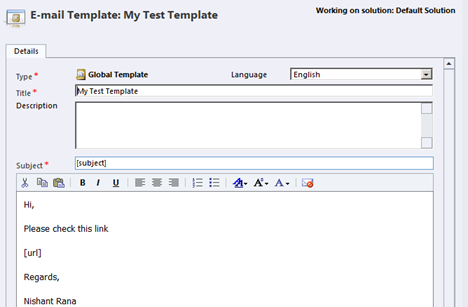
Here we would replace the [subject] and [url] placeholders.
Sample Code used
</p>
<p>private void SendMail(object sender, EventArgs e)<br />
{<br />
IOrganizationService orgService = GetOrganizationService();<br />
Entity entity = GetGlobalTemplate("My Test Template", GetOrganizationService());<br />
Entity email = new Entity();<br />
email.LogicalName = "email";</p>
<p>// get the Subject content from template and replace it with "My New Subject"<br />
email.Attributes["subject"] = GetDataFromXml(entity.Attributes["subject"].ToString(), "match");<br />
email.Attributes["subject"] = email.Attributes["subject"].ToString().Replace("[subject]", "My New Subject");</p>
<p>// get the description from template and replace [url] placeholder with a bing's url<br />
email.Attributes["description"] = GetDataFromXml(entity.Attributes["body"].ToString(), "match");<br />
string urlToReplace = "<a href='http://www.bing.com'>Open Bing</a>";<br />
email.Attributes["description"] = email.Attributes["description"].ToString().Replace("[url]", urlToReplace);</p>
<p>List<Entity> fromtoEntities = new List<Entity>();<br />
Entity activityParty = new Entity();<br />
activityParty.LogicalName = "activityparty";<br />
activityParty.Attributes["partyid"] = new EntityReference("systemuser", new Guid("FC480E73-77A9-E111-B151-00155D882D40"));<br />
fromtoEntities.Add(activityParty);<br />
email.Attributes["from"] = fromtoEntities.ToArray();<br />
email.Attributes["to"] = fromtoEntities.ToArray();<br />
email.Attributes["regardingobjectid"] = new EntityReference("contact", new Guid("2CCB57AA-A9B3-E111-B151-00155D882D40"));</p>
<p>Guid emailCreated = orgService.Create(email);<br />
SendEmailRequest req = new SendEmailRequest();<br />
req.EmailId = emailCreated;<br />
req.TrackingToken = "";<br />
req.IssueSend = true;<br />
SendEmailResponse res = (SendEmailResponse)orgService.Execute(req);<br />
}</p>
<p>private static string GetDataFromXml(string value, string attributeName)<br />
{<br />
if (string.IsNullOrEmpty(value))<br />
{<br />
return string.Empty;<br />
}</p>
<p>XDocument document = XDocument.Parse(value);<br />
// get the Element with the attribute name specified<br />
XElement element = document.Descendants().Where(ele => ele.Attributes().Any(attr => attr.Name == attributeName)).FirstOrDefault();<br />
return element == null ? string.Empty : element.Value;<br />
}</p>
<p>public static Entity GetGlobalTemplate(string title, IOrganizationService orgService)<br />
{<br />
Entity emailTemplate = null;<br />
try<br />
{</p>
<p>QueryExpression query = new QueryExpression();</p>
<p>// Setup the query for the template entity<br />
query.EntityName = "template";</p>
<p>// Return all columns<br />
query.ColumnSet.AllColumns = true;<br />
query.Criteria = new FilterExpression();<br />
query.Criteria.FilterOperator = LogicalOperator.And;</p>
<p>// Create the title condition<br />
ConditionExpression condition1 = new ConditionExpression();<br />
condition1.AttributeName = "title";<br />
condition1.Operator = ConditionOperator.Equal;<br />
condition1.Values.Add(title);</p>
<p>query.Criteria.Conditions.Add(condition1);</p>
<p>// Execute the query and return the result<br />
EntityCollection entityColl = orgService.RetrieveMultiple(query);</p>
<p>if (entityColl.Entities.Count > 0)<br />
{<br />
emailTemplate = entityColl.Entities[0];<br />
}<br />
}<br />
catch<br />
{<br />
throw;<br />
}<br />
return emailTemplate;<br />
}</p>
<p>
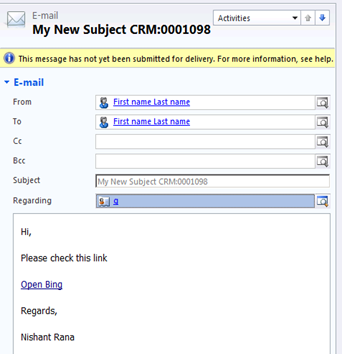
The email activity created :-
Bye.
Advertisements