Using SOAP and OData endpoint of CRM 2013 online in Windows Store App


Connecting to CRM 2013 Online SOAP and OData endpoint through Windows 8 App.

Using SharePoint CSOM (Client Side Object Model) in CRM 2011 On-Premise Plugin.


Hi,

We recently had a requirement to create List Item in SharePoint every time a case is resolved in CRM.

For this we decided to use SharePoint CSOM i.e.

Added reference to following assemblies in our plugin that will fire on Case Resolution

They can be found at

C:\Program Files\Common Files\Microsoft Shared\Web Server Extensions\15\ISAPI\

The plugin gets the content of the KB Article associated to the Case and creates a list item (for a Custom List) in SharePoint.

Sample Code


public void Execute(IServiceProvider serviceProvider)
 {
 IPluginExecutionContext context =
 (IPluginExecutionContext) serviceProvider.GetService(typeof (IPluginExecutionContext));
 if (context.InputParameters.Contains("Target") && context.InputParameters["Target"] is Entity)
 {

Entity entity = (Entity) context.InputParameters["Target"];

OptionSetValue serviceStage = (OptionSetValue) (entity.Attributes["statecode"]);
 if (serviceStage.Value == 1)
 {

IOrganizationServiceFactory serviceFactory =
 (IOrganizationServiceFactory)
 serviceProvider.GetService(typeof (IOrganizationServiceFactory));

IOrganizationService orgService = serviceFactory.CreateOrganizationService(context.UserId);

// Get the KB Article Associated
 ColumnSet cols = new ColumnSet();
 cols.AddColumn("kbarticleid");

// Get the content of the article
 Entity caseEntity = orgService.Retrieve("incident", context.PrimaryEntityId, cols);
 EntityReference entityRef = (EntityReference) caseEntity.Attributes["kbarticleid"];
 Guid kbId = entityRef.Id;
 Entity kbEntity = orgService.Retrieve("kbarticle", kbId, new ColumnSet(true));
 string title = kbEntity.Attributes["title"].ToString();
 string content = kbEntity.Attributes["content"].ToString();
 // create the custom list item in SharePoint using Client Side Object Model of SharePoint 2013

ClientContext clientContext = new ClientContext("http://sharepoint/sites/portal/");
 clientContext.Credentials = new System.Net.NetworkCredential("username", "password", "mydomain");
 List announcementsList = clientContext.Web.Lists.GetByTitle("Kb List");

ListItemCreationInformation itemCreateInfo = new ListItemCreationInformation();
 ListItem newItem = announcementsList.AddItem(itemCreateInfo);
 newItem["Title"] = title;
 newItem["Content"] = content;

newItem.Update();

clientContext.ExecuteQuery();

}
 }
 }

Hope it helps.

Mark Complete an Activity on create through Plugin in CRM 2011.


Hi,

We had a requirement to immediately close the Appointment record as completed after creating it. The initial thought was to call Set State Request on the Post Create plugin. That approach gave error. Then we tried passing statecode and statuscode value as input parameter in Pre Plugin. That approach also didn’t work.

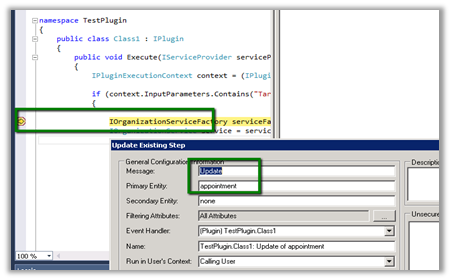
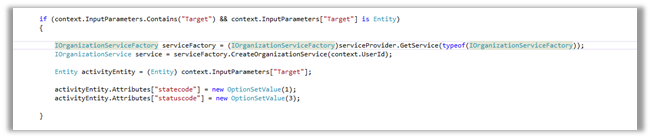
Finally we registered a pre update plugin on appointment entity and set the values for statecode and statuscode attributes. This worked for us.

The learning is that on create of Appointment record, update message is also called.

Sample Code (Pre Update)

Hope it helps.

Curious Case of Remove button for QueueItem SubGrid in CRM 2011


Hi,

The QueueItem subgrid will normally have a Remove button associated to it in the ribbon.

However when used in a view in Dashboard it goes missing.

One option to get it back is create a new custom ribbon button with the exact definition of the existing OOB Remove button.

http://www.mscrm-developer.com/2012/11/remove-button-missing-for-queue-items/

Hope it helps

Understanding Queues and QueueItem in CRM 2011


Hi,

I am currently working on a project that deals with queue management and the following posts were of immense help

http://xrmcubed.com/admin-101-queues-part1/

http://xrmcubed.com/admin-101-queues-part2/

http://xrmcubed.com/admin-101-queues-part3/

Thanks to the author !

MSCRMAuthentication cannot be found. Either the component that raises this event is not installed on your local computer or the installation is corrupted. You can install or repair the component on the local computer.


Hi,

We had created a WCF Service as wrapper over our OrganizationService.svc. It was all working fine until we installed UR 13. After installing UR 13, we started getting the below error for our WCF Service in the eventlog.

MSCRMAuthentication cannot be found. Either the component that raises this event is not installed on your local computer or the installation is corrupted. You can install or repair the component on the local computer.

We had to replace the following assemblies from the CRM Server’s bin (latest one after installing UR 13) directory to WCF Service bin directory.

Hope it helps.