Business Rules in CRM 2015


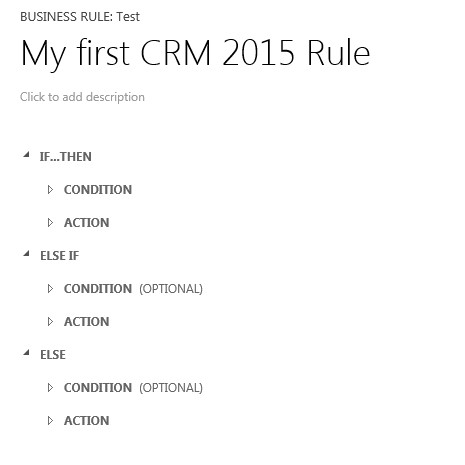
Supports Else, Else If Condition

businessrule

Server side support

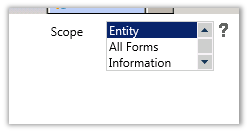
Set the scope to Entity.


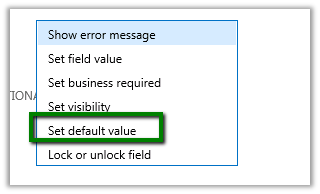
Supports Default Values

In CRM 2013


In CRM 2015


My Notes on Business Process Flow in CRM 2015


  • In CRM 2013 we were restricted to only those Entities that were 1: n related.
  • In CRM 2015 we can select any entity on which Business Process Flow is enabled.
  • Here test is an entity which has business process flow enabled, however it is not related to Contact record i.e. our primary entity

  • The same restriction of having only 5 entities applies to CRM 2015 also.


  • The entity relationships supported are of type 1: n only and it is optional.
  • Each process can have maximum 30 stages.
  • And each stage can have maximum 30 steps.
  • There can only be one active process at a time.
  • No closed entity loop, the entity used earlier can be referenced again.


Business Hours in Service Level Agreements (SLA) in CRM 2013


Hi,

Was looking into how the business hours works in SLA.

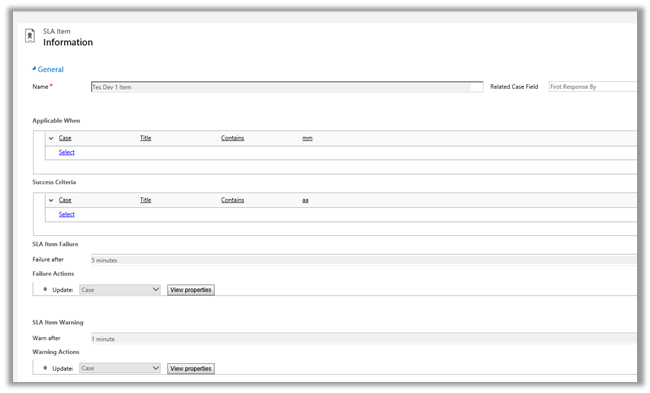
For this we a created new SLA record on CreatedOn field and which will update one of the fields on warning after one minute and some other field on failure after waiting for 5 minute.

And Applicable When -> when the Title field of Case contains “mm” text in it.


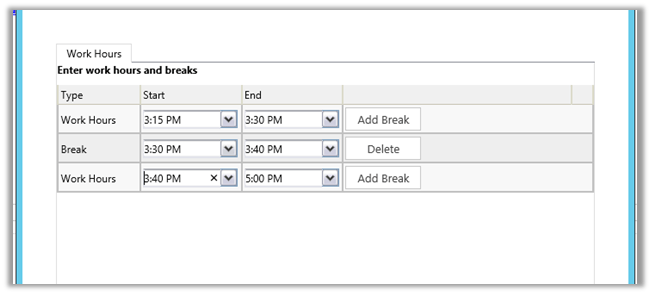
Following was the schedule

We created case record that satisfies the above condition at 3:28 P.M.

It updated one field on warning after one minute and then on 3:30 it went into wait condition and then resumed at 3:40 and showed failure at 3:43 as expected (i.e. total 5 minutes).

So it did consider the Break specified and on resuming ran for the remaining 3 minutes.

Hope it helps..


How to – Showing Total in Footer in jqGrid.


Hi,

We recently had a requirement to show total for 2 of our decimal columns in jqGrid.

We need to set the following properties footerrow and userDataOnFooter and the a function on loadComplete of grid

Hope it helps..

Advertisements

Using CreateMultiEntityAssociation method of CRMServiceClient for 1: n records.


Hi,

CreateMultiEntityAssociation method of CrmServiceclient can be used for associating 1 : n records i.e. if we have one contact record that we want to associate with multiple opportunity record ( 1-n) then we can use that method. This way we wont have to update each individual record.

http://msdn.microsoft.com/en-us/library/microsoft.xrm.tooling.connector.crmserviceclient.createmultientityassociation.aspx

Sample Code


Uri organizationUri = new Uri("http://server/crmrog/XRMServices/2011/Organization.svc");
Uri homeRealmUri = null;
ClientCredentials credentials = new ClientCredentials();
credentials.Windows.ClientCredential = System.Net.CredentialCache.DefaultCredentials;
OrganizationServiceProxy orgProxy = new OrganizationServiceProxy(organizationUri, homeRealmUri, credentials, null);

CrmServiceClient crmServiceClient = new CrmServiceClient(orgProxy);
List<Guid> lstOpportunityGuid = new List<Guid>();
lstOpportunityGuid.Add(new Guid("9DDCE989-0738-E411-9878-00155D56FF56"));
lstOpportunityGuid.Add(new Guid("019E1598-0738-E411-9878-00155D56FF56"));
lstOpportunityGuid.Add(new Guid("EA393A91-0738-E411-9878-00155D56FF56"));
crmServiceClient.CreateMultiEntityAssociation("contact", new Guid("CF1FC3C0-0738-E411-9878-00155D56FF56"), "opportunity", lstOpportunityGuid, "opportunity_customer_contacts");

Hope it helps ..

Business Rules in CRM 2013


Just writing down few key points regarding the Business Rules in CRM 2013.

  • Business Rules run on client side so any custom server side code or data import will bypass it.
  • Business Rule can be created for a specific form or all the forms of the entity.


  • Business Rules execute offline and also for tablet client.
  • If else conditions are not supported.
  • Rule are created for a single entity.
  • No support for or conditions.
  • If there is custom JavaScript and two business rules written on same condition, the custom JavaScript will run first, followed by the order in which the business rules have been activated.