Fixed: Not able to add Existing Product and Write-in Product columns in Quote Product view in CRM 2015.


Hi,

We faced this issue where we were not able to add the Existing Product and Write In Product in View in Quote Line opportunity.

After raising the product support ticket, we followed the below steps to fix it

  • Created a small unmanaged solution
  • Added the impacted entity to the solution
  • We didn’t include any other components except the affected entity
  • Exported the solution
  • Extracted the zip file
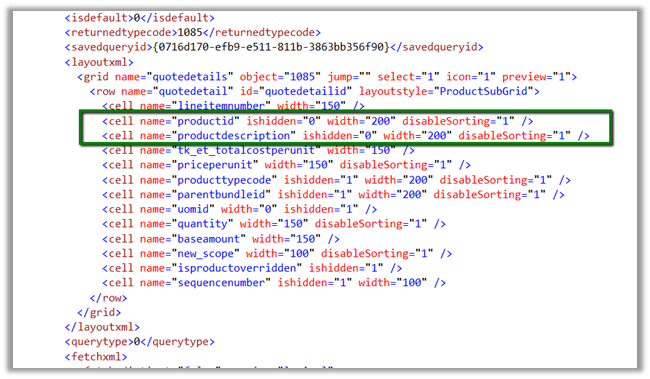
  • Edited the customizations.xml file to show the required two columns: Existing Product and Write-in Product
  • Zipped the files again
  • Uploaded the unmanaged solution to the affected CRM Online environment
  • Published all customizations
  • Checked the outcome: the view was now displaying the required columns

Hope it helps..

Fixed – “The server is busy and the request was not completed. Try again later” or “usersettings with Id = ‘’ does not exist” in Plugin in CRM 2013\2015.


Hi,

Our plugin was failing repeatedly with the below error message.

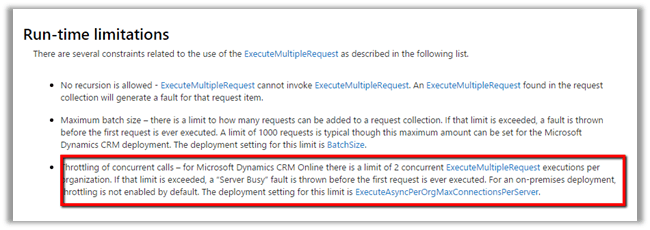
After some analysis we realized that it was because of using ExecuteMultipleRequest in the plugin and as we had multiple ExecuteMultipleRequest running at the same time. And as mentioned in the MSDN

https://msdn.microsoft.com/en-in/library/jj863631.aspx

We refactored the code to execute one request at a time and it fixed the issue.

Hope it helps..

Using RetrievePrincipalAccessRequest in CRM


Hi,

Recently had a requirement to show\hide a ribbon button based on the condition i.e. if a user has Write access to that record show it else hide it.

Here either the user can have Write access to the record through the one of the security roles assigned to him or through the team which has that rights.

In this case we can use RetrievePrincipalAccessRequest which returns as response all the right user had on that particular record either through his own security roles or teams he is part of.

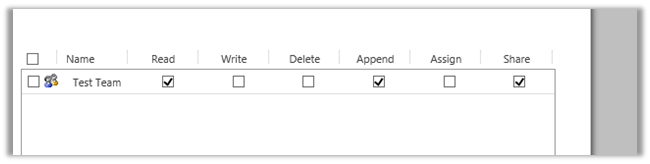
For e.g. we give following rights on a particular record to a team (which the user is part of)

If we check the rights user has on the record using RetrievePrincipalAccessRequest we get the following response (combination of all the rights either through sharing or his own security roles)

[


RetrievePrincipalAccessRequest request = new RetrievePrincipalAccessRequest();

// system user or team
request.Principal = new EntityReference("systemuser", new Guid("EBEECB5F-2D60-E511-80F8-3863BB357FC0"));

// record for which we want to check the access
request.Target = new EntityReference("is_productionsite", new Guid("15734DF9-31DD-E511-810E-3863BB353ED0"));

RetrievePrincipalAccessResponse resp = (RetrievePrincipalAccessResponse)orgService.Execute(request);


Hope it helps.

Only Secure Content is displayed notification while using Bing Map API version 7.0 in CRM Online.


Hi,

We recently developed a web resource using Bing Map API to show address as push pin for Custom Entities.

However, we were getting the following notification

The reason being we were using Http version of the API and CRM is on HTTPS. We changed it to use HTTPS version and it fixed the issue.

Else we would have to do the following settings in the browsers

http://du.screenstepslive.com/s/docs/m/7107/l/219447-allow-mixed-content-in-browsers

Helpful post

http://blog.devdave.com/2011/01/removing-mixed-content-warning-when.html

Hope it helps..

Business Process Error while trying to open records in CRM 2015


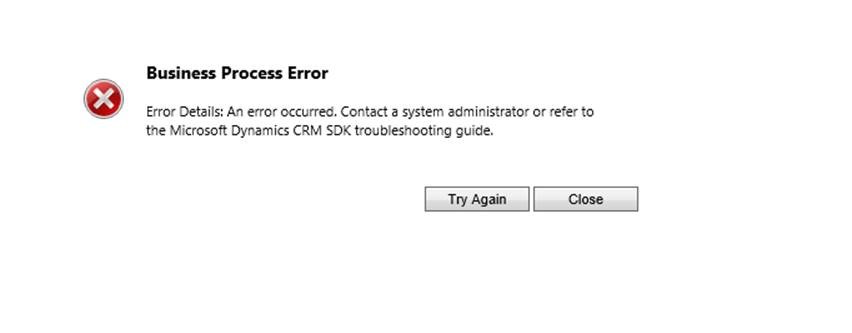
Hi we were getting the below error while trying to open any record in CRM 2015

G

Turned out that by mistake one wrong extra step had got registered on RetrieveMultiple

ActivityFeeds.Plugins: ActivityFeeds.Plugins.ActivityClose]

[c824b80a-d392-e511-8114-3863bb356f90: ActivityFeeds.Plugins.ActivityClose: RetrieveMultiple of any Entity]

Removing this step fixed the issue.

Hope it helps.

Fixed – Microsoft Dynamics CRM Reporting Authoring Extension Setup – Setup cannot continue because there is a pending restart required error in CRM 2015


Hi,

Got the below error while trying to install the Report Authoring Extension for CRM 2015.

To fix the issue, open the log file, check for the registry path and delete it

Hope it helps !