Perform Age calculation using Formula Columns in Dataverse / Dynamics 365


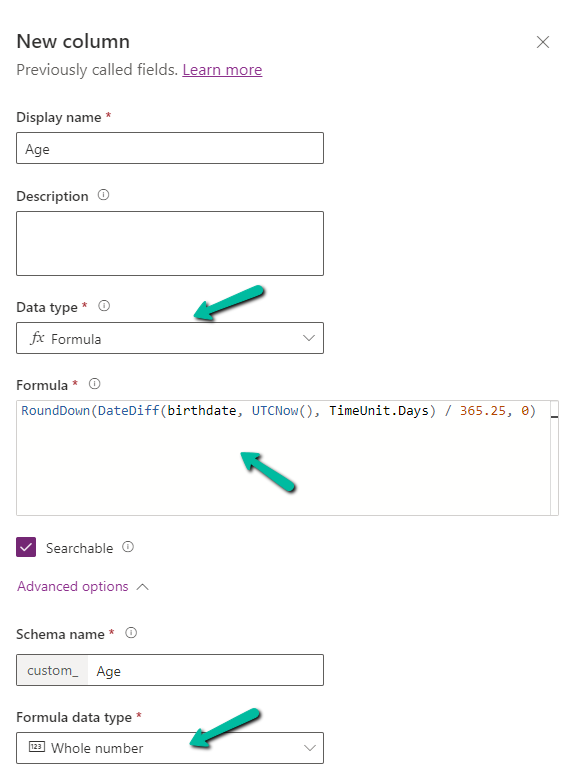
Below we have created a new field of Data Type Formula and Formula Data Type as Whole Number

A screenshot of a computer

Description automatically generated

Specify the following formula.

RoundDown(DateDiff(birthdate, UTCNow(), TimeUnit.Days) / 365.25, 0)

  • DateDiff calculates the difference in days between birthdate and current UTC Date.
  • Dividing by 365.25 takes care of converting the days to years, considering the leap year into account.
  • Roundown takes care of rounding the result to a nearest integer.

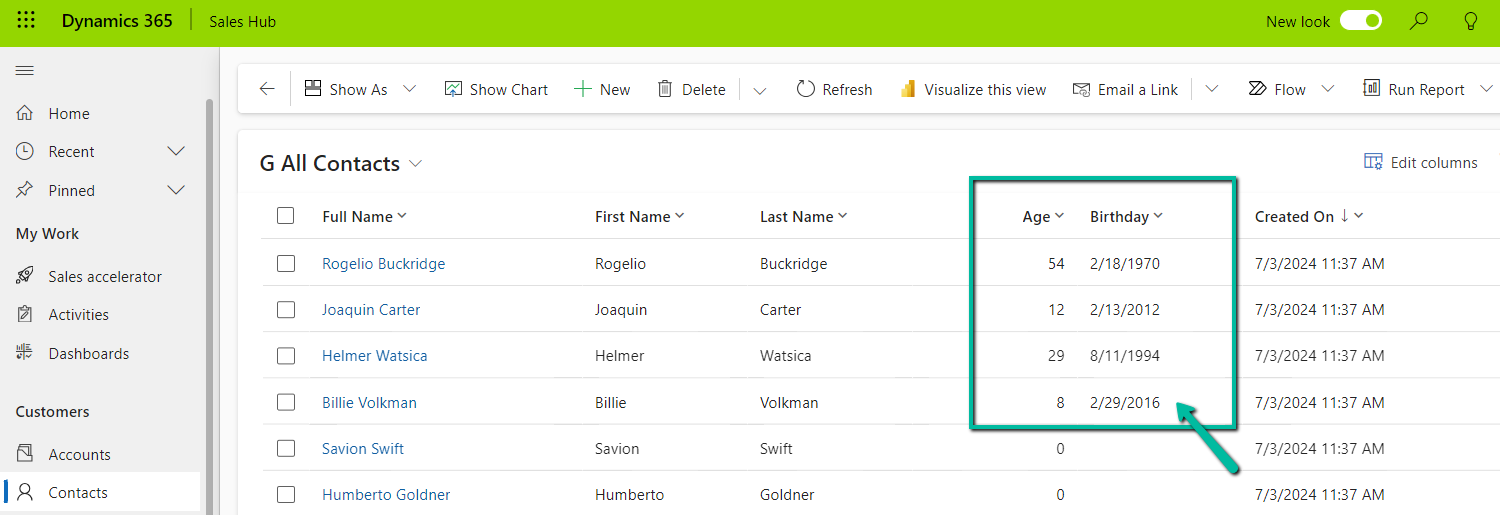
Below we see the field in action.

UTC current date is 10th Wednesday July 2024 for the below example.

A screenshot of a computer

Description automatically generated

Also checkout the helpful video –

and the forum – https://powerusers.microsoft.com/t5/Microsoft-Dataverse/Calculating-age-in-CDS-entity/td-p/495528

Hope it helps..

Advertisements

Using Homogenous Batch / Bulk operation messages for improved performance – Data Migration / Dataverse


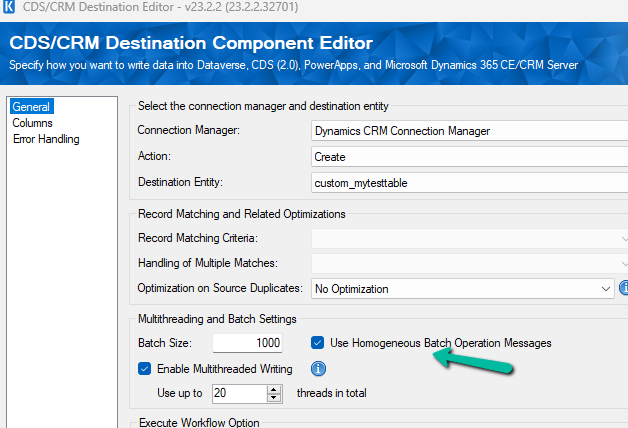
As we all are aware Microsoft has introduced Bulk Operation messages in the platform. Now we could use the same in our SSIS Package that uses KingswaySoft’s SSIS Integration Toolkit for Microsoft Dynamics 365 by using the Homengeneous Batch Operation Messages option in the CDS / CRM Destination Component Editor.

Let us first use the data spawner component to generate sample data for a custom table for which we just have 2 new custom first name and last name fields created as well as mapped with 100 K records.

A screenshot of a computer

Description automatically generated

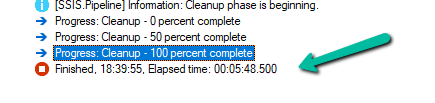
Let us first run the Package with batch size = 1000, threads as 20, multiplexing user = 5, and homogeneous batch operation disabled.

Below is the User Multiplexing option in the Connection Manger.

A screenshot of a computer

Description automatically generated

Here we have defined 5 different application users.

A screenshot of a computer

Description automatically generated
A screenshot of a computer

Description automatically generated
A computer screen shot of a number

Description automatically generated

Now let us run the same with the Homogenous Batch Operation option checked.

A screenshot of a computer

Description automatically generated
A computer screen shot of a computer screen

Description automatically generated

Below are the findings with different variations of Batch Size, Threads, Multiplexing Users, Homogenous Batch Operation for the – 100K records – Custom table

Batch Size

Threads

Multiplexing Users

Homogenous Batch Operation

Duration (minutes)

1000

20

5

N

5:48

1000

20

5

Y

1:54

500

20

5

N

4:16

500

20

5

Y

1:29

250

20

5

N

3:58

250

20

5

Y

1:38

100

20

5

N

4:47

100

20

5

Y

1:58

500

50

5

N

4:00

500

50

5

Y

1:24

We can see huge performance improvements while using Bulk Operations (Homogenous batch option) for our custom table, with threads around 20 and multiplexing users as 5. Increasing the number of multiplexing users will provide further performance improvement here.

Now let us run it against the Contact table and this time we take 10K as a sample instead of 100K as a sample.

10K records Contact table

Batch Size

Threads

Multiplexing Users

Homogenous Batch Operation

Duration (minutes)

500

1

1

N

25:26

500

1

1

Y

42:14

100

1

1

N

24:34

100

1

1

Y

36:06

100

5

1

N

21:56

100

5

1

Y

16:45

100

10

1

N

6:59

100

10

1

Y

12:54

100

10

2

N

6:14

100

10

2

Y

11:28

100

10

5

N

3:26

100

10

5

Y

9:36

100

15

5

N

2:56

100

15

5

Y

9:57

100

20

5

N

2:34

100

20

5

Y

10:17(Ran into a server-side throttling error.)

1000

20

5

N

5:30 (Ran into a server-side throttling error.)

1000

20

5

Y

5:02 (Ran into a server-side throttling error.)

500

20

5

N

4:20(Ran into a server-side throttling error.)

500

20

5

Y

2:36 (Ran into a server-side throttling error.)

100

20

1

N

18:00

(Ran into a server-side throttling error.)

100

20

1

Y

11:20

(Ran into a server-side throttling error.)

With the higher Batch size along Threads + Multiplexing users + Homogenous Batch Operation message option, we could get a good performance improvement, however, we can see that we ran into server-side throttling errors on increasing the batch size. So with tables having a higher number of fields/relationships, we need to be more careful than a custom/table with fewer relationships and fields

[CDS Destination] Warning: An exception has occurred while processing the service request, the same request will be attempted again immediately. KingswaySoft.IntegrationToolkit.DynamicsCrm.WebAPI.WebApiServiceException: The underlying connection was closed: A connection that was expected to be kept alive was closed by the server. (Error Type / Reason: KeepAliveFailure, Detailed Message: The underlying connection was closed: A connection that was expected to be kept alive was closed by the server.)

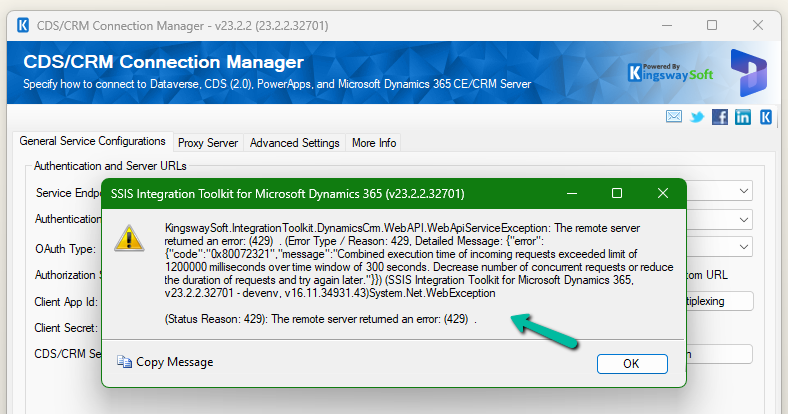
[CDS Destination] Warning: A server side throttling is encountered, the same request will be retried after 5 minutes (as instructed by the returned throttling error message from the server). KingswaySoft.IntegrationToolkit.DynamicsCrm.WebAPI.WebApiServiceException: The remote server returned an error: (429) . (Error Type / Reason: 429, Detailed Message: {“error”:{“code”:”0x80072321″,”message”:”Combined execution time of incoming requests exceeded limit of 1200000 milliseconds over time window of 300 seconds. Decrease number of concurrent requests or reduce the duration of requests and try again later.”}})

A screenshot of a computer

Description automatically generated

More on the Homogenous Batch Operation option – https://www.kingswaysoft.com/blog/2023/11/29/Use-Homogeneous-Batch-Operation-Messages-for-Greater-DataverseCRM-Writing-Performance

Hope it helps..

Customize the Schedule Board to show bookable resource attribute – Dynamics 365 Field Service


Below we can see the resource cell template (or view) applied that defines the images, values, and fields displayed for the resource in the Schedule Board.

A screenshot of a computer

Description automatically generated

Now suppose we want to show the Account (custom field) value also, that would make it easy for the Dispatcher to schedule them from within the Schedule board.

For this, we need to select Board Settings for the Schedule Board.

A screenshot of a computer

Description automatically generated

Navigate to the Other section within the Board Settings.

We’d first start by adding/defining a new Resource Cell Template and a new Retrieve resource query template.

A screenshot of a computer

Description automatically generated

We have added below Div tag below to show the account name.

Save this new template

Next, add the below attribute tag for the account field in the Fetch XML for it to retrieve the value of the account, here name property holds the schema name of the field.

Select Save as new to add the new template.

On refreshing the Schedule Board we can see the Account value added to the view, however, it shows the Guid of the account record.

To get the label /name, edit the Resource Cell Template and add the below UFX Bag (UFX directives for querying the data) to fetch the name of the account.

Update the Sample Resource Query, Save the changes, and refresh the schedule board.

We can see the Guid replaced by the Account name there.

Resource Cell Template –

<?xml version="1.0" encoding="utf-8" ?>
<bag xmlns:ufx="http://schemas.microsoft.com/dynamics/2017/universalfetchxml">
  <Resources ufx:source="fetch">
    <fetch mapping="logical" aggregate="true">
      <entity name="bookableresource">
        <attribute name="bookableresourceid" alias="bookableresourceid" groupby="true"/>
        <attribute name="name" alias="name" groupby="true"/>
        <attribute name="calendarid" alias="calendarid" groupby="true"/>
        <attribute name="resourcetype" alias="resourcetype" groupby="true"/>
        <attribute name="msdyn_startlocation" alias="startlocation" groupby="true"/>
        <attribute name="msdyn_organizationalunit" alias="msdyn_organizationalunit" groupby="true"/>

          <!-- Add the account field -->
         <attribute name="new_account" alias="accountname" groupby="true"/>
        
          <!-- Let the database sort by name, unless we have characteristics - in which case we'll sort by the count of characteristics -->
        <order ufx:if="not($input/Characteristics/bag/characteristic)" alias="name" />

        <!-- Characteristic join -->
        <link-entity name="bookableresourcecharacteristic" from="resource"
            to="bookableresourceid" link-type="inner" ufx:if="$input/Characteristics/bag/characteristic">
          <attribute name="characteristic" aggregate="countcolumn" 
              alias="characteristiccount" distinct="true" />
          <order alias="characteristiccount" descending="true" />

          <link-entity name="ratingvalue" from="ratingvalueid" to="ratingvalue" link-type="outer">
            <attribute name="value" aggregate="sum" alias="proficiencyscore" distinct="true" />
            <order alias="proficiencyscore" descending="true" />
          </link-entity>

          <filter>
            <condition attribute="statecode" operator="eq" value="0" />
          </filter>
        </link-entity>

        <!-- Characteristic filter -->
        <filter type="or" ufx:if="$input/Characteristics/bag/characteristic">
          <ufx:apply select="$input/Characteristics/bag">
            <filter type="and">
              <condition entityname="bookableresourcecharacteristic" attribute="characteristic" operator="eq">
                <ufx:value select="characteristic" attribute="value" />
              </condition>
              <condition entityname="ratingvalue" attribute="value" operator="ge" ufx:if="ratingvalue">
                <ufx:value select="ratingvalue" attribute="value" />
              </condition>
            </filter>
          </ufx:apply>
        </filter>

        <!-- Category join -->
        <link-entity name="bookableresourcecategoryassn" from="resource" to="bookableresourceid" link-type="inner" ufx:if="$input/Roles/bag">
          <attribute name="resourcecategory" aggregate="countcolumn" alias="rolecount" distinct="true" />

          <filter>
            <condition attribute="statecode" operator="eq" value="0" />
            <condition operator="in" attribute="resourcecategory">
              <ufx:apply select="$input/Roles/bag">
                <value>
                  <ufx:value select="@ufx-id" />
                </value>
              </ufx:apply>
            </condition>
          </filter>
        </link-entity>

        <!-- Territory join -->
        <link-entity ufx:if="$input/Territories/bag | $input/UnspecifiedTerritory[. = 'true']" name="msdyn_resourceterritory" from="msdyn_resource" to="bookableresourceid" alias="territory" link-type="outer">
          <filter>
            <condition attribute="statecode" operator="eq" value="0" />
            <condition attribute="msdyn_territory" operator="not-null" />
          </filter>
        </link-entity>

        <!-- Territory filter -->
        <filter type="or">
          <condition ufx:if="$input/UnspecifiedTerritory[. = 'true']" entityname="territory" attribute="msdyn_territory" operator="null" />

          <condition ufx:if="$input/Territories/bag" entityname="territory" attribute="msdyn_territory" operator="in">
            <ufx:apply select="$input/Territories/bag">
              <value>
                <ufx:value select="@ufx-id" />
              </value>
            </ufx:apply>
          </condition>
        </filter>

        <filter type="and">
          <condition attribute="statecode" operator="eq" value="0" />

          <!-- Must choose from resource filter -->
          <condition ufx:if="$input/MustChooseFromResources/bag" attribute="bookableresourceid" operator="in">
            <ufx:apply select="$input/MustChooseFromResources/bag">
              <value>
                <ufx:value select="@ufx-id" />
              </value>
            </ufx:apply>
          </condition>

          <!-- Restricted resource filter -->
          <condition ufx:if="$input/RestrictedResources/bag" attribute="bookableresourceid" operator="not-in">
            <ufx:apply select="$input/RestrictedResources/bag">
              <value>
                <ufx:value select="@ufx-id" />
              </value>
            </ufx:apply>
          </condition>

          <!-- DisplayOnScheduleBoard and DisplayOnScheduleAssistant filter -->
          <condition attribute="msdyn_displayonscheduleboard" operator="eq" value="1" ufx:if="$input/DisplayOnScheduleBoard[. = 'true']" />
          <condition attribute="msdyn_displayonscheduleassistant" operator="eq" value="1" ufx:if="$input/DisplayOnScheduleAssistant[. = 'true']" />

          <!-- Organizational unit filter -->
          <condition operator="in" attribute="msdyn_organizationalunit" ufx:if="$input/OrganizationalUnits/bag">
            <ufx:apply select="$input/OrganizationalUnits/bag">
              <value>
                <ufx:value select="@ufx-id" />
              </value>
            </ufx:apply>
          </condition>

          <!-- Resource & Pool type filter -->
          <condition attribute="resourcetype" operator="in" ufx:if="$input/ResourceTypes/bag/option">
            <ufx:apply select="$input/ResourceTypes/bag/option">
              <value>
                <ufx:value select="." />
              </value>
            </ufx:apply>
          </condition>
          <filter type="or" ufx:if="$input/PoolTypes/bag/option">
            <condition attribute="msdyn_pooltype" operator="null" />
            <condition attribute="msdyn_pooltype" operator="contain-values">
              <ufx:apply select="$input/PoolTypes/bag/option">
                <value>
                  <ufx:value select="." />
                </value>
              </ufx:apply>
            </condition>
          </filter>
        </filter>

        <link-entity name="systemuser" from="systemuserid" to="userid" link-type="outer">
          <!-- If Business Units or Teams are supplied, assume only users are to be returned -->
          <ufx:value ufx:if="$input/BusinessUnits/bag | $input/Teams/bag" select="'inner'" attribute="link-type" />

          <attribute name="systemuserid" alias="systemuserid" groupby="true" />
          <attribute name="entityimage_url" alias="userimagepath" groupby="true"/>

          <!-- User and Teams filter -->
          <link-entity name="teammembership" from="systemuserid" to="systemuserid" link-type="inner" ufx:if="$input/Teams/bag">
            <filter type="and" >
              <condition operator="in" attribute="teamid">
                <ufx:apply select="$input/Teams/bag">
                  <value>
                    <ufx:value select="@ufx-id" />
                  </value>
                </ufx:apply>
              </condition>
            </filter>
          </link-entity>

          <!-- User Businessunits filter -->
          <filter type="and" ufx:if="$input/BusinessUnits/bag">
            <condition operator="in" attribute="businessunitid">
              <ufx:apply select="$input/BusinessUnits/bag">
                <value>
                  <ufx:value select="@ufx-id" />
                </value>
              </ufx:apply>
            </condition>
          </filter>
        </link-entity>

        <link-entity name="contact" from="contactid" to="contactid" link-type="outer">
          <attribute name="contactid" alias="contactid" groupby="true"/>
          <attribute name="entityimage_url" alias="contactimagepath" groupby="true"/>
        </link-entity>

        <link-entity name="account" from="accountid" to="accountid" link-type="outer">
          <attribute name="accountid" alias="accountid" groupby="true"/>
          <attribute name="entityimage_url" alias="accountimagepath" groupby="true"/>
        </link-entity>
      </entity>
    </fetch>    

     <!-- Add the account field, to show Lookup' Name / Label and not the Guid -->
    <bag>
        <accountname ufx:select="accountname/@ufx-formatvalue"></accountname>      
    </bag>
     
    
    <bag>
      <imagepath ufx:select="accountimagepath | contactimagepath | userimagepath" />
      <accountimagepath ufx:select="$null" />
      <contactimagepath ufx:select="$null" />
      <userimagepath ufx:select="$null" />   
               
    </bag>   


  </Resources>

  <Resources ufx:if="$input/Characteristics/bag/characteristic" ufx:select="list(Resources/bag[characteristiccount = count($input/Characteristics/bag/characteristic)])" />
  <Resources ufx:select="order(Resources, iif($input/Orders/bag, $input/Orders, 'name'))" />
</bag>

Resource Query –

<?xml version="1.0" encoding="utf-8" ?>
<bag xmlns:ufx="http://schemas.microsoft.com/dynamics/2017/universalfetchxml">
  <Resources ufx:source="fetch">
    <fetch mapping="logical" aggregate="true">
      <entity name="bookableresource">
        <attribute name="bookableresourceid" alias="bookableresourceid" groupby="true"/>
        <attribute name="name" alias="name" groupby="true"/>
        <attribute name="calendarid" alias="calendarid" groupby="true"/>
        <attribute name="resourcetype" alias="resourcetype" groupby="true"/>
        <attribute name="msdyn_startlocation" alias="startlocation" groupby="true"/>
        <attribute name="msdyn_organizationalunit" alias="msdyn_organizationalunit" groupby="true"/>

          <!-- Add the account field -->
         <attribute name="new_account" alias="accountname" groupby="true"/>
        
          <!-- Let the database sort by name, unless we have characteristics - in which case we'll sort by the count of characteristics -->
        <order ufx:if="not($input/Characteristics/bag/characteristic)" alias="name" />

        <!-- Characteristic join -->
        <link-entity name="bookableresourcecharacteristic" from="resource"
            to="bookableresourceid" link-type="inner" ufx:if="$input/Characteristics/bag/characteristic">
          <attribute name="characteristic" aggregate="countcolumn" 
              alias="characteristiccount" distinct="true" />
          <order alias="characteristiccount" descending="true" />

          <link-entity name="ratingvalue" from="ratingvalueid" to="ratingvalue" link-type="outer">
            <attribute name="value" aggregate="sum" alias="proficiencyscore" distinct="true" />
            <order alias="proficiencyscore" descending="true" />
          </link-entity>

          <filter>
            <condition attribute="statecode" operator="eq" value="0" />
          </filter>
        </link-entity>

        <!-- Characteristic filter -->
        <filter type="or" ufx:if="$input/Characteristics/bag/characteristic">
          <ufx:apply select="$input/Characteristics/bag">
            <filter type="and">
              <condition entityname="bookableresourcecharacteristic" attribute="characteristic" operator="eq">
                <ufx:value select="characteristic" attribute="value" />
              </condition>
              <condition entityname="ratingvalue" attribute="value" operator="ge" ufx:if="ratingvalue">
                <ufx:value select="ratingvalue" attribute="value" />
              </condition>
            </filter>
          </ufx:apply>
        </filter>

        <!-- Category join -->
        <link-entity name="bookableresourcecategoryassn" from="resource" to="bookableresourceid" link-type="inner" ufx:if="$input/Roles/bag">
          <attribute name="resourcecategory" aggregate="countcolumn" alias="rolecount" distinct="true" />

          <filter>
            <condition attribute="statecode" operator="eq" value="0" />
            <condition operator="in" attribute="resourcecategory">
              <ufx:apply select="$input/Roles/bag">
                <value>
                  <ufx:value select="@ufx-id" />
                </value>
              </ufx:apply>
            </condition>
          </filter>
        </link-entity>

        <!-- Territory join -->
        <link-entity ufx:if="$input/Territories/bag | $input/UnspecifiedTerritory[. = 'true']" name="msdyn_resourceterritory" from="msdyn_resource" to="bookableresourceid" alias="territory" link-type="outer">
          <filter>
            <condition attribute="statecode" operator="eq" value="0" />
            <condition attribute="msdyn_territory" operator="not-null" />
          </filter>
        </link-entity>

        <!-- Territory filter -->
        <filter type="or">
          <condition ufx:if="$input/UnspecifiedTerritory[. = 'true']" entityname="territory" attribute="msdyn_territory" operator="null" />

          <condition ufx:if="$input/Territories/bag" entityname="territory" attribute="msdyn_territory" operator="in">
            <ufx:apply select="$input/Territories/bag">
              <value>
                <ufx:value select="@ufx-id" />
              </value>
            </ufx:apply>
          </condition>
        </filter>

        <filter type="and">
          <condition attribute="statecode" operator="eq" value="0" />

          <!-- Must choose from resource filter -->
          <condition ufx:if="$input/MustChooseFromResources/bag" attribute="bookableresourceid" operator="in">
            <ufx:apply select="$input/MustChooseFromResources/bag">
              <value>
                <ufx:value select="@ufx-id" />
              </value>
            </ufx:apply>
          </condition>

          <!-- Restricted resource filter -->
          <condition ufx:if="$input/RestrictedResources/bag" attribute="bookableresourceid" operator="not-in">
            <ufx:apply select="$input/RestrictedResources/bag">
              <value>
                <ufx:value select="@ufx-id" />
              </value>
            </ufx:apply>
          </condition>

          <!-- DisplayOnScheduleBoard and DisplayOnScheduleAssistant filter -->
          <condition attribute="msdyn_displayonscheduleboard" operator="eq" value="1" ufx:if="$input/DisplayOnScheduleBoard[. = 'true']" />
          <condition attribute="msdyn_displayonscheduleassistant" operator="eq" value="1" ufx:if="$input/DisplayOnScheduleAssistant[. = 'true']" />

          <!-- Organizational unit filter -->
          <condition operator="in" attribute="msdyn_organizationalunit" ufx:if="$input/OrganizationalUnits/bag">
            <ufx:apply select="$input/OrganizationalUnits/bag">
              <value>
                <ufx:value select="@ufx-id" />
              </value>
            </ufx:apply>
          </condition>

          <!-- Resource & Pool type filter -->
          <condition attribute="resourcetype" operator="in" ufx:if="$input/ResourceTypes/bag/option">
            <ufx:apply select="$input/ResourceTypes/bag/option">
              <value>
                <ufx:value select="." />
              </value>
            </ufx:apply>
          </condition>
          <filter type="or" ufx:if="$input/PoolTypes/bag/option">
            <condition attribute="msdyn_pooltype" operator="null" />
            <condition attribute="msdyn_pooltype" operator="contain-values">
              <ufx:apply select="$input/PoolTypes/bag/option">
                <value>
                  <ufx:value select="." />
                </value>
              </ufx:apply>
            </condition>
          </filter>
        </filter>

        <link-entity name="systemuser" from="systemuserid" to="userid" link-type="outer">
          <!-- If Business Units or Teams are supplied, assume only users are to be returned -->
          <ufx:value ufx:if="$input/BusinessUnits/bag | $input/Teams/bag" select="'inner'" attribute="link-type" />

          <attribute name="systemuserid" alias="systemuserid" groupby="true" />
          <attribute name="entityimage_url" alias="userimagepath" groupby="true"/>

          <!-- User and Teams filter -->
          <link-entity name="teammembership" from="systemuserid" to="systemuserid" link-type="inner" ufx:if="$input/Teams/bag">
            <filter type="and" >
              <condition operator="in" attribute="teamid">
                <ufx:apply select="$input/Teams/bag">
                  <value>
                    <ufx:value select="@ufx-id" />
                  </value>
                </ufx:apply>
              </condition>
            </filter>
          </link-entity>

          <!-- User Businessunits filter -->
          <filter type="and" ufx:if="$input/BusinessUnits/bag">
            <condition operator="in" attribute="businessunitid">
              <ufx:apply select="$input/BusinessUnits/bag">
                <value>
                  <ufx:value select="@ufx-id" />
                </value>
              </ufx:apply>
            </condition>
          </filter>
        </link-entity>

        <link-entity name="contact" from="contactid" to="contactid" link-type="outer">
          <attribute name="contactid" alias="contactid" groupby="true"/>
          <attribute name="entityimage_url" alias="contactimagepath" groupby="true"/>
        </link-entity>

        <link-entity name="account" from="accountid" to="accountid" link-type="outer">
          <attribute name="accountid" alias="accountid" groupby="true"/>
          <attribute name="entityimage_url" alias="accountimagepath" groupby="true"/>
        </link-entity>
      </entity>
    </fetch>    

     <!-- Add the account field, to show Lookup' Name / Label and not the Guid -->
    <bag>
        <accountname ufx:select="accountname/@ufx-formatvalue"></accountname>      
    </bag>
     
    
    <bag>
      <imagepath ufx:select="accountimagepath | contactimagepath | userimagepath" />
      <accountimagepath ufx:select="$null" />
      <contactimagepath ufx:select="$null" />
      <userimagepath ufx:select="$null" />   
               
    </bag>   


  </Resources>

  <Resources ufx:if="$input/Characteristics/bag/characteristic" ufx:select="list(Resources/bag[characteristiccount = count($input/Characteristics/bag/characteristic)])" />
  <Resources ufx:select="order(Resources, iif($input/Orders/bag, $input/Orders, 'name'))" />
</bag>

Get more details –

https://www.avanade.com/en/blogs/techs-and-specs/dynamics-365/how-to-customize-dynamics365-field-service-schedule-board

Universal FetchXML

https://www.linkedin.com/pulse/extending-schedule-boardif-i-can-do-you-too-scott-lefante/

Customize the schedule board with a custom resource attribute

Schedule Board Extensibility in Microsoft Dynamics 365 Field Service

Hope it helps..

Use Recycle Bin to restore deleted records (Preview)– Dataverse / Dynamics 365


To enable the feature, log in to

Power Platform Admin Center https://admin.powerplatform.microsoft.com/environments

Environment >> Settings >> Features and enable it

We can specify 30 days as the maximum recovery time.

Let us delete some of the contact and lead records.

A screenshot of a computer

Description automatically generated
A screenshot of a computer

Description automatically generated

Navigate to Environment >> Settings >> Data Management >> View Deleted Records to view the deleted records.

A screenshot of a computer

Description automatically generated

We can select the records and click on Restore to get the deleted records back

We can see the records removed from the Deleted Records view.

A screenshot of a computer

Description automatically generated

Below we can see the restored records – we can also see the Modified On updated.

A screenshot of a computer

Description automatically generated

The feature applies at the environment level, we cannot specify it for individual tables currently. Only the main deleted record and related records deleted via the cascaded relationship behavior will be restored. If a related record is deleted as part of custom business logic, it will not be restored.

Below let us delete the Contact record which has a case and an opportunity record associated.

A screenshot of a computer

Description automatically generated

On deleting the Case the child case and lead records also get deleted.

A screenshot of a computer

Description automatically generated

However, we do not see those records in the Deleted records list only the main (parent) Contact record.

A screenshot of a computer
Description automatically generated
On restoring the deleted contact restores the child case and opportunity record also.

A screenshot of a computer

Description automatically generated

More details on – Restore deleted records

Hope it helps..
Advertisements

Project and Resources in different Time zones within Project – Dynamics 365 Project Operations


Came across below insightful post, while looking for details on Calendar Template / Work Template.

Advertisements

The selected system job could not be deleted. Only completed system jobs can be deleted – Delete Recurring Bulk Deletion Jobs (Dynamics 365 / Dataverse)


While trying to delete a Recurring Bulk Deletion Job we would get the below error.

“The selected system job could not be deleted. Only completed system jobs can be deleted”

The way we can delete them is first to Cancel them.

A screenshot of a computer

Description automatically generated
A screenshot of a computer

Description automatically generated

Next is to update the recurrencestarttime column value to 9999-12-31 for it.

We can use our wonderful XrmToolBox Plugin – Bulk Data Updater for it.

A screenshot of a computer

Description automatically generated

This updates the Postponse Until value in the background.

Now if we try deleting it, we will be able to delete it successfully.

A screenshot of a computer

Description automatically generated

Check for more details – https://community.dynamics.com/forums/thread/details/?threadid=b5bb6278-971c-440c-be08-d669df8c5787

Hope it helps..
Advertisements