How to Trigger a Plugin on a Calculated Column Change in Dataverse / Dynamics 365


In Microsoft Dataverse, calculated columns are a powerful way to derive values dynamically without the need for manual updates. However, one challenge is that plugins do not trigger directly on calculated column changes since these values are computed at runtime and not stored in the database.

Calculated field considerations

A screenshot of a field

AI-generated content may be incorrect.

Since calculated columns use/depend on other fields, we can register a plugin on the change of those dependent fields. If a calculated column Total Amount is based on Quantity and Unit Price, then we can trigger the plugin on the Update event of Quantity and Unit Price.

Let us see it in action, we have the below plugin registered in the update event.

A computer screen shot of a program

AI-generated content may be incorrect.

On specifying the Formula / Calculated column as a Filtering attribute, our plugin doesn’t get triggered.
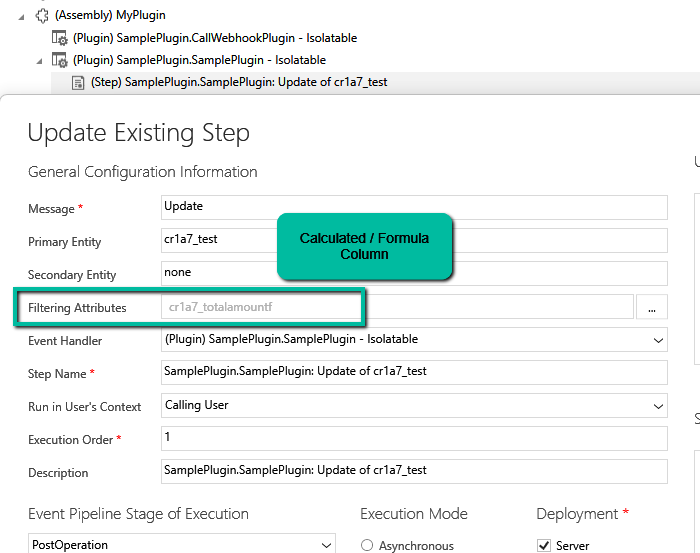
A screenshot of a computer

AI-generated content may be incorrect.

Here we updated the Unit Price, which changed the Total Amount, but we do not see any trace log generated.

A screenshot of a computer

AI-generated content may be incorrect.

Now we have updated the filtering attribute to be Quantity and Unit Price the field used by the Calculated column.

A screenshot of a computer

AI-generated content may be incorrect.

We updated both the Quantity and Unit Price and see the log generated i.e. plugin triggered.

A computer screen with a green arrow pointing to a white box

AI-generated content may be incorrect.

The trace log –

A screenshot of a computer

AI-generated content may be incorrect.

While plugins can’t directly trigger on the calculated column changes, this workaround ensures we still get the desired automation.

Hope it helps..

How to deal with the Calculated columns having Null values (Dynamics 365 / Dataverse)


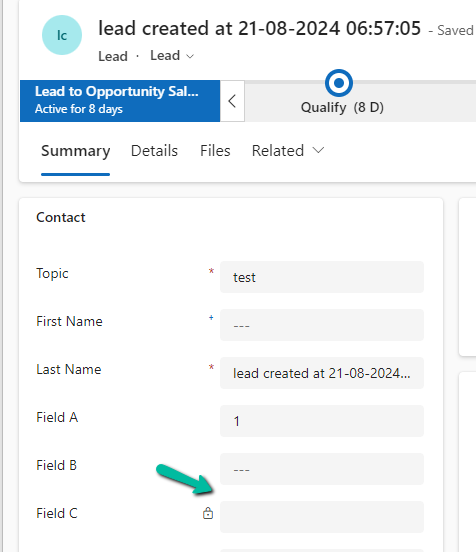
Suppose we have the following whole number fields, where Field C is the calculated column and is the sum of Field A and Field B

A screenshot of a contact form

Description automatically generated

Field C calculated column –

However, if any of the fields used for calculation is null, Field C will also show null.

A screenshot of a computer

Description automatically generated

The way we can resolve it is to put a null check in the formula.

We have created a new calculated column with the below definition.

A screenshot of a computer

Description automatically generated
A screenshot of a computer

Description automatically generated

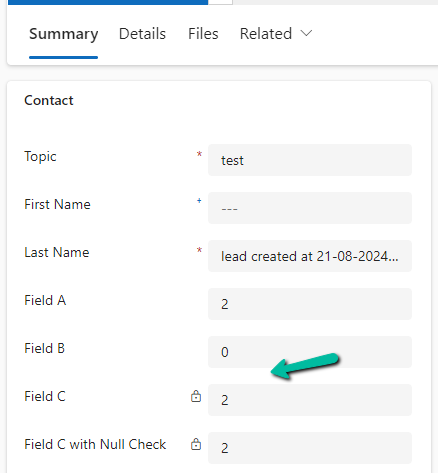
The other option that we can consider is using JavaScript / Business Rules / Additional Calculated Columns to set the default value to 0 in case of null, for the fields being used for calculation.

In the case of 0 also, the calculated columns will work properly.

A screenshot of a computer

Description automatically generated

Finally, now that we have Fx Formula Columns available we can make use of them instead of Calculated Columns.

The formula columns work properly and we do not have to put the null check.

A screenshot of a computer

Description automatically generated

Get more details on Fx Formula Columns

Hope it helps..

Advertisements

Perform Age calculation using Formula Columns in Dataverse / Dynamics 365


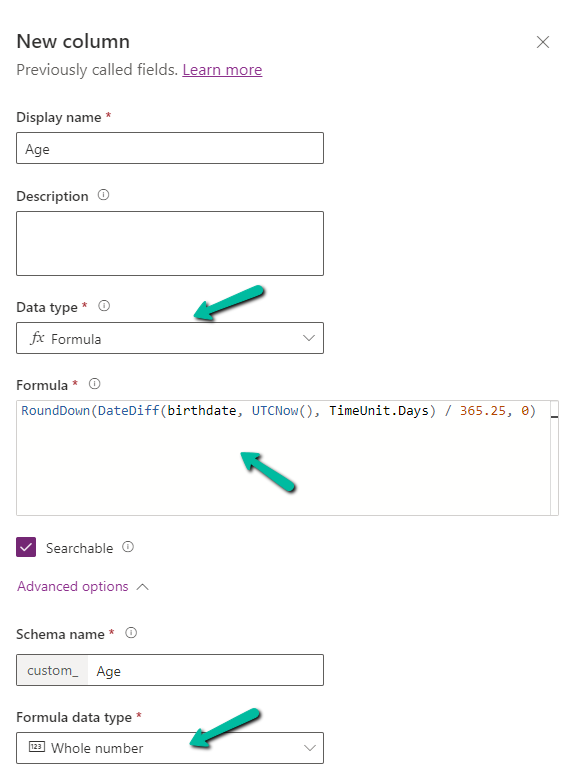
Below we have created a new field of Data Type Formula and Formula Data Type as Whole Number

A screenshot of a computer

Description automatically generated

Specify the following formula.

RoundDown(DateDiff(birthdate, UTCNow(), TimeUnit.Days) / 365.25, 0)

  • DateDiff calculates the difference in days between birthdate and current UTC Date.
  • Dividing by 365.25 takes care of converting the days to years, considering the leap year into account.
  • Roundown takes care of rounding the result to a nearest integer.

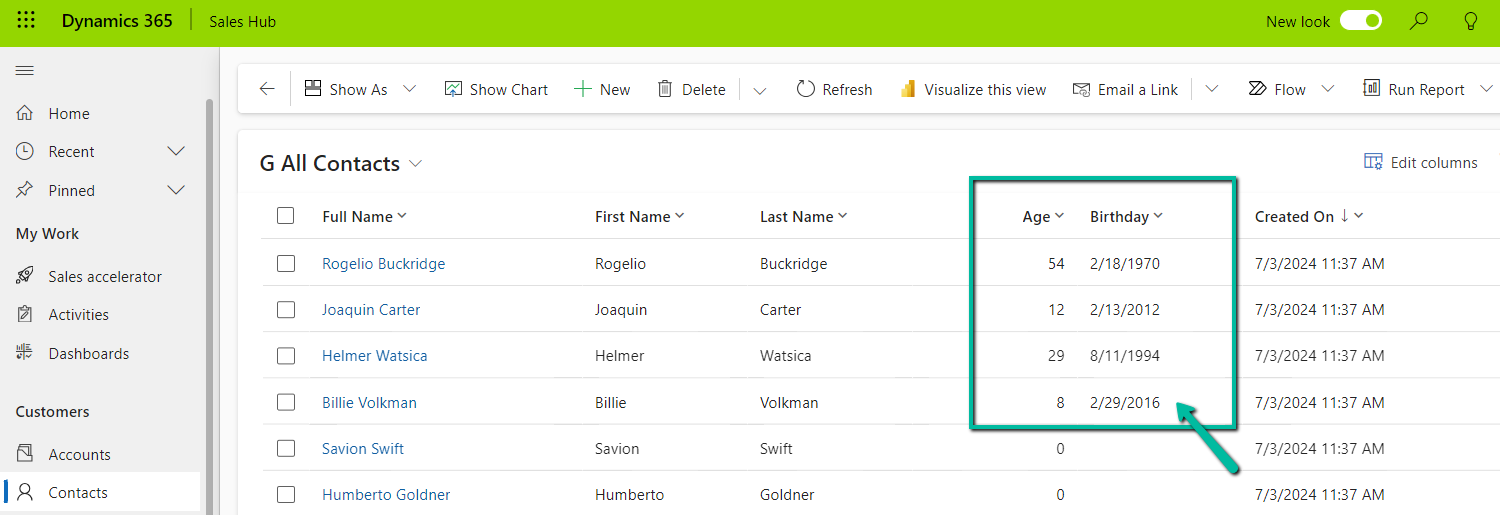
Below we see the field in action.

UTC current date is 10th Wednesday July 2024 for the below example.

A screenshot of a computer

Description automatically generated

Also checkout the helpful video –

and the forum – https://powerusers.microsoft.com/t5/Microsoft-Dataverse/Calculating-age-in-CDS-entity/td-p/495528

Hope it helps..

Advertisements