How to – Use Pre-Filtering in Fetch XML based report in CRM 2013 online.


Hi,

We recently had a requirement to run a report on the form of a custom entity named incident.

It should show incident data and its related entity data i.e. contact and account.

Incident is having n: n relationship with Contact and Account here.

Here we will create three data sets one for showing the incident data and other two for the related entities.

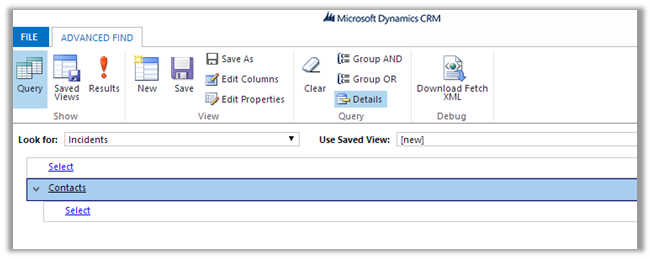
Create a DataSet for Incident to fetch the incident record information (using Advanced Find View).

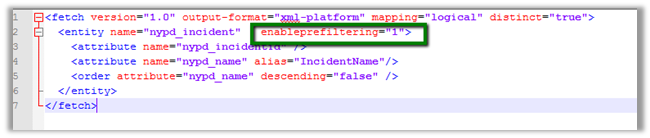
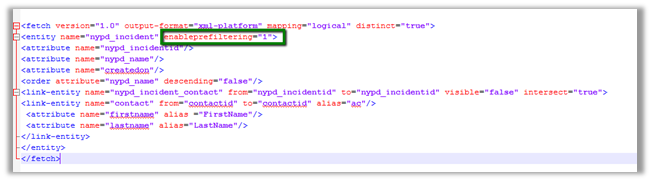
Make sure to set enableprefiltering as 1

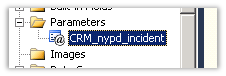
This will create a report parameter in the report

Next we will create a DataSet for Contact entity which is n: n (many to many) related to Incident.

Download the fetch xml and add enableprefiletering attribute

Follow the same step for the DataSet for account entity related to Incident.

While uploading the select Display in value as “Forms for related record types” to run the report in the context of the form.

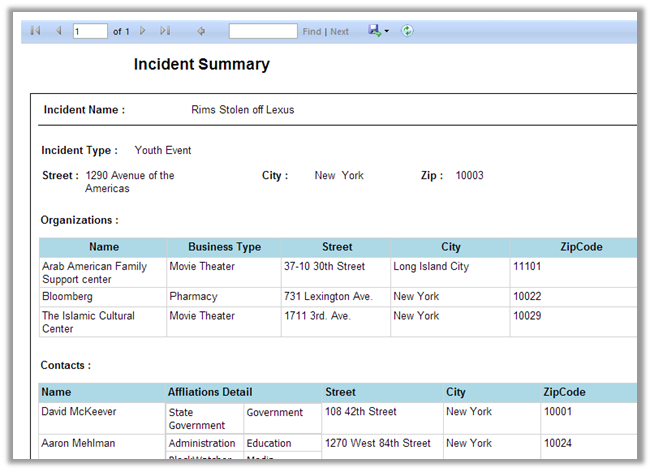
Report will start appearing in the Incident Form

Sample screenshot


Hope it helps

Advertisements

Sample code to get label and value for OptionSet in CRM


Hi,

Just sharing a sample code that retrieves optionset data from CRM and also sorts it. We are using it to bind drop down in one of our custom SharePoint Application Page.


/// <summary>
/// The get global option sets.
/// </summary>
/// <param name="config">
/// The config.
/// </param>
/// <param name="globalOptionSetName">
/// The _global option set name.
/// </param>
/// <returns>
/// The <see cref="List"/>.
/// </returns>
public static List<XrmOptionSet> GetGlobalOptionSets(IOrganizationService config, string globalOptionSetName)
{
using (
XrmServiceContext context = SDKHelper.GetXrmServiceContext(
config.OrganizationServiceUrl,
config.Credentials))
{
RetrieveOptionSetRequest retrieveOptionSetRequest = new RetrieveOptionSetRequest
{
Name =
globalOptionSetName
};

// Execute the request.
RetrieveOptionSetResponse retrieveOptionSetResponse =
(RetrieveOptionSetResponse)context.Execute(retrieveOptionSetRequest);

OptionSetMetadata retrievedOptionSetMetadata =
(OptionSetMetadata)retrieveOptionSetResponse.OptionSetMetadata;

OptionMetadata[] optionList = retrievedOptionSetMetadata.Options.ToArray();

List<XrmOptionSet> optionSetItems = new List<XrmOptionSet>();

// Add each item in OptionMetadata array to the ListItemCollection object.
foreach (OptionMetadata o in optionList)
{
XrmOptionSet xrmOptionSet = new XrmOptionSet();
xrmOptionSet.Label = o.Label.LocalizedLabels[0].Label;
xrmOptionSet.Value = o.Value.Value.ToString(CultureInfo.InvariantCulture);
optionSetItems.Add(xrmOptionSet);
}

optionSetItems.Sort(
delegate(XrmOptionSet thisItem, XrmOptionSet otherItem)
{
return thisItem.Label.CompareTo(otherItem.Label);
});

return optionSetItems;
}
}

/// <summary>
/// The get local option sets.
/// </summary>
/// <param name="config">
/// The config.
/// </param>
/// <param name="entityName">
/// The entity name.
/// </param>
/// <param name="optionSetAttributeName">
/// The option set attribute name.
/// </param>
/// <returns>
/// The <see cref="List"/>.
/// </returns>
public static List<XrmOptionSet> GetLocalOptionSets(
IOrganizationService config,
string entityName,
string optionSetAttributeName)
{
using (
XrmServiceContext context = SDKHelper.GetXrmServiceContext(
config.OrganizationServiceUrl,
config.Credentials))
{
// Create the Attribute Request.
RetrieveAttributeRequest retrieveAttributeRequest = new RetrieveAttributeRequest
{
EntityLogicalName =
entityName,
LogicalName =
optionSetAttributeName,
RetrieveAsIfPublished
= true
};

// Get the Response and MetaData. Then convert to Option MetaData Array.
RetrieveAttributeResponse retrieveAttributeResponse =
(RetrieveAttributeResponse)context.Execute(retrieveAttributeRequest);
PicklistAttributeMetadata retrievedPicklistAttributeMetadata =
(PicklistAttributeMetadata)retrieveAttributeResponse.AttributeMetadata;
OptionMetadata[] optionList = retrievedPicklistAttributeMetadata.OptionSet.Options.ToArray();

List<XrmOptionSet> optionSetItems = new List<XrmOptionSet>();

// Add each item in OptionMetadata array to the ListItemCollection object.
foreach (OptionMetadata o in optionList)
{
XrmOptionSet xrmOptionSet = new XrmOptionSet();
xrmOptionSet.Label = o.Label.LocalizedLabels[0].Label;
xrmOptionSet.Value = o.Value.Value.ToString(CultureInfo.InvariantCulture);
optionSetItems.Add(xrmOptionSet);
}

optionSetItems.Sort(
delegate(XrmOptionSet thisItem, XrmOptionSet otherItem)
{
return thisItem.Label.CompareTo(otherItem.Label);
});

return optionSetItems;
}
}
}

&nbsp;


Hope it helps.

Issue while using SDK.MetaData.js in Chrome in CRM 2013.


Recently was writing a jscript function to populate optionset value using SDK.MetaData.js helper class.

https://nishantrana.wordpress.com/2014/02/05/retrieve-optionset-label-using-sdk-metadata-rertrieveattribute-method-in-javascript-crm-2011/

It was working fine in IE, however I was getting error in Chrome.

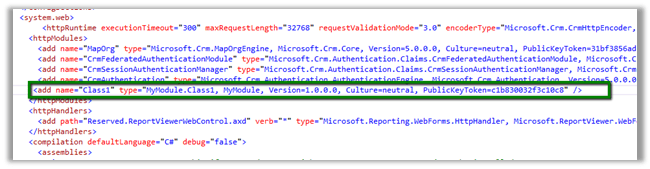
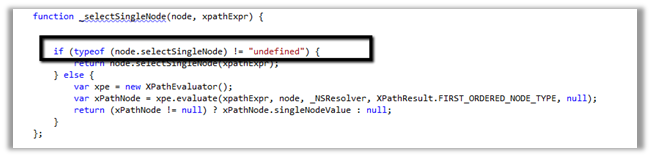
It turned out the following condition was always evaluating as true

And as selectSingleNode is not supported in Chrome we were getting error.

Added the following condition fixed the issue


if (typeof(window.chrome) != ‘undefined’) {


var xpe = new XPathEvaluator();


var xPathNode = xpe.evaluate(xpathExpr, node, _NSResolver, XPathResult.FIRST_ORDERED_NODE_TYPE, null);


return (xPathNode != null) ? xPathNode.singleNodeValue : null;


}


Hope it helps..

Generic SQL Error – RetriveMultiple with ConditionOperator.Contains in CRM


Hi,

Was getting Generic SQL Error while using ConditionOperator.Contains in the ConditionExpression. The requirement was to get all the incident records based on the title attribute value.

condExp.AttributeName = “title”;

condExp.Operator = ConditionOperator.Contains;

condExp.Values.Add(“test”);

The correct way to perform this kind of search is by using Like operator with %.

condExp.AttributeName = “title”;

condExp.Operator = ConditionOperator.Contains;

condExp.Values.Add(“%test%”);

http://social.microsoft.com/Forums/en-US/ede5932b-5ac9-4fc9-86d9-12ef5b2b305d/crm-2011-getting-generic-sql-error-when-performing-retrievemultiple-with?forum=crmdevelopment

Hope it helps.


attributeName error while using join in LINQ in CRM.


I recently wrote a LINQ using joins, all seemed fine, but was still getting the attributeName exception. Finally this post came to rescue.

http://www.develop1.net/public/post/e2809cValue-cannot-be-nullParameter-name-attributeNamee2809d-when-running-Linq-query-with-join.aspx

Hope it helps.


REVIEW: Microsoft Dynamics CRM 2013 Marketing Automation


Hi,

I was very happy to receive the eBook of Microsoft Dynamic CRM 2013 Marketing Automation (Packt Publishing by Alok Singh and Sandeep Chanda) for review few days back.

7227EN_cov

It a mini guide focusing on the Marketing Module of CRM 2013, with around 100 pages divided into 6 chapters. It starts by explaining the challenges faced in marketing and how CRM 2013 can address those challenges. It then explains in detail various feature available in Microsoft Dynamics CRM 2013 that can be leveraged to successful implement the marketing module.It also talks about two of the most popular third party marketplace solution available for marketing module of CRM i.e. ClickDimensions and CoreMotives.

The book is very informative and clearly explains everything that there is in Marketing Module of CRM 2013. The authors are expert and we can clearly see their authority in the subject.

It a must read guide for all the CRM professionals.

Grab your copy here

http://goo.gl/2Ze97E

Bye.