Hi,
Got the below error while trying to install the Report Authoring Extension for CRM 2015.

To fix the issue, open the log file, check for the registry path and delete it

Hope it helps !

Hi,
Got the below error while trying to install the Report Authoring Extension for CRM 2015.
To fix the issue, open the log file, check for the registry path and delete it
Hope it helps !

Hi
Recently we upgraded one of our CRM 2013 Online to CRM 2015 Online Update 1. The approach was installing the solution from our dev to new CRM 2015 environment.
After the update when trying to create a new product we were getting the following error message
“2 is not a valid state code on product with Id 0977da8e-3368-e511-80fc-3863bb359f30”
We raised the support ticket and the resolution was to add the following line of code to the customization.xml file. It seemed that few of the State Code and Status Code were gone missing for the product entity.
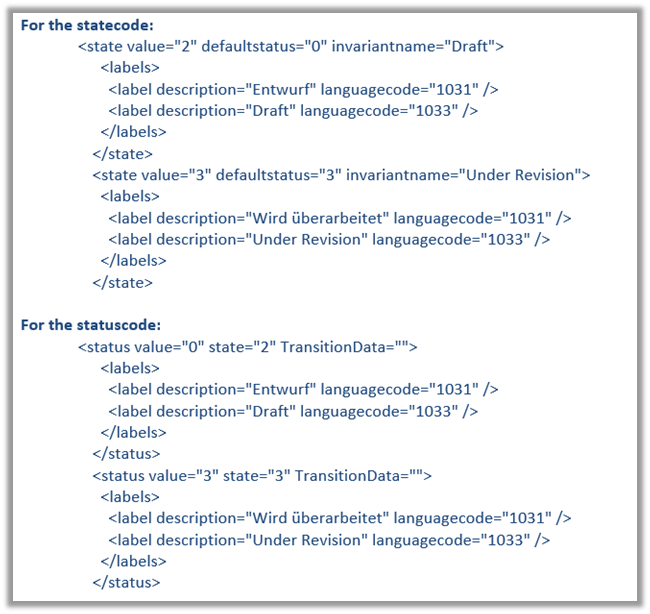
Adding them back resolved the issue.
Hope it helps..

Hi,
Update – Check if the class used for defining Plugin / Workflow Activitiy is PUBLIC
Was getting below error while trying to register Custom Workflow Activity in CRM 2013 Online.

The solution we found out was to use CRM 2015’s Plugin Registration Tool to register it.
Hope it helps.

Hi,
While trying to add a new quote record to an opportunity record, we were getting the below error
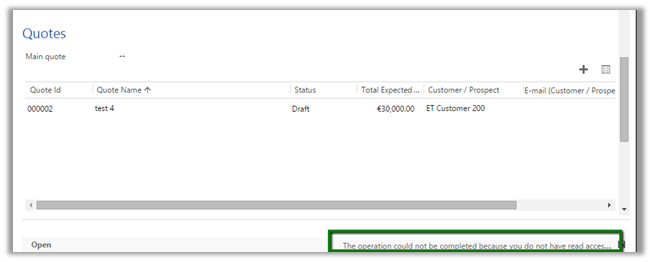
The issue turned out that the user was not having read access to one of the fields in the opportunity record configured through Field Level Security.
Hope it helps..

Hi,
We created a new Action and wanted to trigger a plugin on call of the Action.
However that Action was not appearing in available messages while registering step for Plugin.
Finally got to know that in case of Online need to restart the plugin registration tool for that action to appear in message.

Simple Refresh or Reloading of the organization will not work.
Hope it helps..

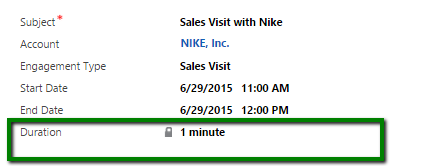
Calculated fields in CRM 2015 (after Update 1) includes functions to calculate difference between date time fields.
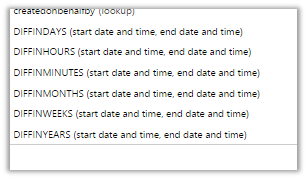
Now we can define the Duration (custom calculated) field in the following manner
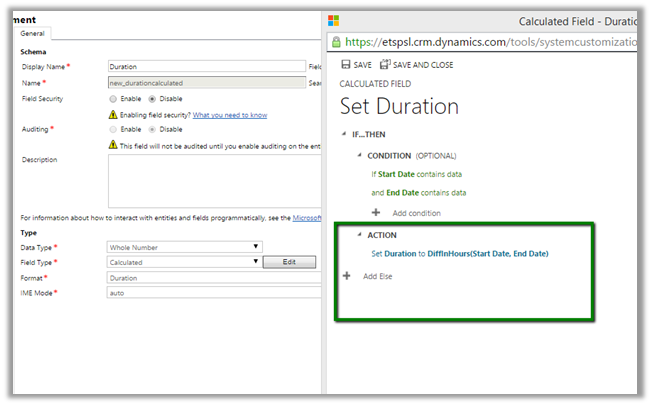
Hope it helps..

 Nishant Rana's Weblog