Using Parallel ForEach and ExecutionTransactionRequest in CRM 2015 for bulk creation of records.


Hi,

Recently we had a requirement to read each account record and create 4 related child records for each of them. First we wrote a console app that will loop through each of the account records and will create corresponding records. The tool was working fine however it’s execution was very slow. It was talking around 5 hours to process 10000 Account records and create corresponding 40000 child records.

To fine tune the performance, we implemented the Parallel.ForEach.

We got the performance improvement, however, we were getting the following error

The communication object, System.ServiceModel.Security.TransportSecurityProtocol, cannot be used for communication because it has been Aborted.

And because of this, we had few Account records which had one, two or three records instead of total 4 related records as required. (as the child records might be getting created by separate thread).

For e.g. we can see that for Account Number 98208 we have four records created one at 8:33, then another one at 8:36, 8:38 and 8:41. (gap of minimum 2 minutes). So if there was an exception we had account records created with less than 4 child records.

We solved this issue by using ExecuteTransactionRequest, and creating all the child records as part of the transaction so that we either have all the 4 records created or none.

All the child records were getting created at the same time

We also got huge performance improvement, the code that was initially taking 5 hours to process 10000 records, was now taking only 1 hour to process them.

Few points to remember:-

  • ExecuteMultipleRequest can contain ExecuteTransactionRequest and not vice versa.
  • Batch Size of 1000 applies to both. In Online the max parallel request could be 2.
  • ExecuteTransactionRequest can have mix of Create and Update Request.

Hope it helps..

SandboxFault.ThrowIfGuidEmpty: entityId in CRM 2015.


Hi,

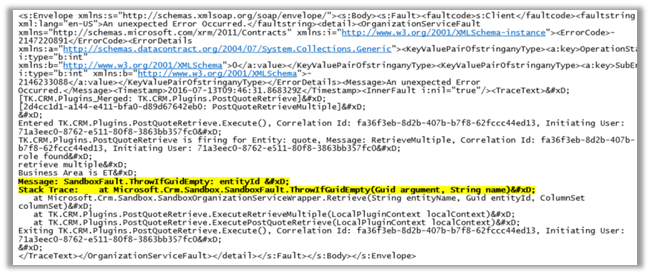
We had one of our Plugins registered in RetrieveMultiple of an entity. And one of the JavaScript was using FetchXML to retrieve that particular entity records. This JavaScript was throwing the following exception

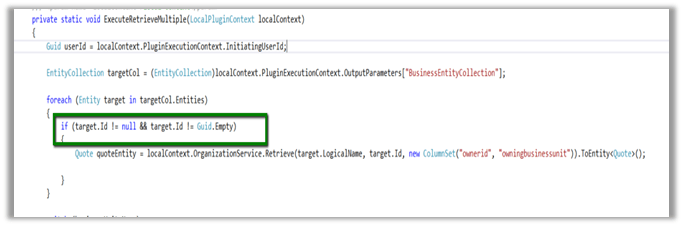
Putting the Guid.Empty check for the OutputParameter EntityCollection fixed the issue.

Hope it helps..

“The content of the import file is not valid. You must select a text file” – Error on Solution Import in CRM 2015 (and earlier)


Hi,

We got this issue while importing (managed) solution from dev to test organization. We had recently deleted one of our existing 1 – n relationship and had created a new n – n relationship between those entities. The issue was that the new relationship had exactly the same schema name as the old relationship which we deleted.

The solution was to delete the newly created n – n relationship in Dev and create a new one with different schema name. After this change we were able to import the solution successfully.

Hope it helps..

Cannot read property ‘raw’ of undefined error message in CRM 2015 (Update 1.2)


Hi,

After our CRM 2015 Online instance was updated with Update 1.2 https://support.microsoft.com/en-us/kb/3141809 , we started getting weird issues around Boolean fields.

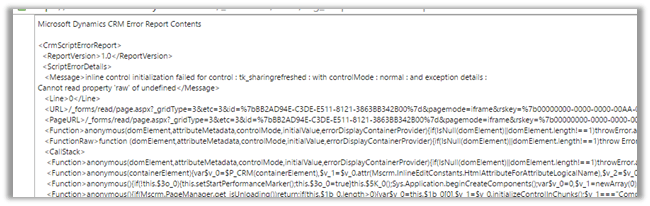
In our existing records having Boolean fields which has no value in it, we started getting the following Jscript error.

<Message>inline control initialization failed for control : tk_sharingrefreshed : with controlMode : normal : and exception details :

Cannot read property ‘raw’ of undefined</Message>


The only way we got it fixed is by changing the format of the field from Two Radio Buttons to either List or Check Box in the form.

Hope it helps ..

Sample code to close a quote as won using WinQuoteRequest in CRM 2016 (and earlier)


Just sharing a sample code to close quote as won through C#


WinQuoteRequest winQuoteRequest = new WinQuoteRequest();
Entity quoteClose = new Entity("quoteclose");
quoteClose.Attributes["quoteid"] = new EntityReference("quote", new Guid("015816C2-2F10-E611-8112-3863BB353ED0"));
quoteClose.Attributes["subject"] = "Quote Close" + DateTime.Now.ToString();
winQuoteRequest.QuoteClose = quoteClose;
winQuoteRequest.Status = new OptionSetValue(-1);
organizationProxy.Execute(winQuoteRequest);

Hope it helps..

Using Rollup fields with Account Hierarchy in CRM 2015.


We recently had a requirement wherein we had one custom entity Financial Detail associated to Account as many to one relationship.

i.e. One account record can have multiple Financial Details records associated.

We had this field Total (currency) in Financial Detail entity of type currency.

The requirement was to have sum of Total of all related Financial Details records of the Account record plus of any Sub Accounts (child accounts up to n level).

It would have been painful if we had to implement the same using Plugin.

This we can achieve easily using Rollup Field in Account

Below is the definition of the Roll up field named Total Rollup

  • Set Hierarchy as Yes.
  • Select Financial Details as the related entity.
  • Filter based only Active records.
  • In Aggregation specify Sum of Total (currency field in Financial Details record).


Hope it helps.