Plugin on Retrieve Multiple in CRM 2015.


Recently we had a requirement to filter sub grid on one of the forms. We thought of using Plugin on Retrieve Multiple for this.

Here we were showing Opportunity Sub Grid on Account form.

So we created a view for Opportunity that will be used as Sub Grid. Used it as Related Record Sub Grid so that we can have the GUID of the Account record being passed to the plugin.

The problem we faced à Sorting and Paging stopped working for the Sub Grid.

http://crmtipoftheday.com/2015/10/05/limitations-of-retrieve-plugins/v

</p>
<p>void IPlugin.Execute(IServiceProvider serviceProvider)<br />
{<br />
// Obtain the execution context from the service provider.<br />
IPluginExecutionContext context = (IPluginExecutionContext)<br />
serviceProvider.GetService(typeof(IPluginExecutionContext));</p>
<p>// Obtain the organization service reference.<br />
IOrganizationServiceFactory serviceFactory = (IOrganizationServiceFactory)serviceProvider.GetService(typeof(IOrganizationServiceFactory));<br />
IOrganizationService service = serviceFactory.CreateOrganizationService(context.UserId);</p>
<p>// The InputParameters collection contains all the data passed in the message request.<br />
if (context.InputParameters.Contains("Query") &amp;&amp; context.InputParameters["Query"] is QueryExpression &amp;&amp; context.MessageName == "RetrieveMultiple")<br />
{<br />
QueryExpression qe = (QueryExpression)context.InputParameters["Query"];<br />
if (qe.EntityName == "opportunity")<br />
{<br />
string currentCustomerId = string.Empty;<br />
ConditionExpression[] filters = qe.Criteria.Conditions.ToArray();<br />
foreach (var filter in filters)<br />
{<br />
currentCustomerId = filter.Values[0].ToString();<br />
}</p>
<p>FetchXmlToQueryExpressionRequest req = new FetchXmlToQueryExpressionRequest();<br />
req.FetchXml = "&lt;fetch version='1.0' output-format='xml-platform' mapping='logical' distinct='false'&gt;" +<br />
"&lt;entity name='opportunity'&gt;" +<br />
" &lt;attribute name='name' /&gt;" +<br />
"&lt;attribute name='customerid' /&gt;" +<br />
"&lt;attribute name='estimatedvalue' /&gt;" +<br />
"&lt;attribute name='statuscode' /&gt;" +<br />
"&lt;attribute name='opportunityid' /&gt;" +<br />
"&lt;order attribute='name' descending='false' /&gt;" +<br />
"&lt;link-entity name='account' from='accountid' to='parentaccountid' alias='ad'&gt;" +<br />
" &lt;filter type='and'&gt;" +<br />
" &lt;filter type='or'&gt;" +<br />
" &lt;condition attribute='accountid' operator='eq' uiname='aaass' uitype='account' value=' " + currentCustomerId + "' /&gt;" +<br />
" &lt;condition attribute='accountid' operator='under' uiname='aaass' uitype='account' value='" + currentCustomerId + "' /&gt;" +<br />
"&lt;/filter&gt;" +<br />
"&lt;/link-entity&gt;" +<br />
"&lt;/entity&gt;" +<br />
"&lt;/fetch&gt;";<br />
FetchXmlToQueryExpressionResponse resp = (FetchXmlToQueryExpressionResponse)service.Execute(req);<br />
context.InputParameters["Query"] = resp.Query;</p>
<p>}<br />
}</p>
<p>

Hope it helps..

Advertisements

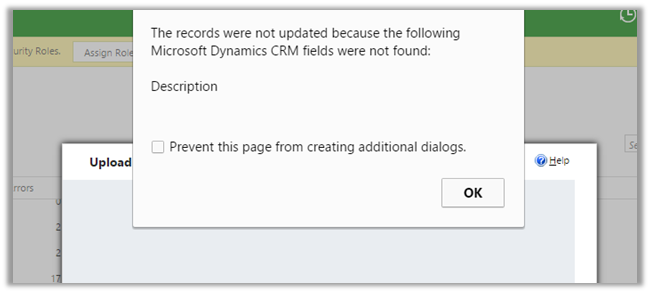
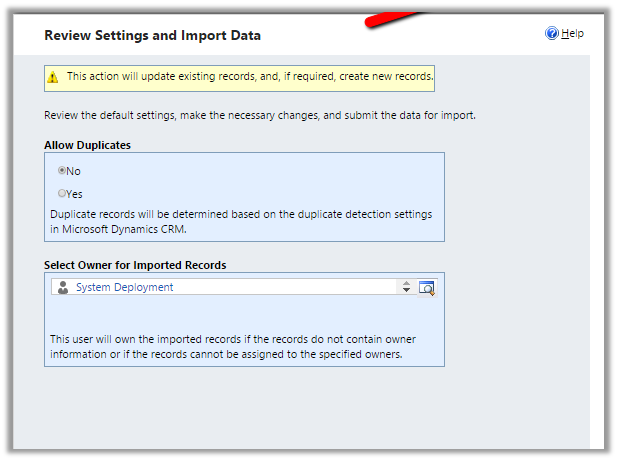
The records were not updated because the following Microsoft Dynamics CRM fields were not found during Import in CRM 2015.


Hi,
Was getting the below error while trying to import few records

The reason being there were two field in the entity having same Display Name. Renaming one of the fields fixed the issue and import ran successfully.

Hope it helps ..

Add Find Columns to Lookup View in CRM.


Hi,

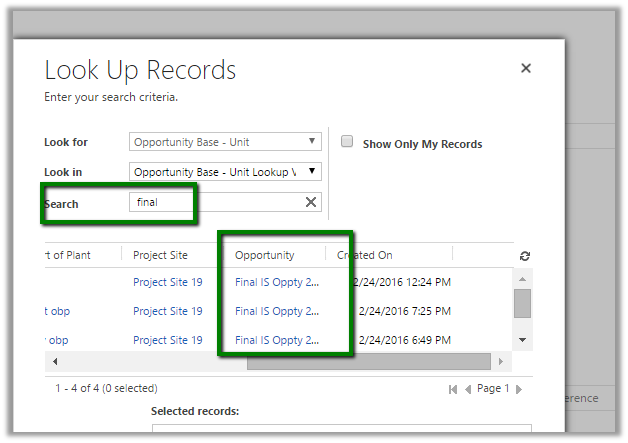
Recently we had a requirement to search based on a particular attribute within the lookup view. The initial thought was to add a Find Columns to the lookup view. But then realized we do not have option of adding Find Columns to the lookup view.

The next thought was if I add that particular field to the list of Find Columns in Quick Find view will it work in Lookup View also? And it worked, basically adding any fields in the Find Column will make it Searchable.

The search works properly in the Lookup View as well as Lookup Inline View.

Hope it helps..

Sample Fetch XML Report using Multivalued Parameter (in Operator) in CRM


Hi,

Sharing a sample report which shows the usage of Multi Value parameter in filter.

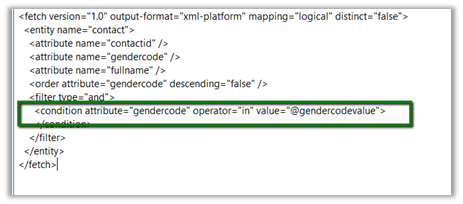
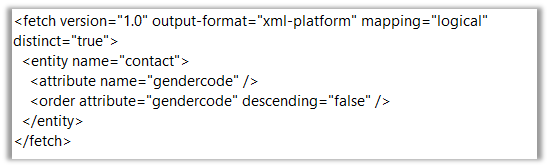
Replace the Condition generated in the Fetch xml query using Advanced Find

As following

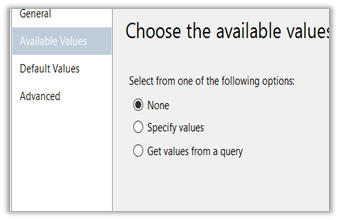
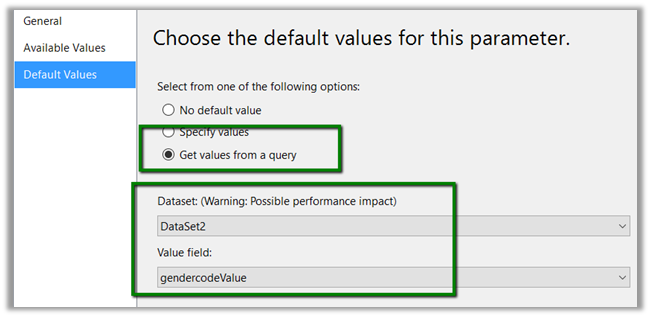
Create another DataSet to provide value for @gendercodevalue parameter.

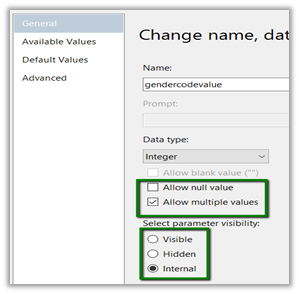
Set @gendercodevalue parameter as following ( internal – if we do not want user to select or specify value for it in report)

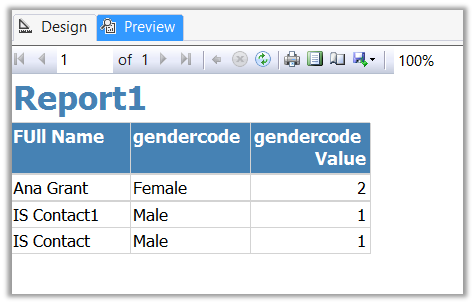
Preview:

Hope it helps..

Advertisements
Fixed – “The server is busy and the request was not completed. Try again later” or “usersettings with Id = ‘’ does not exist” in Plugin in CRM 2013\2015.


Hi,

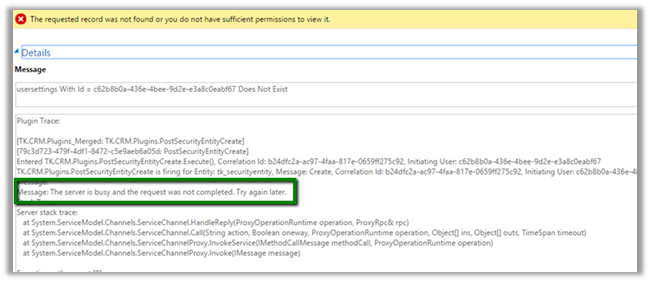
Our plugin was failing repeatedly with the below error message.

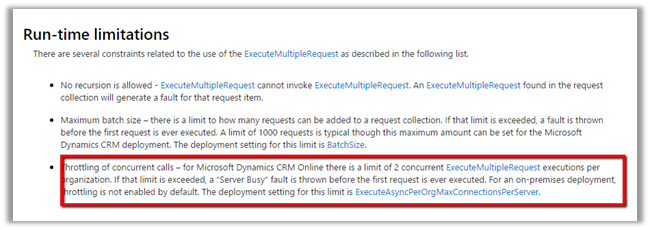
After some analysis we realized that it was because of using ExecuteMultipleRequest in the plugin and as we had multiple ExecuteMultipleRequest running at the same time. And as mentioned in the MSDN

https://msdn.microsoft.com/en-in/library/jj863631.aspx

We refactored the code to execute one request at a time and it fixed the issue.

Hope it helps..

Using RetrievePrincipalAccessRequest in CRM


Hi,

Recently had a requirement to show\hide a ribbon button based on the condition i.e. if a user has Write access to that record show it else hide it.

Here either the user can have Write access to the record through the one of the security roles assigned to him or through the team which has that rights.

In this case we can use RetrievePrincipalAccessRequest which returns as response all the right user had on that particular record either through his own security roles or teams he is part of.

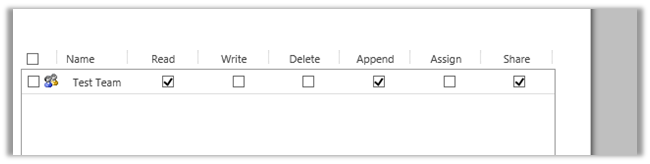
For e.g. we give following rights on a particular record to a team (which the user is part of)

If we check the rights user has on the record using RetrievePrincipalAccessRequest we get the following response (combination of all the rights either through sharing or his own security roles)

[


RetrievePrincipalAccessRequest request = new RetrievePrincipalAccessRequest();

// system user or team
request.Principal = new EntityReference("systemuser", new Guid("EBEECB5F-2D60-E511-80F8-3863BB357FC0"));

// record for which we want to check the access
request.Target = new EntityReference("is_productionsite", new Guid("15734DF9-31DD-E511-810E-3863BB353ED0"));

RetrievePrincipalAccessResponse resp = (RetrievePrincipalAccessResponse)orgService.Execute(request);


Hope it helps.