While going through various videos on Microsoft Dynamics CRM, found these 2 nice videos on Package Deployer Tool and Configuration Tool.
Do check it out
Hope it helps..

While going through various videos on Microsoft Dynamics CRM, found these 2 nice videos on Package Deployer Tool and Configuration Tool.
Do check it out
Hope it helps..

Hi,
Got this error while trying to import a managed solution in CRM 2016 Online.
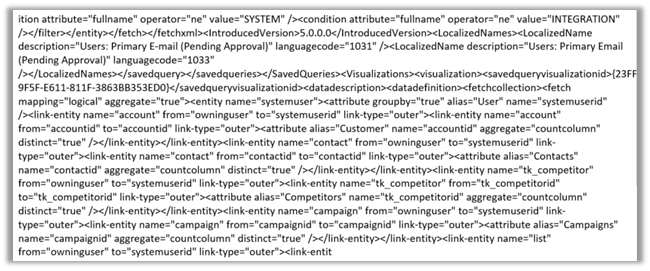
During analysis we figured out that it was pointing to one of the charts created for System User Entity. It seemed like chart’s xml was modified after export and then imported. The xml definition of the chart contained distinct keyword.
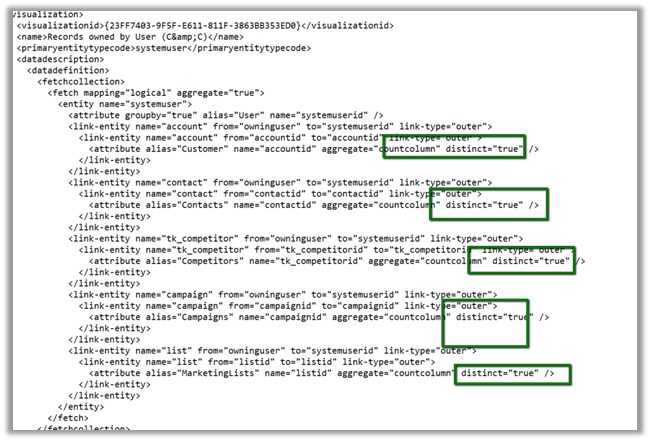
Removing the distinct keyword from the Chart definition and importing it back and then importing the managed solution with this updated chart got imported without any error.
Hope it helps..

We had one of our plugins on Create of Opportunity however during the import of the Opportunity record it was not working properly. We had the Depth check in our plugin code to check for infinite loop as the same plugin was being used for Update also.
After some debugging we realized that Depth value is 2 instead of 1 during import.
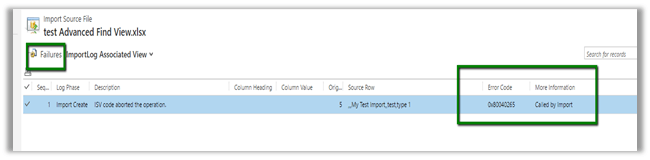
To test this, we created a sample plugin for create of Test entity record and then imported the Test entity records.
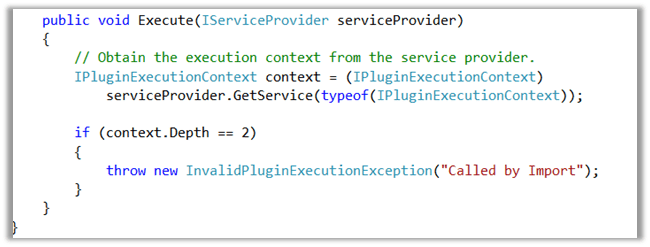
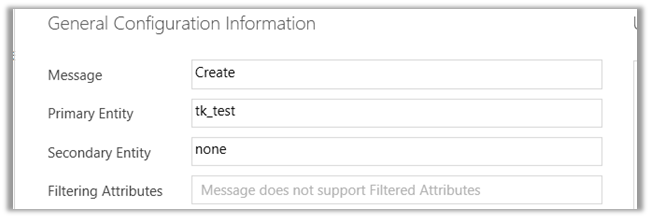
As expected the import failed and we got our custom exception in it.
Hope this helps..

Recently had a requirement to set Access Mode of around 500 users to Administrative from Read – Write. We wrote an on demand workflow for that. However, running that workflow on those 500 records in a batch of 100 records was causing them to stuck in waiting stage and we had to then manually resume those workflow instance. So we ended up writing a Console Application for that.
   QueryExpression queryExpression = new QueryExpression();
            queryExpression.EntityName = "systemuser";
            queryExpression.ColumnSet = new ColumnSet();
            queryExpression.ColumnSet.AddColumn("fullname");

            ConditionExpression conditionExpression1 = new ConditionExpression();
            conditionExpression1.AttributeName = "tk_businessarea";
            conditionExpression1.Values.Add("EE286698-AF08-E311-B55E-1CC1DE6DAA0B");
            conditionExpression1.Operator = ConditionOperator.Equal;

            ConditionExpression conditionExpression2 = new ConditionExpression();
            conditionExpression2.AttributeName = "isdisabled";
            conditionExpression2.Values.Add(false);
            conditionExpression2.Operator = ConditionOperator.Equal;

            // access mode ==> 0 --> Read Write and 1 --> Adminstrative
            ConditionExpression conditionExpression3 = new ConditionExpression();
            conditionExpression3.AttributeName = "accessmode";
            conditionExpression3.Values.Add(1);
            conditionExpression3.Operator = ConditionOperator.Equal;

            queryExpression.Criteria.AddCondition(conditionExpression1);
            queryExpression.Criteria.AddCondition(conditionExpression2);
            queryExpression.Criteria.AddCondition(conditionExpression3);

            queryExpression.Criteria.FilterOperator = LogicalOperator.And;

            EntityCollection entityColl = organizationProxy.RetrieveMultiple(queryExpression);
            foreach(var entity in entityColl.Entities)
            {
                Entity userEntity = new Entity("systemuser");
                userEntity.Id = entity.Id;
                userEntity.Attributes["accessmode"] = new OptionSetValue(0);
                organizationProxy.Update(userEntity);
            }
Hope it helps !!

Recently we were getting the Generic SQL Error in one of our Plugin which was registered in Create of Opportunity Line.
The scenario was that on qualifying the lead, opportunity was getting created and we had Async Plugin on Create of Opportunity that will create an Opportunity Line and had Sync Plugin on Create of Opportunity Line that was updating the parent Opportunity. This issue was occurring randomly.
We observed the following, that if both the Plugin are registered as Sync or Async the issue doesn’t occur. It also doesn’t occur if we have Opportunity Plugin on Create as Sync and the one on Opp. Line as Async.
The other way of solving the issue was to introduce delay before updating the Parent Opportunity from the child opportunity line create Plugin.

Hope this helps..

Hi,
We had one of our Plugins registered in RetrieveMultiple of an entity. And one of the JavaScript was using FetchXML to retrieve that particular entity records. This JavaScript was throwing the following exception
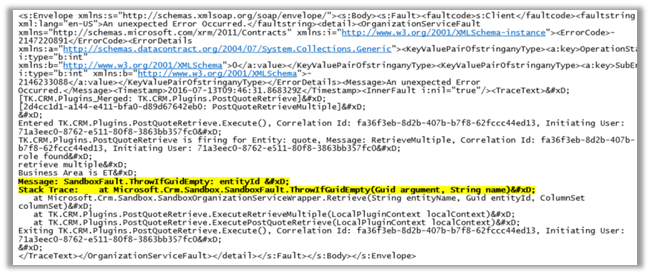
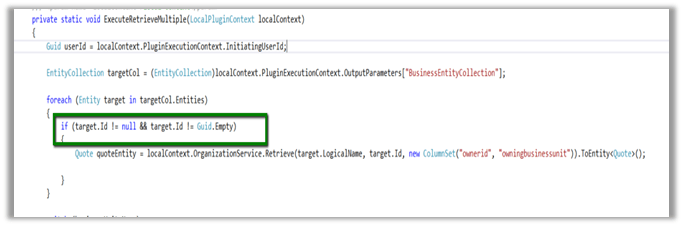
Putting the Guid.Empty check for the OutputParameter EntityCollection fixed the issue.
Hope it helps..

 Nishant Rana's Weblog