Hierarchical Security Modelling (Manager Hierarchy) in CRM 2015


Hierarchical Security is a new security feature introduced in CRM.

It could be either

Manager Hierarchy or Custom Position Hierarchy based.

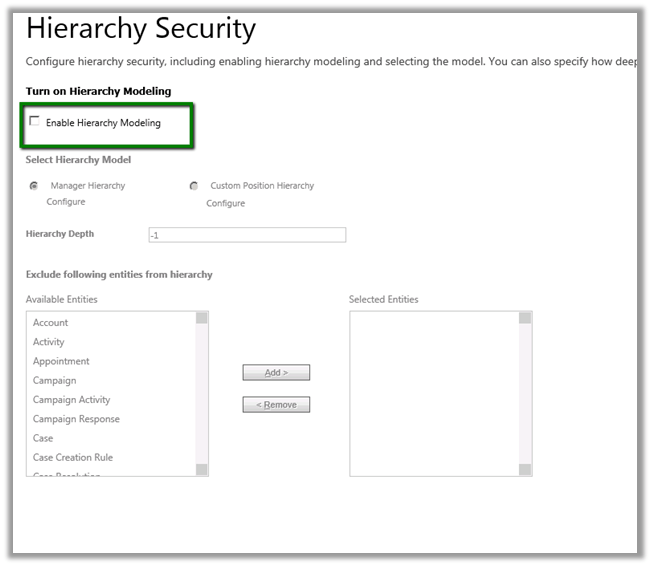
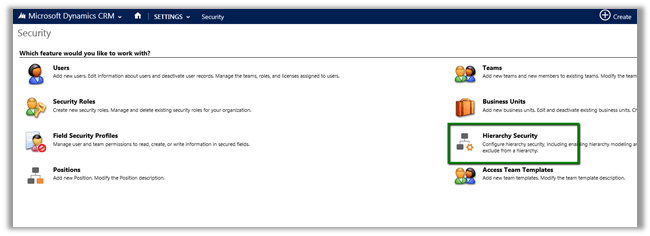
To enable it we need to go to

Settings à Security
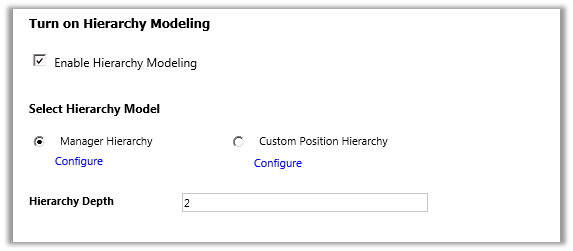
Let us enable Hierarchy Modelling and set the Hierarchy Depth as 2.

With depth we can specify up to what level the user can have read access to the records. Here the user will have write, update, append, append to access to those records only which are accessible to his direct report.
 

Let us say we have 3 users in our system.

  • User A, Manager A and CEO.
  • CEO is manager of Manager A and Manager A is manager of User A in our system.
  • CEO à manager à Manager A à manager à User A
  • User A is sales person and creates a contact record.
  • Now in our configuration we have set depth as 2 which means.
  • CEO user will have Write access to record that are accessible to Manager A and Read Access to those records accessible to User A.
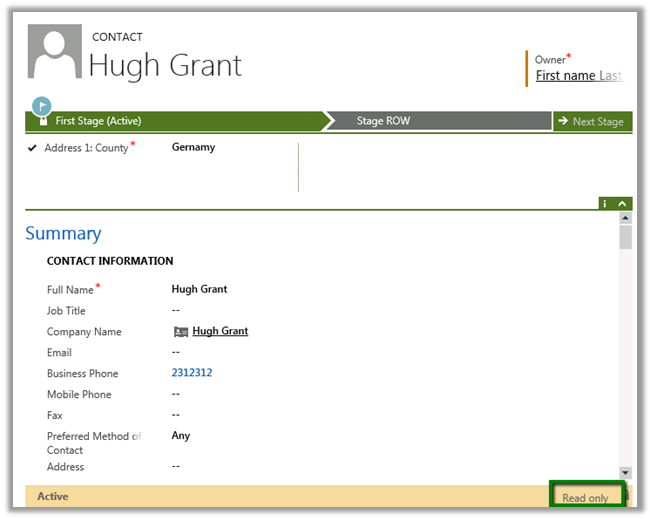
  • CEO opens a record created by User A. ( it is read only for him)
  • Manager A opens the same record (He can edit it)
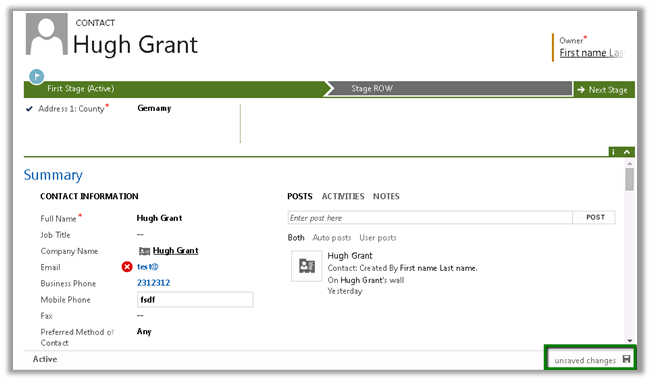
  • Now Manager A creates a new contact record. This record will be editable for CEO as he is the manager of Manager A

Hierarchical Security Model works in conjunction with all the other existing security models.


Fixed – Unhandled Exception: Microsoft.Crm.CrmException: Cannot create a lookup without the required parameters in CRM 2013


Hi,

Got this error in one of the steps in the Action. It was updating one of the lookup field using Update step.

The issue was that the lookup field was not in the form. Adding that particular field in the form back resolved the issue.

Hope this helps..


JavaScript Reference for Microsoft Dynamics CRM 2011 / 2013


Nice compilation ..

http://www.stunnware.com/crm2/topic.aspx?id=js13

Using CreateMultiEntityAssociation method of CRMServiceClient for 1: n records.


Hi,

CreateMultiEntityAssociation method of CrmServiceclient can be used for associating 1 : n records i.e. if we have one contact record that we want to associate with multiple opportunity record ( 1-n) then we can use that method. This way we wont have to update each individual record.

http://msdn.microsoft.com/en-us/library/microsoft.xrm.tooling.connector.crmserviceclient.createmultientityassociation.aspx

Sample Code


Uri organizationUri = new Uri("http://server/crmrog/XRMServices/2011/Organization.svc");
Uri homeRealmUri = null;
ClientCredentials credentials = new ClientCredentials();
credentials.Windows.ClientCredential = System.Net.CredentialCache.DefaultCredentials;
OrganizationServiceProxy orgProxy = new OrganizationServiceProxy(organizationUri, homeRealmUri, credentials, null);

CrmServiceClient crmServiceClient = new CrmServiceClient(orgProxy);
List<Guid> lstOpportunityGuid = new List<Guid>();
lstOpportunityGuid.Add(new Guid("9DDCE989-0738-E411-9878-00155D56FF56"));
lstOpportunityGuid.Add(new Guid("019E1598-0738-E411-9878-00155D56FF56"));
lstOpportunityGuid.Add(new Guid("EA393A91-0738-E411-9878-00155D56FF56"));
crmServiceClient.CreateMultiEntityAssociation("contact", new Guid("CF1FC3C0-0738-E411-9878-00155D56FF56"), "opportunity", lstOpportunityGuid, "opportunity_customer_contacts");

Hope it helps ..

Business Rules in CRM 2013


Just writing down few key points regarding the Business Rules in CRM 2013.

  • Business Rules run on client side so any custom server side code or data import will bypass it.
  • Business Rule can be created for a specific form or all the forms of the entity.


  • Business Rules execute offline and also for tablet client.
  • If else conditions are not supported.
  • Rule are created for a single entity.
  • No support for or conditions.
  • If there is custom JavaScript and two business rules written on same condition, the custom JavaScript will run first, followed by the order in which the business rules have been activated.


Calling a Windows Authenticated WCF Service in a Plugin in CRM


Hi,

Suppose we need to call the service created here in our plugin

https://nishantrana.me/2014/09/05/configure-a-wcf-service-for-windows-authentication/

As plugin don’t have configuration file, we need to specify binding information in Code.

The sample code to call the WCF Service by passing Network Credentials


private static void CallWCFService()
{
BasicHttpBinding binding = new BasicHttpBinding();
binding.Security.Mode = BasicHttpSecurityMode.TransportCredentialOnly;
binding.Security.Transport.ClientCredentialType = HttpClientCredentialType.Windows;

// Specify the endpointAddress
EndpointAddress endpointAddress = new EndpointAddress(new Uri("http://servername:port/Service1.svc"));

ServiceReference1.Service1Client client = new ServiceReference1.Service1Client(binding, endpointAddress);
if (client.ChannelFactory.Credentials != null)
client.ChannelFactory.Credentials.Windows.ClientCredential = new System.Net.NetworkCredential("username", "password", "domain");
if (client.ClientCredentials != null)
client.ClientCredentials.Windows.AllowedImpersonationLevel = System.Security.Principal.TokenImpersonationLevel.Delegation;
MessageBox.Show(client.GetData(1));
}

Hope it helps ..