Sample code to check if User is a member of a team C# CRM 2011/2013/2015


Sharing sample code to check if a user belongs to a team or not


public static bool IsTeamMember(Guid teamID, Guid userID, IOrganizationService service)
{
QueryExpression query = new QueryExpression("team");
query.ColumnSet = new ColumnSet(true);
query.Criteria.AddCondition(new ConditionExpression("teamid", ConditionOperator.Equal, teamID));
LinkEntity link = query.AddLink("teammembership", "teamid", "teamid");
link.LinkCriteria.AddCondition(new ConditionExpression("systemuserid", ConditionOperator.Equal, userID));
var results = service.RetrieveMultiple(query);

if (results.Entities.Count > 0)
{
return true;
}
else
{
return false;
}
}

Hope it helps.

Sample code to read XML Data from Web Resource in Plugin in CRM 2011/2013/2015


We recently had a requirement to read xml data stored in a particular web resource in plugin.

Sharing the sample code


public static Dictionary<string, string> GetMarketClusterAndMarketSegment(string webresourceName, string buildingTypeValue, IOrganizationService organizationService)
{
Dictionary<string, string> dictionaryMarket = new Dictionary<string, string>();

// tk_et_oppline_marketingfilterpicklists
// create request to retrieve Webresource
ColumnSet cols = new ColumnSet();
cols.AddColumn("content");
QueryByAttribute requestWebResource = new QueryByAttribute
{
EntityName = "webresource",
ColumnSet = cols
};
requestWebResource.Attributes.AddRange("name");
requestWebResource.Values.AddRange(webresourceName);

Entity webResourceEntity = null;
EntityCollection webResourceEntityCollection = organizationService.RetrieveMultiple(requestWebResource);

if (webResourceEntityCollection.Entities.Count > 0)
{
webResourceEntity = webResourceEntityCollection.Entities[0];
byte[] binary = Convert.FromBase64String(webResourceEntity.Attributes["content"].ToString());
string resourceContent = System.Text.Encoding.UTF8.GetString(binary);
string byteOrderMarkUtf8 = Encoding.UTF8.GetString(Encoding.UTF8.GetPreamble());
if (resourceContent.StartsWith(byteOrderMarkUtf8))
{
resourceContent = resourceContent.Remove(0, byteOrderMarkUtf8.Length);
}

XDocument xmlDocument = XDocument.Parse(resourceContent);

var marketSegment = from t in xmlDocument.Descendants("ParentField").ElementAt(1).Descendants("ShowOption")
where t.Attribute("value").Value.Equals(buildingTypeValue)
select new
{
marketSegmentValue = t.Parent.Attribute("value").Value,
marketSegmentLabel = t.Parent.Attribute("label").Value
};

foreach (var v in marketSegment)
{
dictionaryMarket.Add("marketsegment", v.marketSegmentValue);
var marketCluster = from t in xmlDocument.Descendants("ParentField").ElementAt(0).Descendants("ShowOption")
where t.Attribute("value").Value.Equals(v.marketSegmentValue)
select new
{
marketClusterValue = t.Parent.Attribute("value").Value,
marketClusterLabel = t.Parent.Attribute("label").Value
};

foreach (var m in marketCluster)
{
dictionaryMarket.Add("marketcluster", m.marketClusterValue);
}
}
}

return dictionaryMarket;
}
}

Hope it helps..

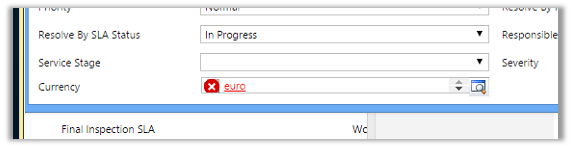
“The entity referenced by this process includes a currency value that does not exist in your organization. Select a different currency and try again.” Error in Workflow in CRM.


After importing one of the solution was getting the below error in one of the processes

The solution was to find out the Currency field and set it to the currency that existed in our organization.

Hope it helps..

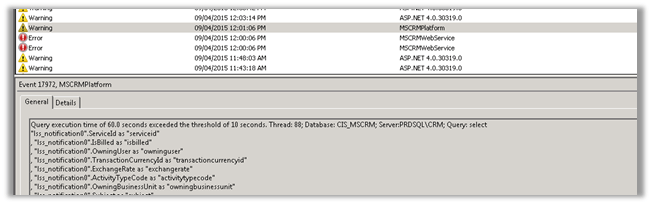
Query execution time of 60 seconds exceeded the threshold of 10 seconds warning in CRM 2013.


Query execution time of 60 seconds exceeded the threshold of 10 seconds warning in CRM 2013.

We were getting the below warning in one of our test environment

On analyzing figured out that one of the plugin was using retrieve with ColumnSet(true) option i.e. retrieving all the columns of the entity which was not required in this case.

Fetching only the required columns fixed the warning.

The other option could have been indexing or increate the value for LongQueryThersholdInSeconds column in ServerSetingProperties table of MSCRM_Config.

Helpful posts

http://blog.edgewater.com/2013/01/07/microsoft-dynamics-crm-querying-data-using-late-binding-versus-early-binding/

http://www.dynamicscrmpros.com/mscrmplatform-warning-in-event-viewer-in-microsoft-dynamics-cr-event-id-17972/

Hope it helps..


Plugin when a case (incident) is resolved in CRM 2013.


Hi,

To fire a plugin when an incident is resolved we need to register the plugin in

Close message for the incident entity.

And in the input parameters of the context we need to check for IncidentResolution.

This entity is a special entity that holds the information about the incident record that is being closed.

The sample plugin below gets the actual end attribute value of IncidentResolution and subtracts created on attribute value of Incident to get the duration and updates the duration (custom field) in the case being resolved.


public void Execute(IServiceProvider serviceProvider)
{
// Obtain the execution context from the service provider.
IPluginExecutionContext context = (IPluginExecutionContext)
serviceProvider.GetService(typeof(IPluginExecutionContext));

if (context.InputParameters.Contains("IncidentResolution"))
{
Entity incidentResolution = (Entity)context.InputParameters["IncidentResolution"];
Guid relatedIncidentGuid = ((EntityReference)incidentResolution.Attributes["incidentid"]).Id;
DateTime actualEnd = DateTime.Now;
if (incidentResolution.Contains("actualend"))
{
actualEnd = (DateTime)incidentResolution.Attributes["actualend"];
}
// Obtain the organization service reference.
IOrganizationServiceFactory serviceFactory = (IOrganizationServiceFactory)serviceProvider.GetService(typeof(IOrganizationServiceFactory));
IOrganizationService service = serviceFactory.CreateOrganizationService(context.UserId);

// Get created on of incident

Entity retrievedIncident = service.Retrieve("incident", relatedIncidentGuid, new ColumnSet(true));
DateTime createdOn = (DateTime)retrievedIncident.Attributes["createdon"];

TimeSpan totalTimeSpent = actualEnd.Subtract(createdOn);

Entity incident = new Entity("incident");
incident.Id = relatedIncidentGuid;
incident.Attributes["new_duration"] = totalTimeSpent.TotalMinutes;
service.Update(incident);

}
}

The helpful post

http://varghesedanny.com/2011/02/24/plug-in-when-case-incident-is-closed/


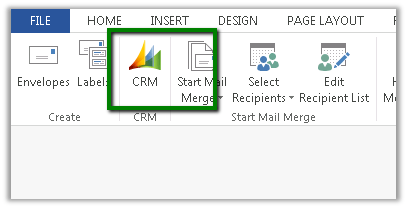
Fixed – CRM Mail Merge button missing in Word 2013.


Hi,

The way we got it working was to download the following template

CRMTemplate.dotm

From the following location

http://server:port/_static/Tools/MailMerge/CRMTemplate.dotm

And place it at the following location

C:\Users\[username]\AppData\Roaming\Microsoft\Templates

Followed by restarting Word.

The helpful post

http://www.experts-exchange.com/Software/Microsoft_Applications/Microsoft_Dynamics/Q_27749742.html