Fixed – MisMatchingOAuthClaims – One or more claims either missing or does not match with the open authentication access control policy error – OAuth Authentication for HTTP Request trigger (Power Automate)ismatch


Recently while trying to invoke the HTTP Request trigger, on passing the token we got the below error from the Postman

{
    "error": {
        "code": "MisMatchingOAuthClaims",
        "message": "One or more claims either missing or does not match with the open authentication access control policy."
    }
}

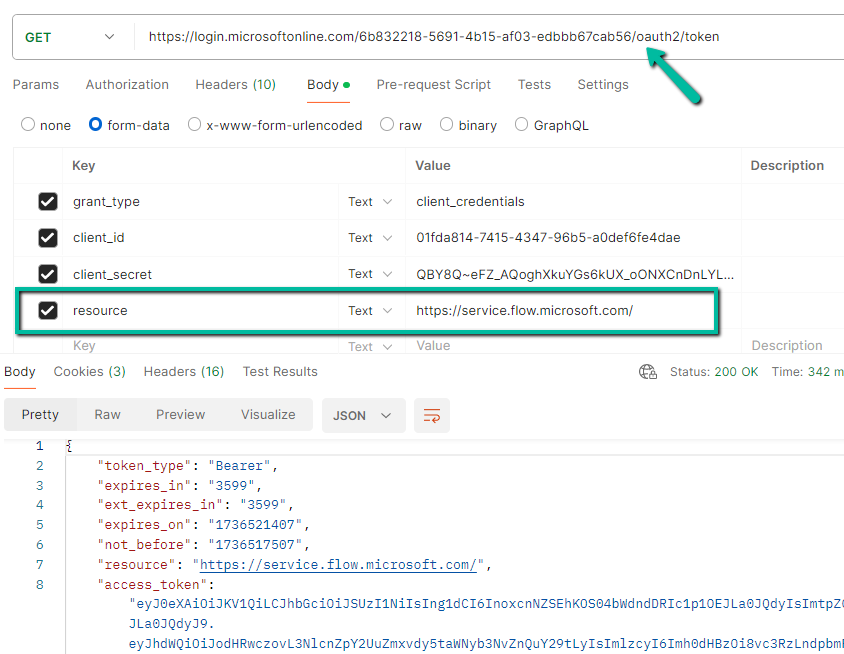
Turned out that we missed the trailing slash for the resource’s value while generating the token.

Audience values as expected in the claim.

A screenshot of a computer

Description automatically generated

https://jwt.io/

On correcting the resource value, and using the new generated token,

fixed the mismatch claim issue

Below is our flow

A screenshot of a computer

Description automatically generated

Refer – https://nishantrana.me/2025/01/28/configure-oauth-authentication-for-http-request-triggers-specific-users-in-my-tenant-power-automate/

Get more details

Hope it helps..

Advertisements

Configure OAuth authentication for HTTP Request Triggers (Specific users in my tenant) – Power Automate


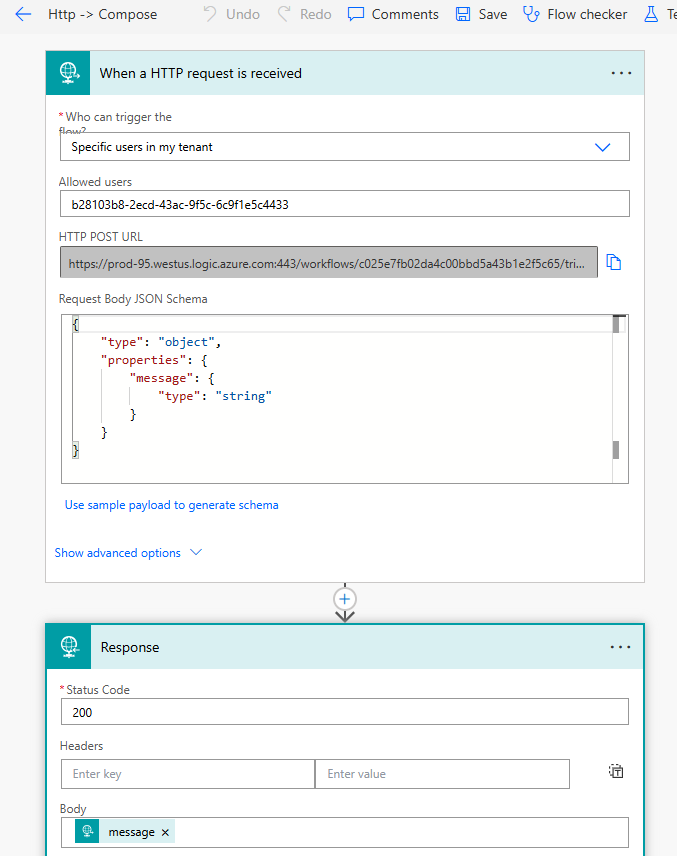
Below is our final Power Automate Cloud Flow which uses the HTTP request trigger followed by Response action.

The Allows Users = Specific users in my tenant option ensures that only authorized users in the tenant can trigger the flow while leveraging the security provided by Oauth authentication and Azure AD.

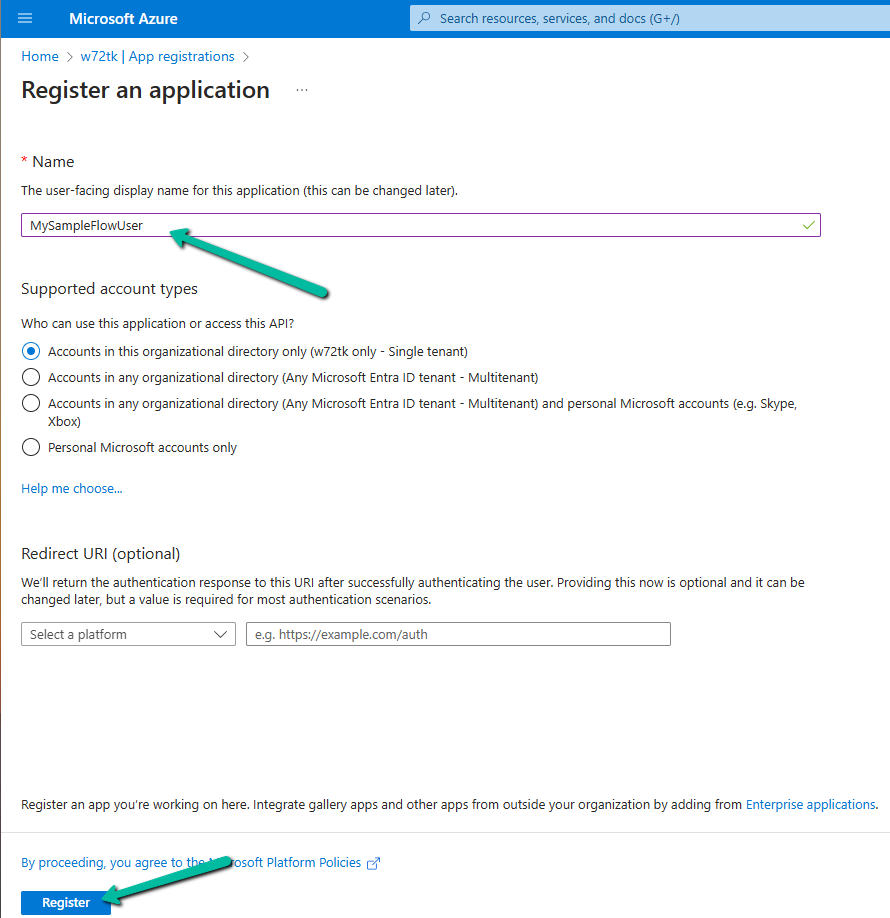
Let us first register an App in the Azure AD.

A screenshot of a computer

Description automatically generated

Go to API Permissions → Add a permission.

A screenshot of a computer

Description automatically generated

Select User permission.

A screenshot of a computer

Description automatically generated

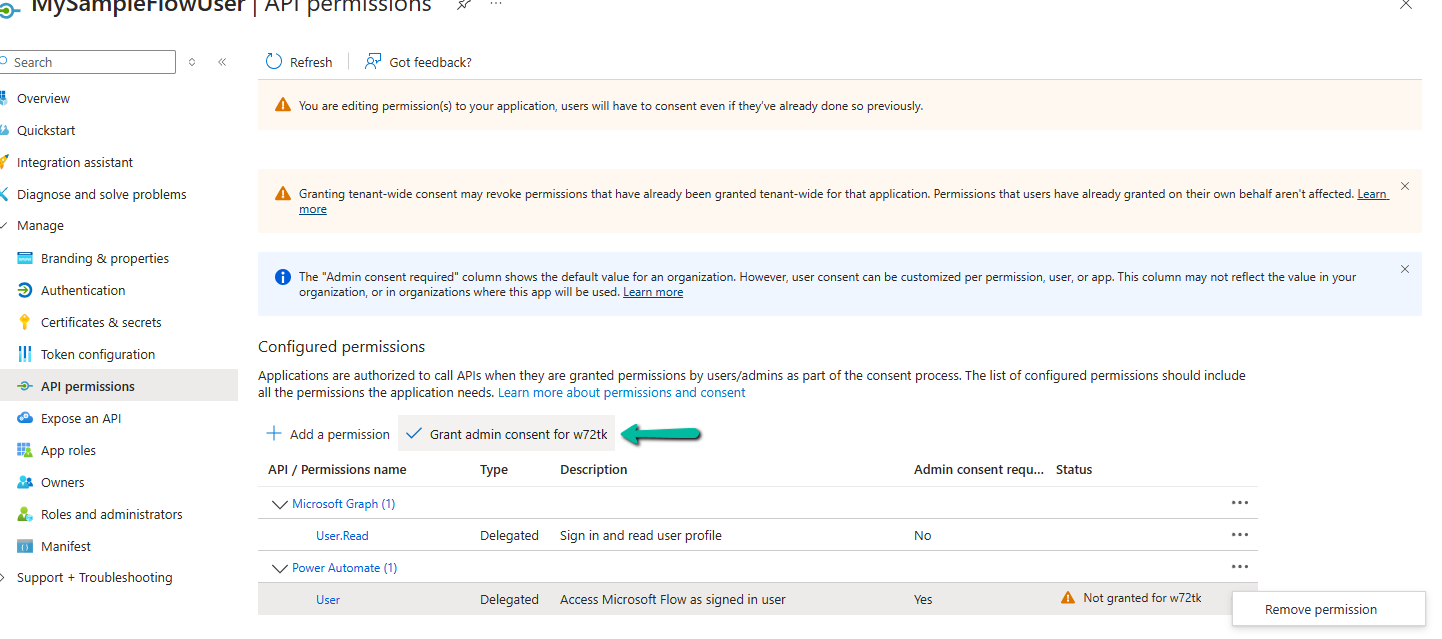
Grant admin consent

A screenshot of a computer

Description automatically generated

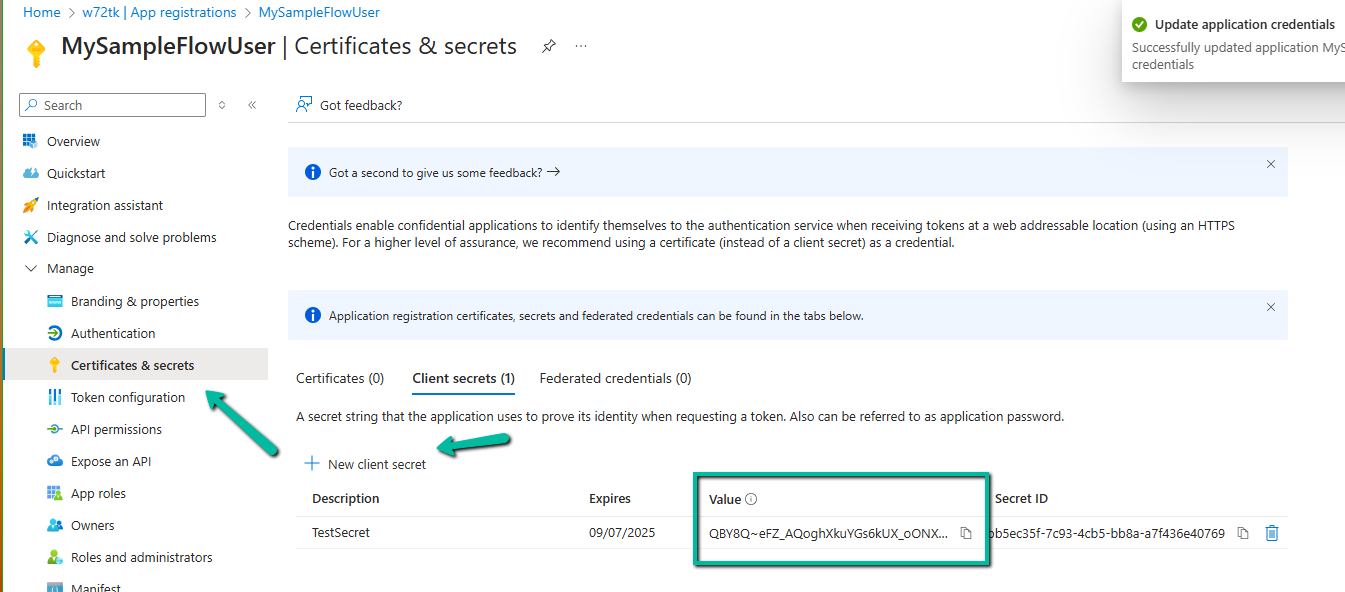
Generate and copy the client secret.

A screenshot of a computer

Description automatically generated

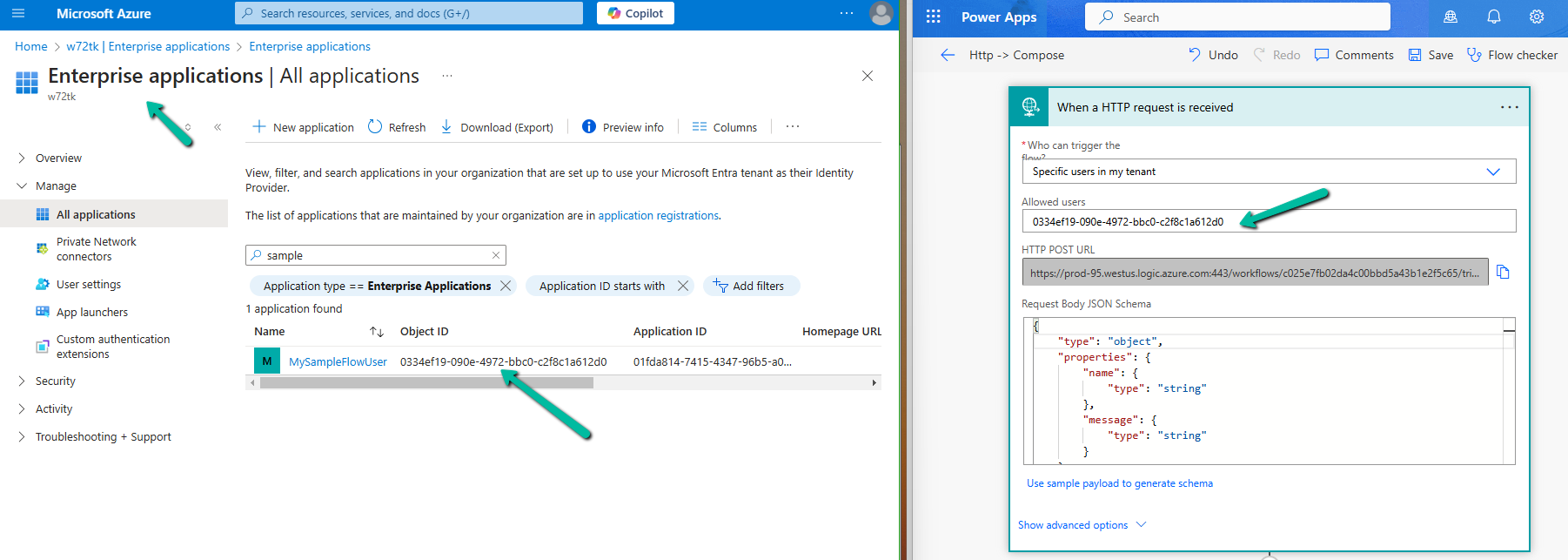
Navigate to Enterprise Applications, search for the app, copy the Object ID of the App, and specify the same for the Allowed users property in the HTTP request trigger.

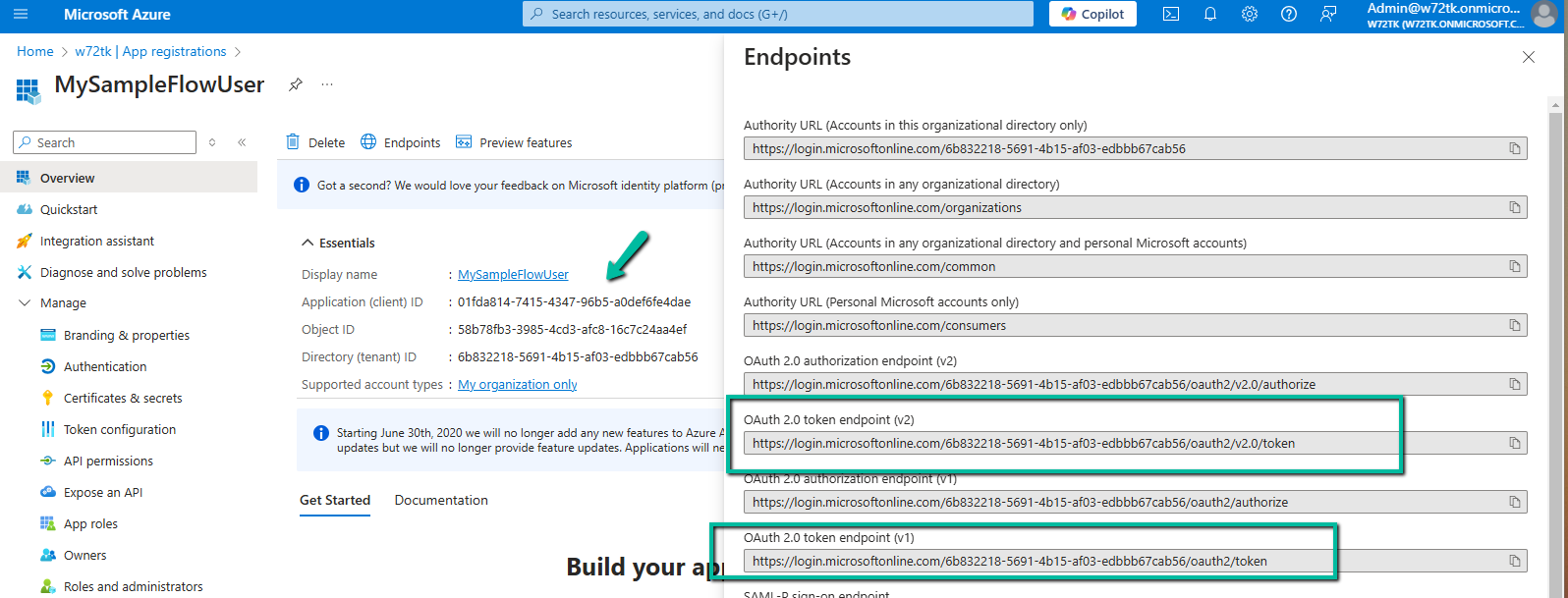
Now let us use the Postman to generate the token and call the flow. Note down the Application (client) ID and we can either use the v1 or v2 Oauth token endpoint.

A screenshot of a computer

Description automatically generated

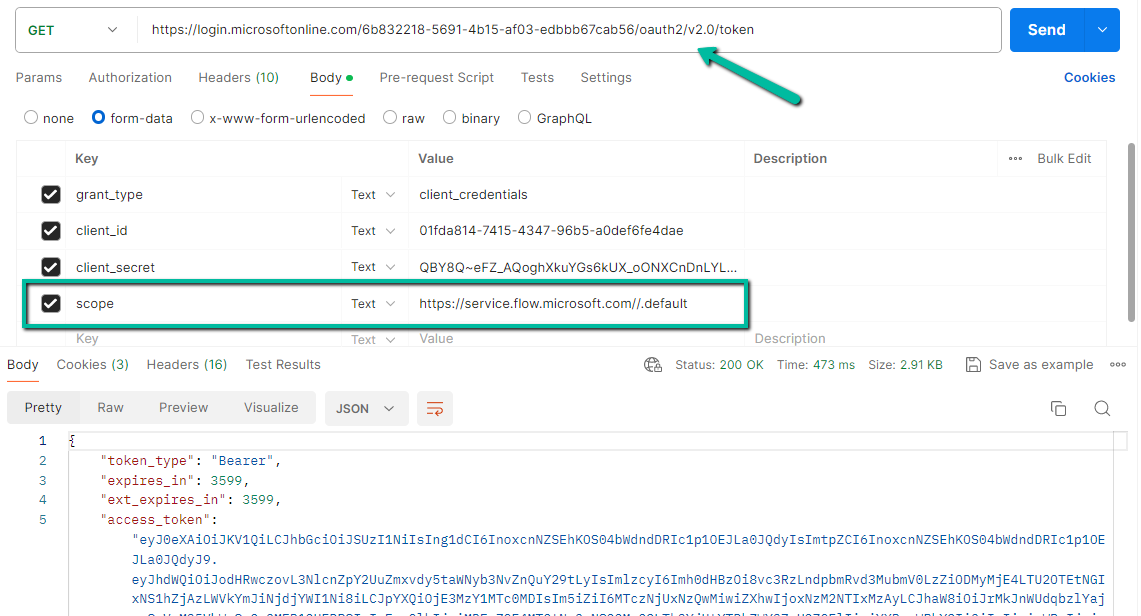
Specify the following values if using the v2 endpoint to generate the token.

A screenshot of a computer

Description automatically generated

https://login.microsoftonline.com/6b832218-5691-4b15-af03-edbbb67cab56/oauth2/v2.0/token

scope = https://service.flow.microsoft.com//.default

and for v1 token endpoint

https://login.microsoftonline.com/6b832218-5691-4b15-af03-edbbb67cab56/oauth2/token

resource = https://service.flow.microsoft.com/

A screenshot of a computer

Description automatically generated

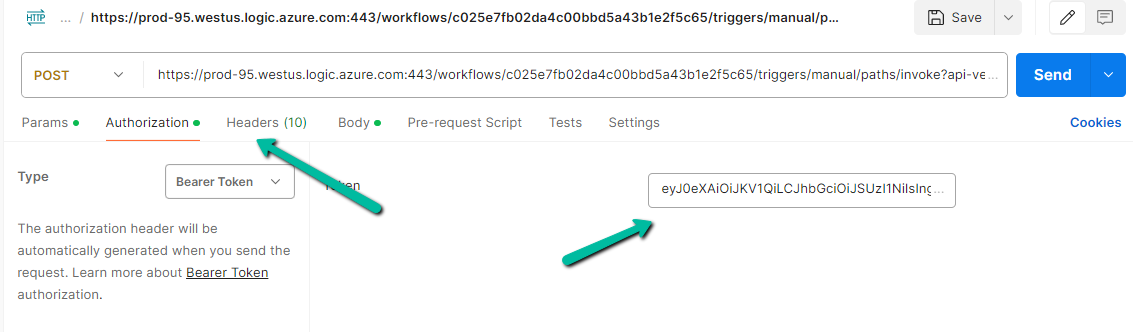
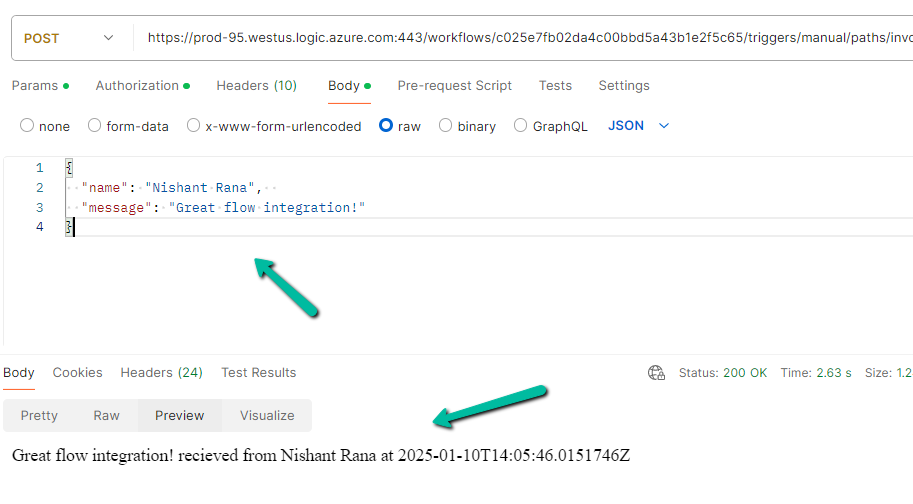
Now specify the URL generated for the HTTP Request Trigger, copy the Token generated, and for the body specify the following value expected.

A screen shot of a computer

Description automatically generated

We can see the response received successfully from the flow.

A screenshot of a computer

Description automatically generated

Get more details

Also, refer

OAuth Authentication for Power Automate HTTP Request Trigger | Dynamic Bites

https://www.beringer.net/beringerblog/microsoft-power-automate-http-trigger-and-restricting-users/

https://manish-solanki.com/how-to-secure-http-trigger-end-point-for-3rd-party-application/

Hope it helps..

Advertisements

Fixed – Action Failed: A record with matching key values already exists (DuplicateRecord)– Power Automate / Dataverse


Recently while testing one of our old existing flows, we got the below error

Action ‘Create_Child_Log_Record’ failed: A record with matching key values already exists.

{

“error”: {

“code”: “0x80040237”,

“message”: “A record with matching key values already exists.”,

“@Microsoft.PowerApps.CDS.ErrorDetails.ApiExceptionSourceKey”: “Plugin/Microsoft.Crm.ObjectModel.CustomBusinessEntityService”,

“@Microsoft.PowerApps.CDS.ErrorDetails.ApiStepKey”: “38200c13-a28e-ee11-be36-002248933483”,

“@Microsoft.PowerApps.CDS.ErrorDetails.ApiDepthKey”: “1”,

“@Microsoft.PowerApps.CDS.ErrorDetails.ApiExceptionMessageName”: “DuplicateRecord”,

“@Microsoft.PowerApps.CDS.ErrorDetails.ApiExceptionHttpStatusCode”: “412”,

“@Microsoft.PowerApps.CDS.ErrorDetails.SqlExceptionMessage”: “Violation of PRIMARY KEY constraint ‘PK_childBase’. Cannot insert duplicate key in object ‘dbo.bew_logBase’. The duplicate key value is .”,

“@Microsoft.PowerApps.CDS.HelpLink”: “http://go.microsoft.com/fwlink/?LinkID=398563&error=Microsoft.Crm.CrmException%3a80040237&client=platform”,

“@Microsoft.PowerApps.CDS.InnerError.Message”: “Cannot insert duplicate key.”

}

}

Basically on Create or Update of the Parent Record it was creating a corresponding child log record, recording changes in the status field of the parent record.

The issue was in the Create Child Log record step, here it was setting the Primary Key Field / GUID field of the Child Log record being created with the GUID of the Parent record.

This worked for the 1st record, but when trying to create any new record with the same parent’s GUID, it was throwing the duplicate exception as it would be the same parent GUID getting specified.

On clearing that field, and letting the system generate the GUID, the flow ran successfully.

Hope it helps..
Advertisements

Enable / Disable (turn on / turn off) multiple cloud flows using Code – Power Automate


Sharing a sample code through which we can Enable / Disable (turn on / turn off) multiple cloud flows using code.

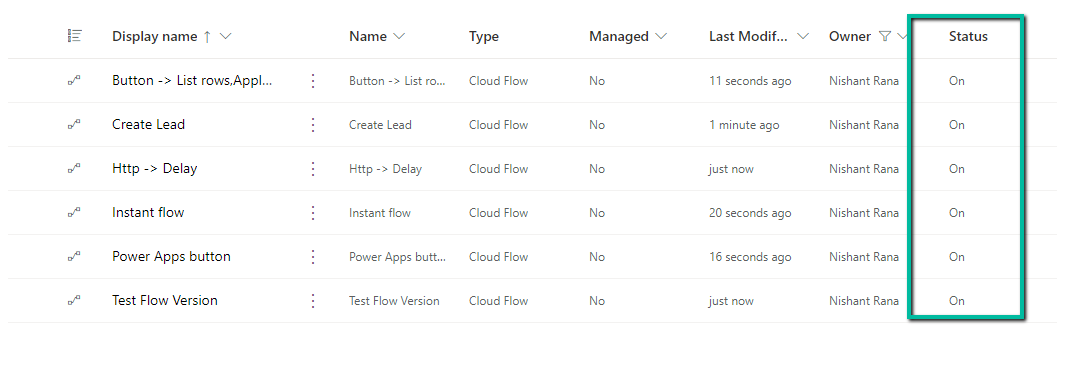
E.g. here we want to turn on the below Cloud Flows owned by a specific user.

A screenshot of a computer

Description automatically generated

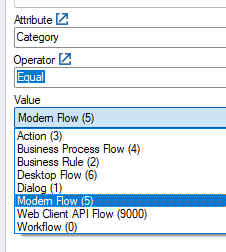
Table name – Workflow and Category – Modern Flow.

Below is the sample code, code is straightforward, we are updating the status of the record.

const string connectionString = "AuthType = ClientSecret; " +
                                         "Url = https://[org].crm.dynamics.com/;" +
                                         "ClientId=[GUID];" +
                                         "ClientSecret=[Secret]";

        var myServiceClient = new CrmServiceClient(connectionString);
        if (myServiceClient.IsReady)
        {
            var query = new QueryExpression("workflow");
            query.ColumnSet.AddColumns("workflowid", "name", "ownerid", "statecode", "category", "primaryentity", "solutionid");
            // Category = 5 (Modern Flow)
            query.Criteria.AddCondition("category", ConditionOperator.Equal, 5);
            // owned by a specific user
            query.Criteria.AddCondition("ownerid", ConditionOperator.Equal, "23d670c5-d02d-ee11-bdf4-0022482db7da");
            var cloudFlows = myServiceClient.RetrieveMultiple(query);
            foreach(var flow in cloudFlows.Entities)
            {
                var myFlow = new Entity("workflow", flow.Id);
                // statecode = 1 (Turn On) and  statecode = 0 (Turn Off)
                myFlow.Attributes["statecode"] = new OptionSetValue(1);
                myServiceClient.Update(myFlow);
            }        
        }

The result :

A screenshot of a computer

Description automatically generated

Check Work with cloud flows using code.

Hope it helps..
Advertisements

Fixed- Flow not getting triggered (Callback Registration)– Power Automate / Dataverse


Recently in one of our test environments, the out the box flow – “Deserialization of Inspection Definition” wasn’t getting triggered even when it was in the On state.

This was because the “CallbackRegistrationExpanderFilter” operation was failing with the below error.

Unexpected failure during ValidateUserAccessCached. Ex: System.ServiceModel.FaultException`1[Microsoft.Xrm.Sdk.OrganizationServiceFault]: The specified user(Id) is disabled. Consider enabling this user. Additional Details: User IsDisabled=True, IsLicensed=True. ImpersonatingSystemUserId. (Fault Detail is equal to Exception details:

ErrorCode: 0x80040225

Message: The specified user(Id = xxxx-xxxx-xxxx-xxx-xxxxxx) is disabled. Consider enabling this user. Additional Details: User IsDisabled=True, IsLicensed=True. ImpersonatingSystemUserId=xxxx-xxxx-xxxx-xxx-xxxxxx)

TimeStamp: 2024-05-20T21:50:42.6724270Z

More on Callback Registration Expander Job – https://rajeevpentyala.com/2021/01/30/callback-registration-expander-system-jobs-waiting-for-resources/

This was because the flow’s corresponding Callback Registration record’s Owner was a user whose account was now disabled in CRM.

So the option to fix was to Turn off and Turn On the flow, which will delete the old callback registration record and will create a new one with the user who is turning off / on the flow. Updating the owner of the flow will not work here, as it won’t update the existing callback registration record.

Also we had another observation, if a callback registration is owned by a user who is a proper / enabled user in CRM, simply turning off and on the flow using a different user account will not delete the existing callback registration record and create a new one with that particular user as the owner. In this case we will have to explicitly delete the existing callback registration record.

Hope it helps..
Advertisements

Fixed – Resource not found for the segment action error – Power Automate / Dataverse


Recently we got the error for one of our flows – Resource not found for the segment ‘dow_ArtefactMoveNotesAttacmentToBlob’.

The flow was running fine with no errors a couple of days back.

On trying to edit the flow we can see it not listing the action in the Perform an unbound action step, instead giving “Request to XRM API failed with error: ‘ Message:Code:InnerError:’.

A screenshot of a computer

Description automatically generated

Eventually, as the error message suggests, we realized that the dev team had unregistered the action and registered a new action in its place. Updating the action to use the correct / new action fixed the issue for us.

A computer screen shot of a computer screen

Description automatically generated

The error could also show up if the action is in the disabled state.

https://community.dynamics.com/forums/thread/details/?threadid=1069c036-683b-4178-a592-6deae37002eb

https://community.dynamics.com/forums/thread/details/?threadid=1069c036-683b-4178-a592-6deae37002eb

Hope it helps..

Advertisements