Exception: Microsoft.SharePoint.Upgrade.SPUpgradeException: Sequence [Microsoft.SharePoint.Upgrade.SPConfigurationDatabaseSequence] cannot upgrade an object [SPConfigurationDatabase Name=””] whose build version [12.0.0.6219] is too old. Upgrade requires [12.0.0.6421] or higher.


Hi I got the error while trying to upgrade MOSS 2007 Content Database to SharePoint 2010.

http://blog.tallan.com/2011/03/29/upgrading-a-sharepoint-2007-content-database-to-sharepoint-2010/

The reason was the update requires that MOSS 2007 has the SP2 applied to it.

Check out this extremely helpful post

http://mosshowto.blogspot.com/2010/06/migrating-to-sharepoint-2010.html

Bye

“An Error Has Occurred” while opening form in CRM 2011.


I was getting the following error while opening form of one of the entity (new_client) after upgrading the CRM server from beta version to RTM.

and inside application log

Exception information:

Exception type: NullReferenceException

Exception message: Object reference not set to an instance of an object.

at Microsoft.Crm.Application.Controls.AppNavigationBar.CreateOrderedAreas(NavPaneItems navPaneItems)

at Microsoft.Crm.Application.Controls.AppNavigationBar.ConfigureControl()

at Microsoft.Crm.Application.Components.UI.CrmUIControlBase.ConfigureControlInternal()

at System.Web.UI.Control.PreRenderRecursiveInternal()

at System.Web.UI.Control.PreRenderRecursiveInternal()

at System.Web.UI.Control.PreRenderRecursiveInternal()

at System.Web.UI.Control.PreRenderRecursiveInternal()

at System.Web.UI.Control.PreRenderRecursiveInternal()

at System.Web.UI.Control.PreRenderRecursiveInternal()

at System.Web.UI.Control.PreRenderRecursiveInternal()

at System.Web.UI.Page.ProcessRequestMain(Boolean includeStagesBeforeAsyncPoint, Boolean includeStagesAfterAsyncPoint)

The issue was we had commented some of the NavBarArea tag within the FormXml of the Entity.

<!–<NavBarArea Id=”Service”><Titles><Title LCID=”1033″ Text=”Service”/></Titles></NavBarArea><NavBarArea Id=”Marketing”><Titles><Title LCID=”1033″ Text=”Marketing”/></Titles></NavBarArea>–>

Uncommenting it and importing it again resolved the issue.

This was not creating issue for the beta version, however it seems that it won’t allow us to do that in the RC or RTM version.

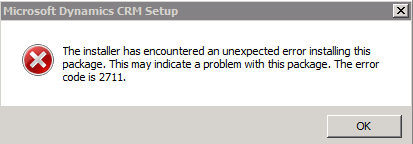
The installer has encountered an unexpected error installing this package. This may indicate a problem with this package. The error code is 2711.


I was getting the above error while uninstalling CRM 2011 Server beta.

Uninstalling Microsoft Dynamics CRM 2011 for Microsoft Office Outlook before uninstalling Server resolved the issue.

Showing a custom aspx deployed in ISV in IFrame of CRM form (CRM 2011)


We had one of our web application deployed inside ISV folder in CRM 2011. We were showing one of the aspx pages in it inside an IFrame of a form.

First we specified the relative url like this for URL field in CRM form

/ISV/myWebApplication/Default.aspx

However on form we were getting page not found error.

Using developer tools, we found out that it was taking the url (src) for the iframe as

/contoso/isv/myWebApplication/Default.aspx

It was appending the organization name to it.

In CRM 4 this wasn’t the case.

Then we gave the absolute url for URL field in IFrame.

http://servername/isv/myWebApplication/Default.aspx.

However this time also we got page not found error. The url that it was using was

http://servername/contoso/isv/myWebApplication/Default.aspx i.e. again appending orgname to it.

The way we got it working was to define the src of the Iframe dynamically in the form onload event’s JavaScript.

function IframeSrc(){

crmForm.all.IFRAME_Map.src=”/ISV/ myWebApplication / Default.aspx”;

}

Hope it helps !

“The password supplied with the username .\Administrator was not correct. Verify that it was entered correctly and try again” Error while creating web application in SharePoint 2010


.

I got that error while creating a new web application in SharePoint 2010. Actually recently we had changed the password of the administrator account. However we had to follow this extra step to get the things working properly.

stsadm -o updatefarmcredentials -userlogin <domain\username>password <newpassword>

http://technet.microsoft.com/en-us/library/cc263417(office.12).aspx

Bye..

Wonderful tools to learn Linq and oData Query for CRM 2011


Check out these wonderful tools to lear Linq and oData Query

Bye.

Nishant Rana's Weblog

Everything related to Microsoft .NET Technology

Skip to content ↓