
The CAML query to get the assigned to and to groups for the current user is
View original post 226 more words

The CAML query to get the assigned to and to groups for the current user is
View original post 226 more words

Hi,
Recently I downloaded a SharePoint Hosted app from codepex. I was getting error while deploying the app as it was pointing to SharePoint Site which obviously couldn’t be found.
To specify our own SharePoint site Url we need to edit the [Project].csproj.user file. And specify the correct SharePoint Url over there

Followed by closing and reopening the csproj file.
Hope it helps.

Hi,
Was getting the below error while serializing the CRM Entity as mentioned here
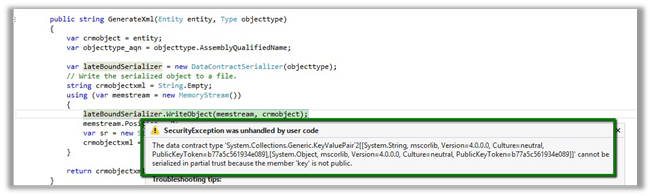
Then gave it a try with a DataContract just to check if it works properly with it or not. It worked properly on the sandbox plugin.
Please check the below discussion for more details.
Bye.

Let us take a simple rest service example here
http://www.rockycherry.net/services/Photos/photos.svc/photos
 It returns the string “You have asked for photos”.
Within the plugin class add references to following assemblies.
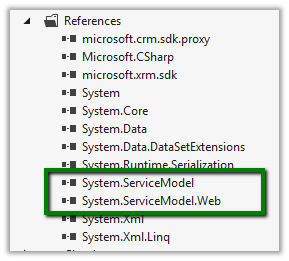
The sample code of the plugin
namespace TestPlugin
{
 public class Class1 : IPlugin
 {
 public void Execute(IServiceProvider serviceProvider)
 {
 IPluginExecutionContext context = (IPluginExecutionContext)serviceProvider.GetService(typeof(IPluginExecutionContext));

 if (context.InputParameters.Contains("Target") && context.InputParameters["Target"] is Entity)
 {

// using WebClient
 WebClient webClient1 = new WebClient();
 string data1 = webClient1.DownloadString("http://www.rockycherry.net/services/Photos/photos.svc/photos");

// using WebChannelFactory
 WebChannelFactory<IPhotos> factory = new WebChannelFactory<IPhotos>(new Uri("http://www.rockycherry.net/services/Photos/photos.svc"));
 IPhotos proxy = factory.CreateChannel();
 string photos = proxy.GetPhotos();

 }

 }
 }

[ServiceContract]
 public interface IPhotos
 {
 [WebGet(UriTemplate = "Photos")]
 [OperationContract]
 string GetPhotos();
 }
}
Register the plugin in Sandbox mode for CRM 2011 online.
Check this wonderful post for all the details
http://rockycherry.net/blog/?p=179
Hope it helps.

Hi,
I was getting the above message while analyzing the code coverage for a Unit Test case written for a Plugin using Microsoft Fakes.
Followed this article
And also deleted the .SUO file (hidden file in the root of the solution) and also restarted the Visual Studio. Re-running the code coverage worked properly this time.
Hope it helps.

Hi,
OOB if we try to add\insert sub grid for Contract Line entity in an Entity’s Form we would realize that the Contract Line entity doesn’t show up in the Entity drop down there.
The UNSUPPORTED way to get it enabled is to
Open the OrgName_MSCRM database
Run the following query
update metadataschema.entity
set IsChildEntity=0
where name=‘contractdetail’
This will let us add the sub grid for the contract line entity.

Bye.

 Nishant Rana's Weblog