tagName is null or not an object error in CRM 2011


Hi,

We recently faced this issue in one of our web resources (html). If we are trying to move the bottom scrollbar in the form, we get the below error in jscrpt.

This issue only occurred IE 8 and Update Rollup 15.

It worked properly in IE 9, 10, 11 and Update Rollup 15.

In one of the forums it was suggested that this issue will not occur if we only have UR 12. We tested it and found out that it did work properly in IE 8 with only Update Rollup 12.

http://community.dynamics.com/crm/f/117/p/119766/250458.aspx

Bye.

Remove option missing for Queue Item Views in Dashboard in CRM 2011.


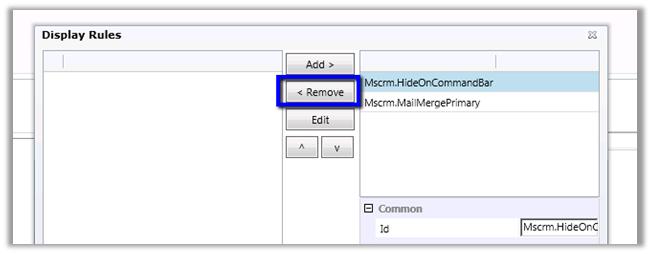
We were recently implementing queues for one of our clients and realized that the Remove button is missing if we are placing the queue item view in the Dashboard.

Inside the home page:-

Inside Dashboard:-

The solution we implemented was to create and add a custom Remove Button in the SubGrid of Queue Item entity using the definition of the existing Remove button on home page grid.

Hope it helps.

Cleared MB2-701: Extending Microsoft Dynamics CRM 2013.


Hi,

Yesterday I cleared the Extending exam.

It had 48 questions with 700 as passing score.

I had referred the official training material of CRM 2011 as the training material for CRM 2013 are not released yet. Apart from that I had gone through different articles and videos to prepare for it.

There were very few questions that were specific to CRM 2013. Mostly they were around new methods added in Client SDK.

For someone who has a good hands-on experience in development in CRM 2011, passing this exam would not be that difficult.

Bye.

405 error – Method not allowed error while calling WCF service inside Plugin in CRM 2011.


Hi,

Recenlty we wrote a plugin that was calling a WCF Rest Service. The plugin was registered on Pre Create of an entity. Here if we were creating the entity record through web interface, the plugin was running fine.

However if we had that plugin being triggered by another plugin (the other plugin was creating the entity record triggering this particular plugin) we were getting “405 – method not allowed” error.

As it turned out the WCF service was getting confused regarding the operation context when being called by another plugin.

Specifying the OperationContextScope fixed the issue.

Original Code

</pre>
using (
 var webChannelFactory =
 new WebChannelFactory<IAutoNumber>(
 new Uri(dictionaryConfigSettings[Constants.AutoNumberServiceUrl])))
 {
 IAutoNumber referralOffer = webChannelFactory.CreateChannel();

// get the next number from sequence
 autoNumber = Constants.PrefixReferralOfferNumber +
 AddPadding(
 referralOffer.GetNextNumber(Constants.EntityNameReferralOffer),
 Constants.PrefixReferralOfferNumberLength);
 }
<pre>

The modified code

</pre>
using (
 var webChannelFactory =
 new WebChannelFactory<IAutoNumber>(
 new Uri(dictionaryConfigSettings[Constants.AutoNumberServiceUrl])))
 {
 IAutoNumber referralOffer = webChannelFactory.CreateChannel();

using (new OperationContextScope((IContextChannel)referralOffer))
 {
 // get the next number from sequence
 autoNumber = Constants.PrefixReferralOfferNumber +
 AddPadding(
 referralOffer.GetNextNumber(Constants.EntityNameReferralOffer),
 Constants.PrefixReferralOfferNumberLength);
 }

}
<pre>

The helpful post

http://www.rgoarchitects.com/nblog/CommentView,guid,26d9b30e-c441-4776-9778-4dfdab58bd3d.aspx

Hope it helps.

Unit Test RetrieveResponse in CRM using Microsoft Fakes.


Hi,

Recently we wrote a plugin that was using RetrieveResponse class to get the information of an n – n relationship using Relationship class.

The issue that we faced over here is that the Entity property of RetrieveResponse is read only, we cannot set it. The option was to write the wrapper class over it and use the same wrapper class in the code and the unit test.

/// <summary>
 /// Wrapper class for retrieve response
 /// </summary>
 [DataContract(Namespace = "http://schemas.microsoft.com/xrm/2011/Contracts")]
 public class RetrieveResponseWrapper : OrganizationResponse
 {
 /// <summary>
 /// The _entity
 /// </summary>
 private Entity entity;

/// <summary>
 /// Initializes a new instance of the <see cref="RetrieveResponseWrapper"/> class.
 /// </summary>
 /// <param name="response">The response.</param>
 public RetrieveResponseWrapper(OrganizationResponse response)
 {
 try
 {
 this.entity = ((RetrieveResponseWrapper)response).Entity;
 }
 catch
 {
 this.entity = ((RetrieveResponse)response).Entity;
 }
 }

/// <summary>
 /// Gets or sets the entity.
 /// </summary>
 /// <value>
 /// The entity.
 /// </value>
 public Entity Entity
 {
 get
 {
 return this.entity;
 }

set
 {
 this.entity = value;
 }
 }
 }


Check out this post for more details
http://www.alexanderdevelopment.net/post/2013/01/13/How-to-unit-test-C-Dynamics-CRM-interface-code-part-III

 Hope it helps.

Querying CRM Relationships


James Wood's avatarWOODSWORKBLOG

Recently I had to create a query that for a given primary entity would return a set of related target entities and support both 1-many and many-many relationships.

I knew how to do this in separate queries, so I could have some branching logic to see which type of query I needed to perform but that wasn’t a particularly elegant solution. I found the RelationshipQueryCollection, this allows you create a RetrieveRequest against your primary entity and then link in any related targets. All you have to do is specify the relationship name and it will support both 1-many and many-many relationships. If your are using self-referencing relationship be sure the populate relationship.PrimaryEntityRole.

Edit based on comment from daryllabar:

To better explain this function here is a practical example.

  • There is a one to many relationship between contact and account, it is named “account_primary_contact”.
  • The foreign key on the account is…

View original post 212 more words

Nishant Rana's Weblog

Everything related to Microsoft .NET Technology

Skip to content ↓