Unable to Change Domain Logon Name error in CRM 2011.


Hi,

Recently got the below error while updating a record. It was surprising as we were just saving the record to which we had full access.
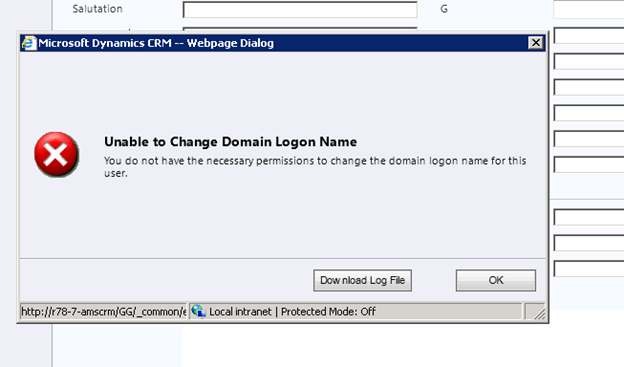
The good thing was that the log file had the correct message\information about the error

The error was because of access denied error while trying to write something to a text file inside plugin code.

Unhandled Exception: System.ServiceModel.FaultException`1[[Microsoft.Xrm.Sdk.OrganizationServiceFault, Microsoft.Xrm.Sdk, Version=5.0.0.0, Culture=neutral, PublicKeyToken=31bf3856ad364e35]]: Access is denied.Detail:

<OrganizationServiceFault xmlns:i=”http://www.w3.org/2001/XMLSchema-instance&#8221; xmlns=”http://schemas.microsoft.com/xrm/2011/Contracts”&gt; <ErrorCode>-2147187707</ErrorCode>

<ErrorDetails xmlns:d2p1=”http://schemas.datacontract.org/2004/07/System.Collections.Generic&#8221; />

<Message>Access is denied.</Message>

<Timestamp>2011-11-02T14:13:28.7922199Z</Timestamp>

<InnerFault i:nil=”true” />

<TraceText>

[testPlugin: testPlugin.Class1]

[7e507fe4-3605-e111-9e2c-00155d2a49c7: testPlugin.Class1: Update of lead]

</TraceText>

</OrganizationServiceFault>

Few days back also one friend of mine was getting the same issue, however it was while importing the solution. Not sure how it was fixed for them. It might be some custom code throwing exception.

Bye.

Accessing Xrm.Page or CrmForm through JavaScript from an html page showing CRM form in an IFrame


Suppose we have an html page having an iframe that shows a crm record. If we want to access the attributes on the form or call the save function from our html page, we can do it in the following manner.

var  crmForm =document.getElementById("myIframe").contentWindow.document.getElementById("contentIFrame").document.frames[0].document.forms['crmForm'];
var XrmPage =document.getElementById("myIframe").contentWindow.document.getElementById("contentIFrame").document.frames[0].Xrm.Page;

Hope it helps.

Using ValueRule to hide “Add New” Button for an entity’s subgrid in CRM 2011


Hi,

Suppose we have to disable “Add New related record” button for a SubGrid of a custom entity A. The condition is that it should get disabled based on the value of one of the option set in the form (of Custom entity B) to which it is associated with.

AddNewStandard button is the one which we need to refer to do that.

In the ValueRule  new_approvalstatus field is an optionset with the corresponding value (2233770000) for which we want to disable the button in the ribbon.

We can use the below RibbonDiffXml to achieve that.

   <RibbonDiffXml>
        <CustomActions>
          <CustomAction Id="MyOrg_CustomAction" Location="Mscrm.SubGrid.new_promotiondefinition.AddNewStandard">
            <CommandUIDefinition>
              <Button Id="Mscrm.SubGrid.new_promotiondefinition.AddNewStandard" Command="MyOrg_Command" Sequence="20"
LabelText="$Resources(EntityDisplayName):Ribbon.SubGrid.AddNew" Alt="$Resources(EntityDisplayName):Ribbon.SubGrid.AddNew" Image16by16="/_imgs/ribbon/NewRecord_16.png" Image32by32="/_imgs/ribbon/newrecord32.png" TemplateAlias="o1" ToolTipTitle="$Resources(EntityDisplayName):Mscrm_SubGrid_EntityLogicalName_MainTab_Management_AddNewStandard_ToolTipTitle" ToolTipDescription="$Resources(EntityDisplayName):Mscrm_SubGrid_EntityLogicalName_MainTab_Management_AddNewStandard_ToolTipDescription" />
            </CommandUIDefinition>
          </CustomAction>
          <HideCustomAction Location="Mscrm.SubGrid.new_promotiondefinition.AddExistingStandard" HideActionId="Mscrm.SubGrid.new_promotiondefinition.AddExistingStandard.HideAction" />
        </CustomActions>
        <Templates>
          <RibbonTemplates Id="Mscrm.Templates"></RibbonTemplates>
        </Templates>
        <CommandDefinitions>
          <CommandDefinition Id="MyOrg_Command">
            <EnableRules>
              <EnableRule Id="MyOrg_CustomEnableRule" />
            </EnableRules>
            <DisplayRules></DisplayRules>
            <Actions></Actions>
          </CommandDefinition>
        </CommandDefinitions>
        <RuleDefinitions>
          <TabDisplayRules />
          <DisplayRules />
          <EnableRules>
            <EnableRule Id="MyOrg_CustomEnableRule">
              <ValueRule Default="true"  Field="new_approvalstatus" InvertResult="true" Value="223770000"/>
            </EnableRule>
          </EnableRules>
        </RuleDefinitions>
        <LocLabels />
      </RibbonDiffXml>

The thing to remember is that it will override the existing command definition and the rules and actions defined in it. So here we would need to copy those displayrules, enablerules and actions if we want those functionality.

Hope it helps.

Using HTML Web Resource in CRM 2011


Just created a simple html page to see how we can use it in CRM 2011.

The page is on account form and shows name of the account. It also accesses ClientGlobalContext.js file to show contextual information like Organization Unique Name and User Id of the user.

The html page:-

<!DOCTYPE html PUBLIC "-//W3C//DTD XHTML 1.0 Transitional//EN" "http://www.w3.org/TR/xhtml1/DTD/xhtml1-transitional.dtd">
<html xmlns="http://www.w3.org/1999/xhtml">
<head>

<!--

Access the ClientGlobanContext js file

src="ClientGlobalContext.js.aspx"  if the html web resource doesn't follow any folder structure
i.e. http://servername/orgname/WebResources/new_myHtmlWebResource

src="../ClientGlobalContext.js.aspx" if the html web resource follows folder structure
i.e. http://servername/orgname/WebResources/new_myfolder/myHtmlWebResource

-->

<script type="text/javascript" src="ClientGlobalContext.js.aspx"></script>
<script type="text/javascript">

    function ContextInformation() {

        // accessing attributes in the form  window.parent.Xrm.Page
        document.getElementById('td1').innerHTML = window.parent.Xrm.Page.getAttribute('name').getValue();

        var context = GetGlobalContext();
        // or by using  window.parent.Xrm.Page.context
        document.getElementById('td2').innerHTML = context.getOrgUniqueName();
        document.getElementById('td3').innerHTML = context.getUserId();
    }

</script>
    <title>My HTML Web Resource</title>
    <style type="text/css">
        .style1
        {
            width: 100%;
        }
        .style2
        {
            width: 147px;
            font-weight: bold;
        }
        .style3
        {
            width: 478px;
        }
    </style>
</head>
<body onload="ContextInformation();">

    <table class="style1">
        <tr>
            <td class="style2">
                Account Name:-</td>
            <td class="style3" id="td1">
                &nbsp;</td>
            <td>
                &nbsp;</td>
        </tr>
        <tr>
            <td class="style2">
                Organization Name:-</td>
            <td class="style3" id="td2">
                &nbsp;</td>
            <td>
                &nbsp;</td>
        </tr>
        <tr>
            <td class="style2">
                User Id:-</td>
            <td class="style3" id="td3">
                &nbsp;</td>
            <td>
                &nbsp;</td>
        </tr>
    </table>

</body>
</html>


Points to remember
Access the ClientGlobanContext js file

src=”ClientGlobalContext.js.aspx” if the html web resource doesn’t follow any folder structure
i.e. http://servername/orgname/WebResources/new_myHtmlWebResource

src=”../ClientGlobalContext.js.aspx” if the html web resource follows folder structure
i.e. http://servername/orgname/WebResources/new_myfolder/myHtmlWebResource

and using window.parent.Xrm.Page to get the reference to the Xrm.Page from the html web resource

Hope it helps.


Updated SDK Version 5.0.7 available


The updated version of the SDK is available for download CRM 2011 SDK 

IETester Tool for testing applications in different versions of IE.


Recently we had built a web application using ASP.NET MVC 3, and had used Regular Expression for checking of password strength.

“^(?=.*[(\W)_]).{8,}$”

The above expression checks for password length to be minimum 8 characters and one special character.

It was working fine in IE 8 and IE 9. However we had our users using IE 7 as well, in which it was not working properly. As we were having our machine running Windows 7 and Windows Server 2008, it was not possible to have IE 7 installed in it. However recently going through one of the blog I have subscribed to I came to know about a tool which we can use to test our application in IE 7.

IE Tester tool:-

http://www.my-debugbar.com/wiki/IETester/HomePage

The helpful post:-

http://blog.customereffective.com/blog/2011/10/crm-2011-cases-knowledgebase-articles-and-ie-7.html

Hope it helps.