Hi,
Just sharing a link which i have found extremely helpful to know about new features in CRM 2011
http://www.dynamicsexchange.com/CRM-2011/New-in-CRM-2011.aspx
Bye.

Hi,
Just sharing a link which i have found extremely helpful to know about new features in CRM 2011
http://www.dynamicsexchange.com/CRM-2011/New-in-CRM-2011.aspx
Bye.

Suppose we want to add a new link on an entity’s form and want to call JavaScript on onclick of that link.
For doing so first we need to add a Navigation link on the form.
Click on Insert tab and Select Navigation Link button.
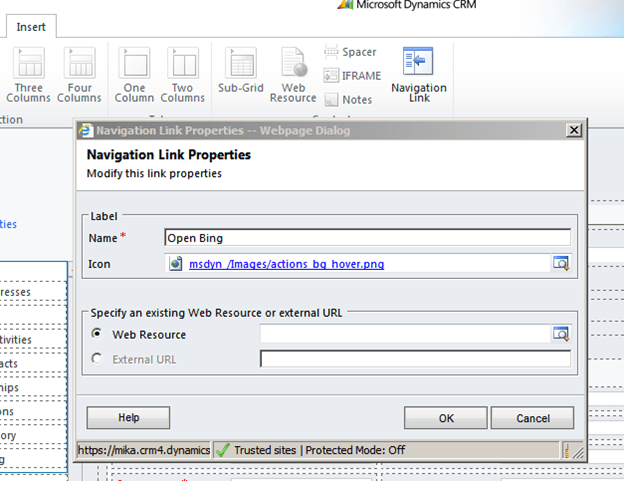
Specify Name and Icon and click on OK.
Save and Publish the customization, then open the form in IE Developer tool to get its id. We will use that id in our JavaScript function for onload of the form.
Our function
function OpenBing()
{
// get the navItem
var navItem = document.getElementById('navLink{6daba50b-300a-824b-453c-660e5b10781b}');

// override the onclick to call the connection page
navItem.onclick =function()
{
window.open("http://www.bing.com");
};
}
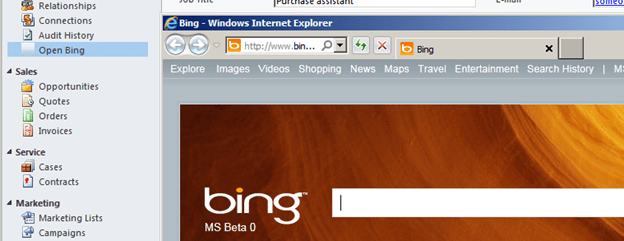
Clicking on Open Bing link opens up the Bing page.
Hope it helps.

Hi,
(This works for 1-n relatinship)
For n-n these are the two links that could be of help
http://www.mscrmking.com/2011/06/crm-2011-how-to-filter-add-existing/
http://blogs.huddle.com.ar/sites/Dynamics/Lists/Posts/Post.aspx?ID=14
Let us take a very simple scenario in which for a given contact record, when I add the Sub-Contacts using Add Existing Button, then I should only see those contacts having last name equal to the last name of the current record.
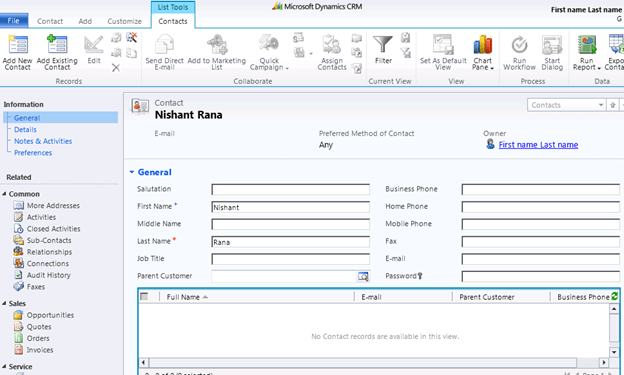
I have following contact records in the system
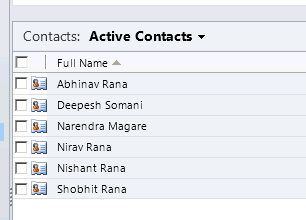
Now clicking on Add Existing Contact button on the ribbon should only show those contact records which have last name equal to “Rana”

To achieve this I have created a plugin and registered the following step for it
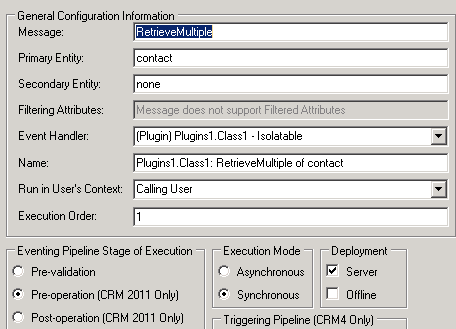
The trick here is to replace the InputParameter named Query with our own QueryExpression.
This the url that is being used for the lookup

From the url we can get the LookupStyle (single or multi) and Id of the record i.e. currentid in our plugin.
The source code
using System;
using System.Collections.Generic;
using System.Linq;
using System.Text;
using Microsoft.Xrm.Sdk;
using System.Web;
using Microsoft.Xrm.Sdk.Query;

namespace Plugins1
{
 public class Class1 : IPlugin
 {
 public void Execute(IServiceProvider serviceProvider)
 {
 if (HttpContext.Current.Request.QueryString["currentid"] != null && HttpContext.Current.Request.QueryString["LookupStyle"].ToString() == "multi")
 {
 string lookupId = HttpContext.Current.Request.QueryString["currentid"].ToString();
 Microsoft.Xrm.Sdk.IPluginExecutionContext context =
 (Microsoft.Xrm.Sdk.IPluginExecutionContext)serviceProvider.GetService(typeof(Microsoft.Xrm.Sdk.IPluginExecutionContext));
 if (context.InputParameters.Contains("Query"))
 {
 // Get the id of the record on which we have our subgrid
 Guid contactGuid = new Guid(HttpContext.Current.Request.QueryString["currentid"].ToString());

// Get the OrgService
 IOrganizationServiceFactory serviceFactory =
 IOrganizationServiceFactory)serviceProvider.GetService(typeof(IOrganizationServiceFactory));
 IOrganizationService service = serviceFactory.CreateOrganizationService(context.UserId);

// Get the lastname value of the conact record
 ColumnSet colsContactLastName = new ColumnSet();
 colsContactLastName.AddColumn("lastname");
 Entity contactEntity = service.Retrieve("contact", contactGuid, colsContactLastName);
 string lastName = contactEntity.Attributes["lastname"].ToString();

// Create the queryexpression to find all the contacts that have last name equal to the record on which we have our subgrid
 QueryExpression newQueryExpression = new QueryExpression();

ConditionExpression condition1 = new ConditionExpression();
 condition1.AttributeName = "lastname";
 condition1.Operator = ConditionOperator.Equal;
 condition1.Values.Add(lastName);

ConditionExpression condition2 = new ConditionExpression();
 condition2.AttributeName = "contactid";
 condition2.Operator = ConditionOperator.NotEqual;
 condition2.Values.Add(contactGuid);

newQueryExpression.EntityName = "contact";
 newQueryExpression.ColumnSet = new ColumnSet();
 newQueryExpression.ColumnSet.AllColumns = true;
 newQueryExpression.Criteria.AddCondition(condition1);
 newQueryExpression.Criteria.AddCondition(condition2);

// Replace the existing Query - Input Parameter with our custom query expresssion
 context.InputParameters["Query"] = newQueryExpression;

}
 }
 }
 }
}
It hasn’t been tested thoroughly though.
Hope it helps.


 private void btnCreateContact_Click(object sender, RoutedEventArgs e)
 {
 // Get IOrganizationService instance
 IOrganizationService myOrgService = SilverlightUtility.GetSoapService();

Entity myContact = new Entity();
 myContact.LogicalName = "contact";

// Create the AttributeCollection
 myContact.Attributes = new AttributeCollection();

// Specify Last Name and First Name for the contact to be created
 KeyValuePair<string, object> myKVPLastName = new KeyValuePair<string, object>();
 myKVPLastName.Key = "lastname";
 myKVPLastName.Value = "Twain";

 KeyValuePair<string, object> myKVPFirstName = new KeyValuePair<string, object>();
 myKVPFirstName.Key = "firstname";
 myKVPFirstName.Value = "Shania";

myContact.Attributes.Add(myKVPLastName);
 myContact.Attributes.Add(myKVPFirstName);

 OrganizationRequest myOrgRequest = new OrganizationRequest();
 myOrgRequest.RequestName = "Create";

// call the Create method
 myOrgService.BeginCreate(myContact, myCreateHandler, myOrgService);
 }

private void myCreateHandler(IAsyncResult ar)
 {
 IOrganizationService orgService = ar.AsyncState as IOrganizationService;

Dispatcher.BeginInvoke(() =>
 {
 txtStatus.Text = "Contact Guid - " + orgService.EndCreate(ar);
 });
 }

https://nishantrana.me/wp-content/uploads/2011/11/crm2011onlinesilverlightapp.docx

Hi,
Yesterday i cleared the installation and configuration exam of CRM 2011. There were 74 questions in it and 140 minutes to answer them.
Most of the questions were on system requirements while installing Microsoft Dynamics CRM 2011, Outlook, Email Router.
If we remember the below points we can easily answer around 40 questions correctly.
can be installed on computers running
can work with following e-mail systems
Supported version of Microsoft Office Outlook
IE Version Supported for Microsoft Dynamic CRM for Outlook
Supported SQL Server Editions (only 64-bit)
SQL Server 2008 Standard, Enterprise, Datacenter, Developer all SP1.
Read about permission required while installing CRM 2011.
Minimum permissions required for Microsoft Dynamics CRM Setup, services, and components.
To remember the above points i also created a small mind map as well.
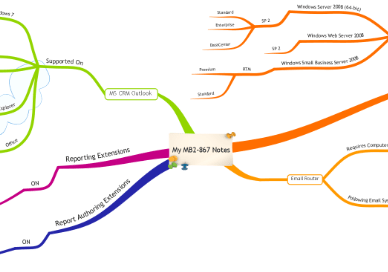
Hope it helps.

Got this issue while configuring Microsoft Dynamics CRM for Outlook for CRM Online.
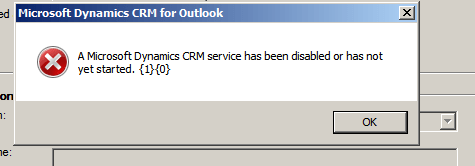
It was because of the following service being disabled.

Enabling the service resolved the issue.
Hope it helps.


